


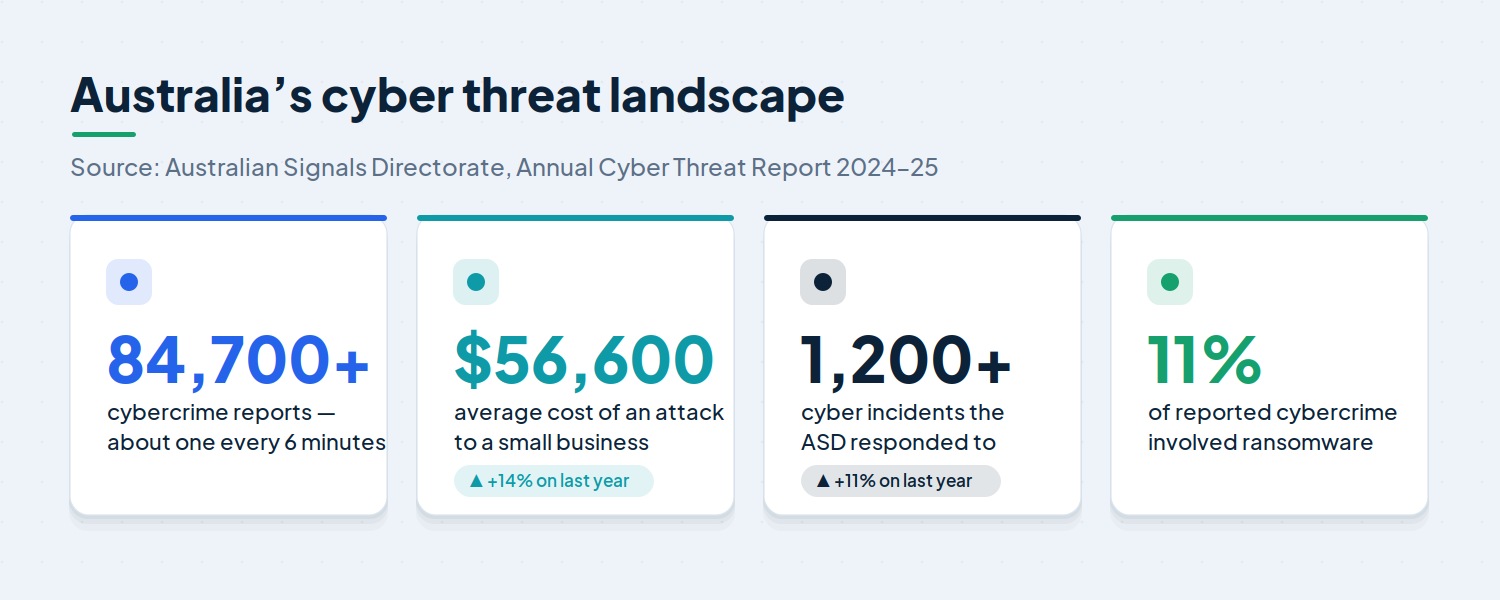
Cyber attacks are no longer something that only happens to large corporations or government departments. Today, small and medium businesses are squarely in the firing line — and the numbers make for sobering reading. In its most recent annual report, the Australian Signals Directorate received a cybercrime report roughly once every six minutes, and the average attack now costs a small business more than $56,000.
The good news is that you don’t need an enterprise security budget to dramatically reduce your risk. The Essential Eight — a set of eight practical strategies developed by the Australian Cyber Security Centre — gives businesses of any size a clear, proven baseline to work towards. No single measure will stop every attack, but together these eight controls make your organisation a far harder target.
This guide explains what the Essential Eight is, why it matters, what each strategy does, and how to put it into practice — in plain English, without the jargon.
What Is the Essential Eight?
The Essential Eight is a set of eight baseline cyber security mitigation strategies developed by the Australian Cyber Security Centre (ACSC), which is part of the Australian Signals Directorate (ASD). First published in 2017 and updated regularly since, it was designed to help organisations protect their internet-connected systems against the most common cyber threats.
Think of it as the cyber security equivalent of locking your doors, fitting an alarm and keeping a spare set of keys somewhere safe. Each strategy is useful on its own, but when they’re implemented together they reinforce one another and cover a wide range of attack methods.
The Essential Eight is mandatory for Australian federal government entities, and it has become a widely recognised benchmark for private businesses. Increasingly, larger clients, insurers and tender processes expect to see it in place before they’ll work with you.
Why the Essential Eight Matters for Australian Businesses
Australia’s threat landscape continues to worsen, and smaller organisations are bearing more of the cost. The ASD’s latest Annual Cyber Threat Report shows tens of thousands of incidents reported over the year, with the average cost to a small business climbing 14 per cent. Ransomware, business email compromise and identity theft remain among the most damaging.
There are three reasons the Essential Eight deserves a place on your priority list:
- It’s cost-effective. Prevention is almost always cheaper than recovery. Implementing these controls typically costs a fraction of what a serious breach — with its downtime, lost data, lost customers and potential fines — would cost you.
- It’s practical. The framework focuses on the controls that stop the attacks businesses actually face, rather than chasing every theoretical risk.
- It supports compliance. Working towards the Essential Eight helps with obligations under the Australian Privacy Principles and makes audits, insurance applications and tenders far smoother.
For many businesses, the framework also pairs naturally with managed IT services that handle the day-to-day work of keeping these controls in place.
The Three Objectives Behind the Framework
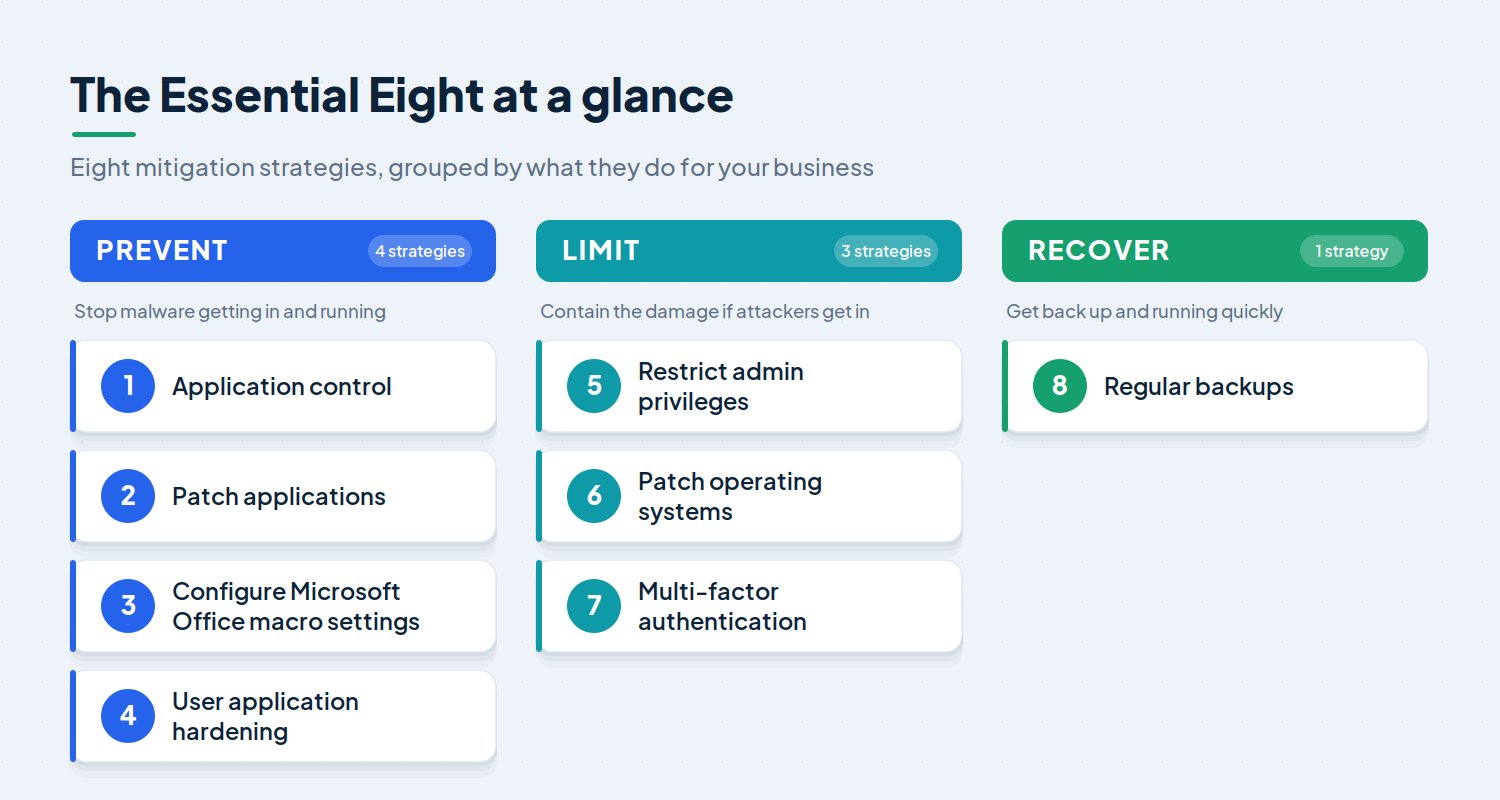
Behind the eight strategies sit three simple objectives. Together they reflect a layered, defence-in-depth approach: you try to stop attacks, you contain anything that gets through, and you make sure you can recover.
Prevent attacks. Four of the strategies are aimed at stopping malicious software from being delivered and run on your systems in the first place.
Limit the impact. Three strategies work to contain an attacker and limit the damage if they do manage to get a foothold.
Recover quickly. The final strategy makes sure you can restore your data and get back to business if the worst happens.
The Eight Strategies Explained
1. Application Control
Application control only lets approved, trusted programs run on your systems. Rather than trying to block every piece of malware — an impossible task when new threats appear daily — you create an approved list and everything else is denied by default. If an employee unknowingly downloads a malicious file, it simply won’t run.
2. Patch Applications
Software vendors regularly release patches to fix newly discovered security flaws. Attackers actively hunt for unpatched applications, because a known vulnerability is an open door. Patching promptly — especially the web browsers, email clients, office software and PDF readers that handle content from the internet — closes those doors quickly.
3. Configure Microsoft Office Macro Settings
Macros automate tasks in programs like Word and Excel, but they can also be used to hide malicious code. The recommended approach is to disable macros for staff who don’t need them, and only allow macros from trusted, vetted sources. This shuts down a common method attackers use to deliver malware through everyday documents.
4. User Application Hardening
Hardening means turning off risky features your business doesn’t actually need. Configuring web browsers to block ads, unnecessary scripts and unwanted plug-ins — and disabling unused features in other applications — shrinks your “attack surface” and leaves fewer openings to exploit.
5. Restrict Admin Privileges
Administrator accounts can change settings, install software and access sensitive data, which makes them a prime target. Restricting these privileges to the few people who genuinely need them, and using separate accounts for admin tasks, limits how far an attacker can spread if an account is ever compromised.
6. Patch Operating Systems
Just like applications, operating systems need regular patching. Outdated systems — particularly those that have reached end of life and no longer receive updates — are a well-known weak point. Keeping Windows and other operating systems current removes a large set of easily exploited vulnerabilities.
As a general guide, the ACSC expects patching on roughly these timeframes:
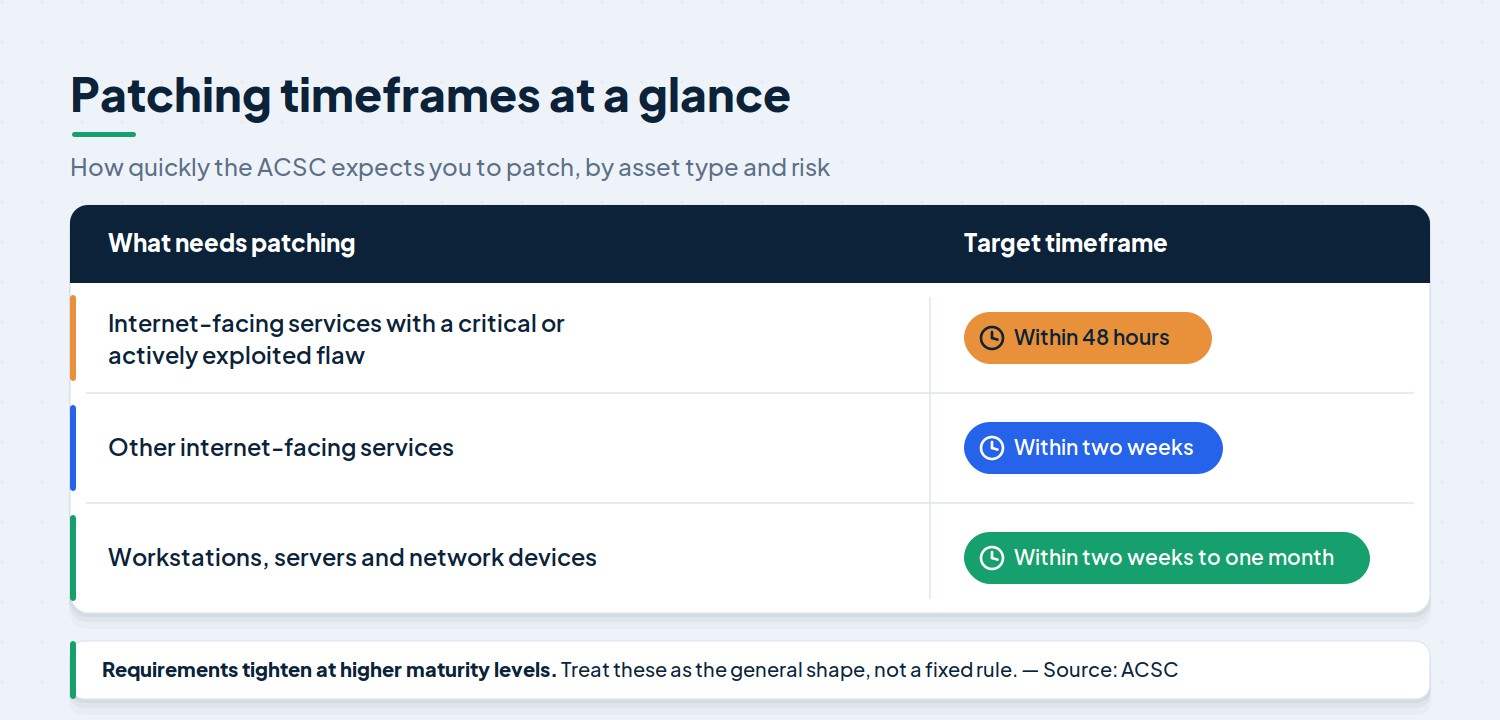
What needs patching Target timeframe Internet-facing services with a critical or actively exploited flaw Within 48 hours Other internet-facing services Within two weeks Workstations, servers and network devices Within two weeks to one month
Exact requirements tighten as you move up the maturity levels, so treat the table above as the general shape rather than a fixed rule.
7. Multi-Factor Authentication
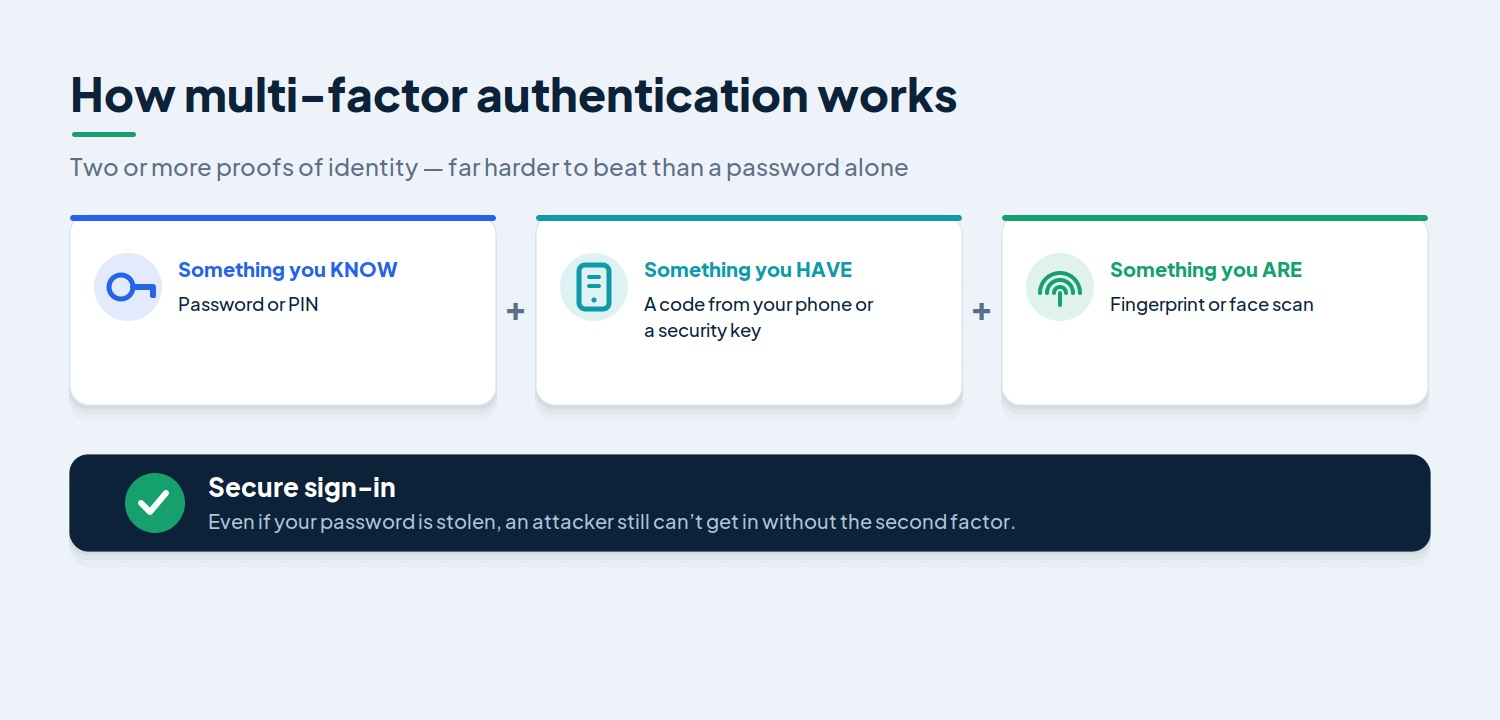
Multi-factor authentication (MFA) asks for more than just a password — usually a second proof, such as a code from your phone or a fingerprint. Even if a password is stolen or guessed, an attacker still can’t get in without that second factor. It’s one of the simplest, highest-impact controls you can put in place, and current guidance places extra emphasis on stronger, phishing-resistant methods.
8. Regular Backups
Backups are your safety net. If ransomware locks your files or hardware fails, recent and tested backups let you restore your data and keep operating. The key is to back up important data regularly, store copies securely — including somewhere disconnected from your network — and, crucially, test that you can actually restore from them.
Understanding the Essential Eight Maturity Model
It isn’t enough to simply “have” the Essential Eight in place. How well each strategy is implemented matters just as much, and that’s where the Essential Eight Maturity Model comes in.
The model defines four maturity levels, from Maturity Level Zero through to Maturity Level Three. Each level reflects how fully a strategy is implemented and how capable an attacker it can withstand:
- Maturity Level Zero — minimally aligned, with significant weaknesses still present.
- Maturity Level One — partly aligned; protects against common, opportunistic attacks.
- Maturity Level Two — mostly aligned; stands up to more capable, targeted attackers.
- Maturity Level Three — fully aligned; defends against adaptive, highly skilled adversaries.
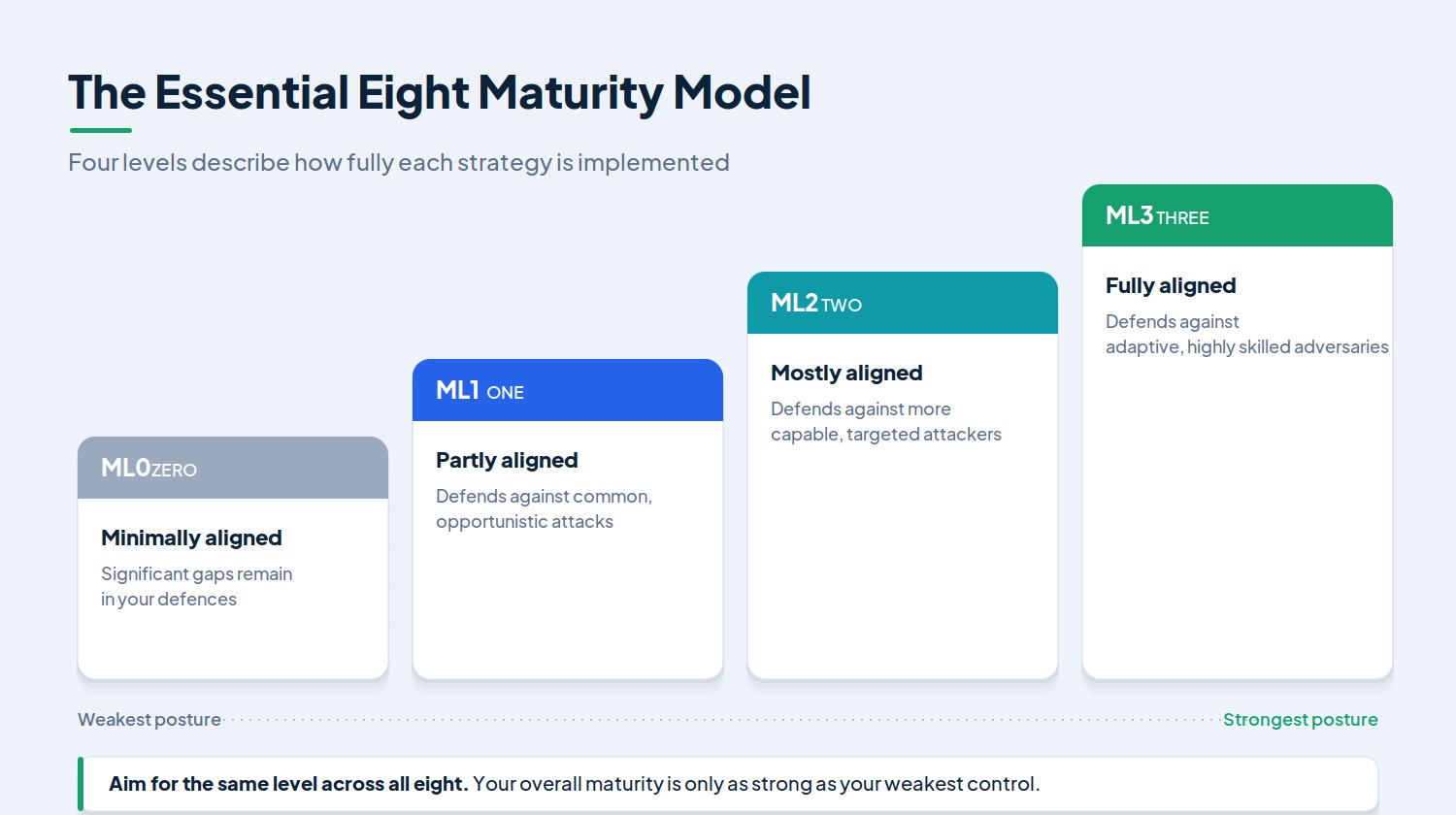
A key principle is that your strategies should mature together. Because the controls reinforce one another, your real-world protection is only as strong as your weakest one. It’s far better to reach Level One across all eight before pushing any single control to Level Two or Three.
Most businesses don’t need to aim for the highest level. The right target depends on your industry, the sensitivity of your data and your appetite for risk. We explore this in more detail in our guide to the Essential Eight Maturity Model.
What’s Changed in the Latest Update
The framework isn’t static. The ACSC refines it as attacker tactics evolve, so it’s worth knowing roughly where things now sit. The most significant recent overhaul placed greater emphasis on a few areas in particular:
- Faster patching for critical risks. Where a vulnerability is rated critical or is already being exploited, organisations are expected to patch within 48 hours.
- Phishing-resistant MFA. Stronger, harder-to-trick forms of multi-factor authentication are now encouraged, reflecting how often attackers go after log-in details.
- Better visibility. There’s a greater focus on monitoring and logging events so that suspicious activity can be detected and investigated quickly.
The takeaway for business owners is simple: this is a moving target, and “set and forget” doesn’t work. Treating it as an ongoing programme rather than a one-off project is the way to stay protected.
How to Implement the Essential Eight
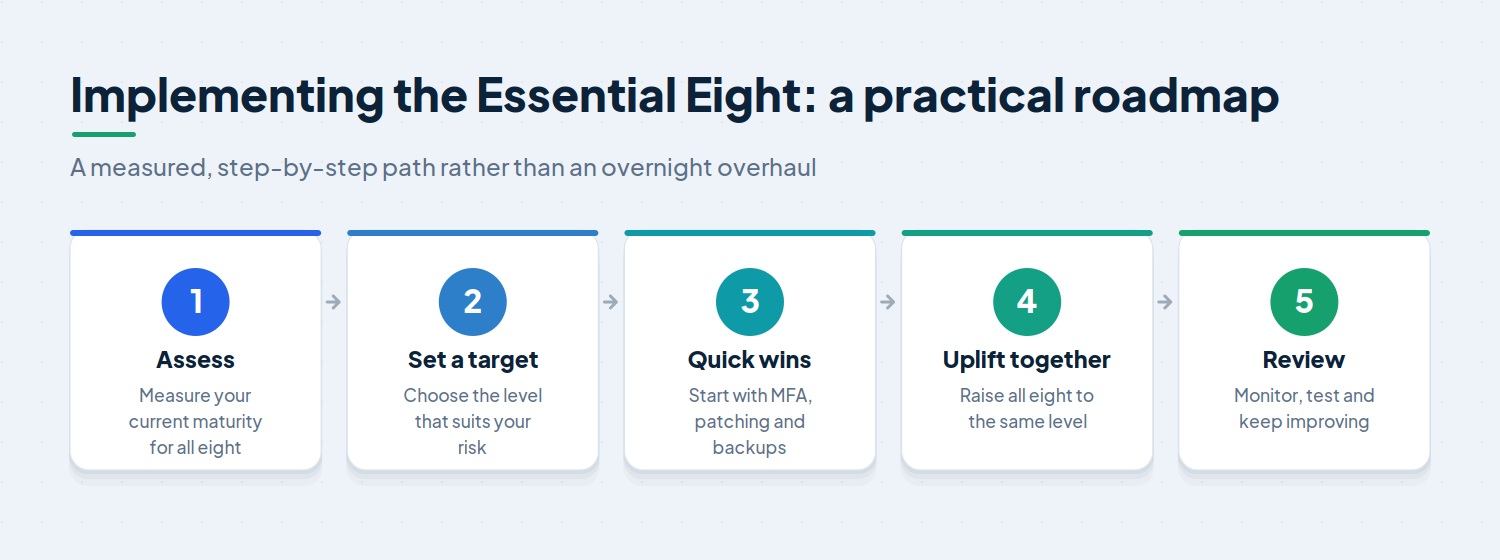
Getting started can feel daunting, but it’s best approached as a measured, step-by-step journey rather than an overnight overhaul. A sensible path looks like this:
- Assess where you stand. Begin with an honest review of your current maturity across all eight strategies. You can’t improve what you haven’t measured.
- Set a realistic target. Decide on the maturity level that genuinely fits your risk, industry and obligations.
- Tackle the quick wins. Turning on MFA, tightening patching and getting reliable backups in place deliver a lot of protection for relatively little effort.
- Lift all eight together. Work towards your target level across the board, rather than perfecting one control at a time.
- Monitor, test and review. Threats change, staff come and go, and systems get updated — so revisit your controls regularly.
For many small and medium businesses, the real challenge isn’t understanding the Essential Eight — it’s finding the time and in-house expertise to implement and maintain it. This is where partnering with a provider that offers dedicated Essential Eight services can make all the difference.
Common Implementation Mistakes to Avoid
A handful of avoidable mistakes trip up many organisations:
- Treating it as a one-off project. The framework needs ongoing attention, not a single tick-box exercise.
- Chasing Level Three unnecessarily. Higher isn’t always better. An unrealistic target wastes effort and budget — aim for the level that suits your business.
- Uneven implementation. Pouring effort into one or two controls while neglecting the rest leaves obvious gaps for attackers to find.
- Forgetting the human element. Technology helps, but staff awareness and good security habits matter just as much. The strongest controls can be undone by a single click on a convincing phishing email.
How Stanfield IT Can Help
Putting the Essential Eight into practice — and keeping it there — takes time, tools and expertise that many growing businesses simply don’t have spare. That’s where the right IT partner earns its keep.
At Stanfield IT, we help Australian businesses assess their current security posture, set a sensible target maturity level, and implement the Essential Eight in a way that fits how they actually work. As a fully Australian-based team, we keep your data onshore and your defences current as the threat landscape shifts, so you can get on with running your business.
Frequently Asked Questions
Is the Essential Eight mandatory?
It’s mandatory for Australian federal government entities. For private businesses it isn’t legally required, but it’s strongly recommended as a baseline — and is increasingly expected by insurers, larger clients and tender processes.
How many maturity levels are there?
There are four: Maturity Level Zero through to Maturity Level Three. Most businesses aim for the level that matches their risk rather than automatically targeting the highest one.
How long does it take to implement?
It depends on your size, systems and starting point. Quick wins like MFA and backups can be in place quickly, while reaching a consistent maturity level across all eight strategies is usually a phased project carried out over several months.
Does it only apply to Microsoft systems?
It was originally designed with Microsoft Windows environments in mind, and a few strategies — such as Office macro settings — are Microsoft-specific. The underlying principles, however, apply broadly to any modern business IT environment.
Is the Essential Eight enough on its own?
It’s an excellent baseline, but no framework guarantees total protection. Think of it as the foundation of a broader security approach that also includes staff training, monitoring and a clear incident response plan.
Final Thoughts
Cyber threats aren’t going away, and Australian businesses of every size are now targets. The Essential Eight gives you a clear, proven and cost-effective baseline to work towards — one that meaningfully reduces your risk without requiring an enterprise budget. The most important step is simply to start: measure where you are today, set a realistic target, and improve steadily from there.
If your business would like help putting the Essential Eight into practice, Stanfield IT can guide you through it, from an initial assessment to ongoing, proactive protection. Get in touch for a no-obligation chat about where to begin.