


For most Australian businesses, technology is no longer a back-office concern — it is how the work actually gets done. Your systems decide how quickly your team can serve customers, how safely your data is handled, and how easily you can grow. Yet many small and medium businesses still run their technology reactively: fixing problems only when something breaks, and buying tools one crisis at a time.
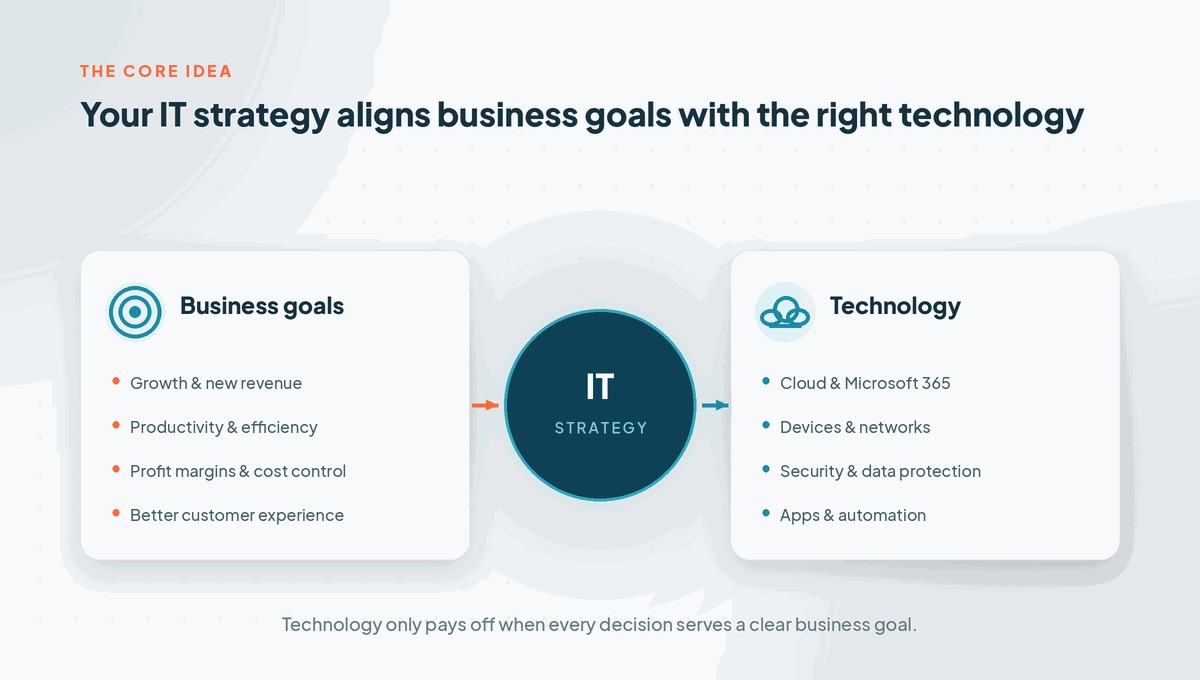
That is the gap a good IT strategy closes. In plain terms, your business strategy is how you plan to win — and your IT strategy is how technology helps you get there. Without one, IT spend creeps up, risks build quietly, and your systems end up shaping your business instead of supporting it.
The good news is that building a strong plan is far more achievable than it sounds. You do not need a huge budget or a large internal team — you need a clear, practical approach. Below are seven ways to nail your IT strategy and turn your technology into a genuine advantage rather than a running cost.
What is an IT strategy, and why does it matter?
An IT strategy is simply a plan that connects your technology decisions to your business goals. It answers a few important questions: what does our technology need to achieve, where are our current systems falling short, and what should we invest in first to get the biggest result?
For a small or medium business, this matters more than ever. A single day of downtime, one successful phishing email, or an ageing server failing at the wrong moment can cost real money and damage customer trust. A clear plan helps you stay ahead of those risks rather than constantly reacting to them.
It also brings discipline to spending. Instead of unplanned, urgent purchases, you make deliberate choices that build towards something. The difference between reactive IT and a considered approach is stark.
| Reactive IT | A strong IT strategy |
|---|---|
| Problems are fixed only after something breaks | Issues are prevented and planned for in advance |
| Spending is unpredictable and often urgent | Budgets are planned, with fewer nasty surprises |
| Security is bolted on after an incident | Security is built into every decision |
| Technology is bought ad hoc, tool by tool | Technology is chosen to support clear business goals |
| Downtime and frustration feel “just normal” | Systems are reliable and the team stays productive |
So how do you actually build a plan like this? These seven practical steps work for almost any growing business.

1. Build your IT strategy around business goals
The most common mistake is to start with the technology — a new app, a shiny platform, or the tool a competitor is using. A strong IT strategy starts with the business instead. Where is the company heading over the next one to three years? Are you adding staff, opening locations, moving to hybrid work, or chasing efficiency?
Once those goals are clear, technology decisions become much easier. If the goal is faster customer service, you invest in the tools and reliability that support it. If the goal is growth, you choose systems that scale without constant rework. Every dollar you spend should trace back to a business outcome, not just a feature list.
It is worth involving more than just IT in this conversation. Operations managers, team leaders and business owners all see different points of friction, and the best plans reflect what the whole business actually needs.
2. Know what you’ve got before you change anything
You cannot plan a route without knowing your starting point. Before making changes, take stock of your current environment: your devices and how old they are, the software and licences you pay for, how your network and internet are set up, where your data lives, and how it is backed up.
This baseline almost always reveals surprises — duplicate subscriptions, unsupported software, devices well past their useful life, or security gaps no one had noticed. An honest audit turns vague worries into a clear list of what is working, what is risky, and what is simply costing you money for no benefit.
From there, you can prioritise. Some issues are quick, inexpensive fixes with immediate impact. Others are larger projects to plan and budget for. Either way, your decisions are now based on facts rather than guesswork.
3. Make security and risk a foundation, not an afterthought
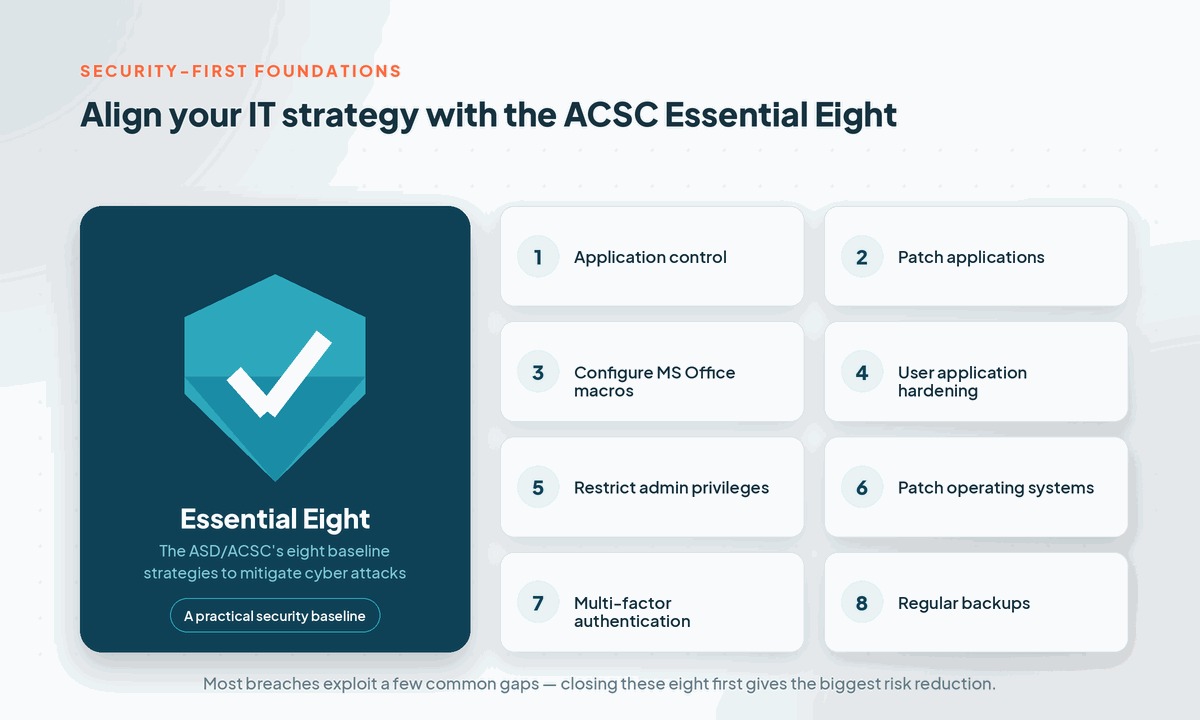
Security cannot be the thing you bolt on after an incident. With cybercrime now a daily reality for Australian businesses of every size, your plan has to treat protection as a foundation. Attackers rarely break in through clever, complex methods; they walk through everyday gaps such as weak passwords, missing updates, and a lack of multi-factor authentication.
A practical starting point is the Australian Cyber Security Centre’s Essential Eight — eight baseline strategies that block the most common attack paths. Measures such as enabling multi-factor authentication, patching systems promptly, restricting admin privileges and keeping tested backups dramatically reduce your risk without huge cost.
Building security in from the start also makes life easier if you ever need to meet customer security requirements, industry obligations, or the Notifiable Data Breaches scheme. It is far cheaper to design protection in than to recover from a breach after the fact.
4. Plan for the cloud and the way your team really works
The way people work has changed for good. Staff move between the office, home and the road, often across several devices. Your technology plan should reflect that reality rather than fight it.
Cloud platforms like Microsoft 365 make it possible to give your team secure access to email, files and collaboration tools from anywhere, while keeping control over who can see what. Done well, the cloud improves productivity, simplifies management, and removes the cost and risk of ageing on-site hardware.
The key words are “done well.” Simply switching tools on is not a strategy. Identity and access need to be set up properly, security settings configured, and licences matched to what people actually use — so you are not paying for features no one touches, or leaving doors open you did not know existed.
5. Turn your IT strategy into a roadmap and budget
A plan that lives in someone’s head is not much use. The real value of an IT strategy comes when you turn it into a roadmap: a simple, sequenced view of what you will tackle now, next and later, with rough costs attached to each stage.
Good roadmaps separate the urgent from the important. Quick wins — like switching on multi-factor authentication or fixing unreliable backups — can often happen straight away. Bigger projects, such as a network upgrade or a cloud migration, can be staged over the following months so they are planned and funded rather than rushed.
Attaching a budget to each stage is what makes leadership comfortable. It replaces unpredictable, reactive spending with a clear view of what technology will cost over the year and why. That clarity alone often pays for the planning effort many times over.

6. Protect your data with backups and a continuity plan
Ask yourself a blunt question: if your main systems went down tomorrow morning, how long could your business keep operating, and how much would you lose? For many businesses, the honest answer is uncomfortable.
Backups and backup and disaster recovery planning are the safety net behind everything else. It is not enough to assume a backup is running somewhere; backups need to be monitored and, crucially, tested by actually restoring from them. A backup you have never tested is really just a hope.
A continuity plan goes a step further by setting out what happens during an outage, ransomware attack or other disruption — who does what, which systems come back first, and how you keep serving customers in the meantime. Building this into your plan turns a potential disaster into a manageable interruption.
7. Treat your IT strategy as a living plan
Technology and business priorities both move quickly, so the worst thing you can do is write a strategy once and file it away. The strongest plans are reviewed regularly — at least once or twice a year — and adjusted as the business changes, new risks emerge, or goals shift.
A simple rhythm works best: assess where you are, plan your priorities, implement changes in sensible stages, then review the results and start again. Each loop keeps your technology aligned with the business rather than drifting out of step with it.
Smaller businesses do not always have a senior technology leader to drive this, which is where a virtual CIO (vCIO) can help — giving you experienced guidance, regular reviews and clear reporting without the cost of a full-time hire. Either way, the goal is the same: keep the plan alive.

Common IT strategy mistakes to avoid
Even well-intentioned businesses tend to trip over the same few issues. Watching for these will keep your plan on track:
-
- Treating technology planning as a one-off project instead of an ongoing process.
-
- Buying technology before clearly understanding the business problem it should solve.
-
- Leaving security and backups until after something has already gone wrong.
-
- Handing everything to “the IT person” with no input from leadership.
-
- Planning only for today, with no roadmap for growth or change.
None of these are difficult to avoid. They simply require stepping back and thinking ahead, rather than reacting in the moment.
Where to start with your IT strategy
Nailing your IT strategy comes down to a handful of sensible habits: start with your business goals, understand what you already have, make security and backups a foundation, plan for modern ways of working, and turn it all into a costed roadmap you review regularly. Done consistently, this shifts technology from a source of stress and surprise bills into a reliable engine for growth.
You do not have to do it all at once, and you do not have to do it alone. If your technology feels reactive or unclear, the simplest first step is an honest review of where things stand and what matters most.
Stanfield IT helps growing Australian businesses build practical IT strategy and roadmaps that align technology with real business goals — and we can help deliver the plan, not just hand you a report. To map out your next step, get in touch for a no-obligation chat or a free IT assessment.