


How to Prevent Phishing Attacks: A Practical Guide for Australian Businesses
Phishing is still the way most cyber attacks begin, and in 2026 the emails, texts and phone calls are more convincing than ever. According to the Australian Signals Directorate’s Annual Cyber Threat Report 2024–25, phishing was the single most commonly reported technique behind cyber incidents in Australia, with a cybercrime reported roughly once every six minutes. For most businesses, the question is no longer if a phishing attempt will land in someone’s inbox, but when, and whether your team will recognise it.
The good news is that phishing is also one of the most preventable threats your business faces. With the right mix of staff awareness, modern security controls and clear processes, you can dramatically reduce both the chance of a successful attack and the damage if one slips through.
This guide explains what phishing attacks look like today, how they’ve changed, what they can cost an Australian business, and the practical steps you can take to protect your team.
What are phishing attacks, and why do they still work?
A phishing attack is a form of social engineering: it targets people rather than technology. Instead of breaking through a firewall, the attacker tricks someone into handing over information or access voluntarily, whether that’s clicking a link, entering a password on a fake login page, approving a multi-factor authentication prompt, or paying an invoice that looks completely genuine.
Phishing works because it exploits very human instincts: the urge to be helpful, to respond to authority, and to act quickly under pressure. A message that appears to come from your bank, your manager, a supplier or a government agency carries built-in trust, and attackers lean on it hard, manufacturing urgency so the recipient acts before they stop to think.
Because the weakness being targeted is human rather than technical, even well-secured businesses can be caught out. That’s exactly why preventing phishing attacks takes more than software alone.
How phishing has changed in 2026
If your idea of a phishing email is a badly written message riddled with spelling mistakes, it’s time for an update. The tactics have moved on, and several recent developments have made phishing far harder to spot.
Phishing is now written by AI. Attackers use generative AI to produce polished, professional messages in seconds, correctly branded, grammatically perfect and tailored to the recipient. The “bad grammar” red flag that many people relied on is largely gone. IBM’s 2025 research found that around one in six breaches now involve attackers using AI, most commonly to generate phishing content.
QR codes are the new bait, known as “quishing”. Attackers hide malicious links inside QR codes placed in emails, PDF attachments and even printed posters. Because the link is buried in an image rather than written as text, it often slips straight past traditional email filters, and it pushes the victim onto a personal phone where it’s harder to check where a link really leads. Security researchers have tracked a steep rise in these QR-code campaigns over the past two years.
Multi-factor authentication is being bypassed. For years, MFA was the gold-standard defence, and attackers have adapted. Using “adversary-in-the-middle” phishing kits, they sit between you and the real login page, capture your password and your one-time code, then steal the active session so they’re logged in as you. Microsoft’s 2025 Digital Defense Report attributed the large majority of MFA-bypass breaches to this kind of session-token theft. The lesson isn’t that MFA is useless; it’s that not all MFA is equal, which we’ll come back to.
Deepfakes and voice scams have arrived. Attackers now use AI-generated voice and video. There have already been cases of staff joining a video call with what looks and sounds like their manager, only to be talked into transferring funds to a fraudster. Voice phishing, or “vishing”, has risen sharply alongside it.
The common thread is that modern phishing is built to defeat the old advice, so spotting it relies less on obvious mistakes and more on healthy scepticism and good processes.
The main types of phishing to watch for
Phishing comes in several forms, and it helps to know the main ones your team is likely to encounter.
| Type | How it works | Who it usually targets |
|---|---|---|
| Email phishing | Fake emails impersonating a trusted brand or contact, pushing you to click, log in or pay | Anyone with an inbox |
| Spear phishing | Personalised messages using real details about you and your business | Specific employees |
| Whaling | Spear phishing aimed at senior leaders, often impersonating other executives | Executives and directors |
| Business email compromise (BEC) | A real or spoofed account used to request payments or sensitive data | Finance, payroll, leadership |
| Clone phishing | A genuine email or website copied almost exactly, with links quietly swapped | Customers and staff |
| Smishing and vishing | Phishing by SMS or phone call, impersonating banks, couriers or the ATO | Mobile users |
| Quishing | Malicious QR codes in emails, attachments or print that lead to fake logins | Hybrid and mobile workers |
Of these, business email compromise deserves special attention. It is consistently one of the costliest forms of cybercrime, because it skips the malware entirely and simply convinces a person to send money or change bank details. A single well-timed BEC email, such as “we’ve updated our account details, please use these for the next payment”, can cost a business tens of thousands of dollars.
The real cost of phishing attacks for Australian businesses
It’s tempting to assume cybercriminals only target large corporations, but the data tells a different story. The Australian Signals Directorate reports that small and medium businesses are among the most frequently targeted groups, largely because they tend to have fewer defences and less round-the-clock monitoring than big enterprises.
The financial impact is significant and rising. The same report found the average self-reported cost of cybercrime to businesses jumped by around 50% in a single year, to roughly $80,850 per incident. That works out to about $56,600 for small businesses and close to $97,000 for medium-sized ones. Business email compromise alone accounted for around 15% of all cybercrime reports.
The costs also reach well beyond the immediate loss. Investigating an incident, resetting accounts and restoring systems pulls staff away from their work and can stall operations for days. Reputational damage can be harder still to undo, since customers quickly lose confidence when their data or money is put at risk. There is compliance to weigh up too: if personal information is exposed, you may have obligations under the Privacy Act and the Notifiable Data Breaches scheme, and Australia now requires businesses with annual turnover above $3 million to report ransomware incidents.
How to spot a phishing attempt
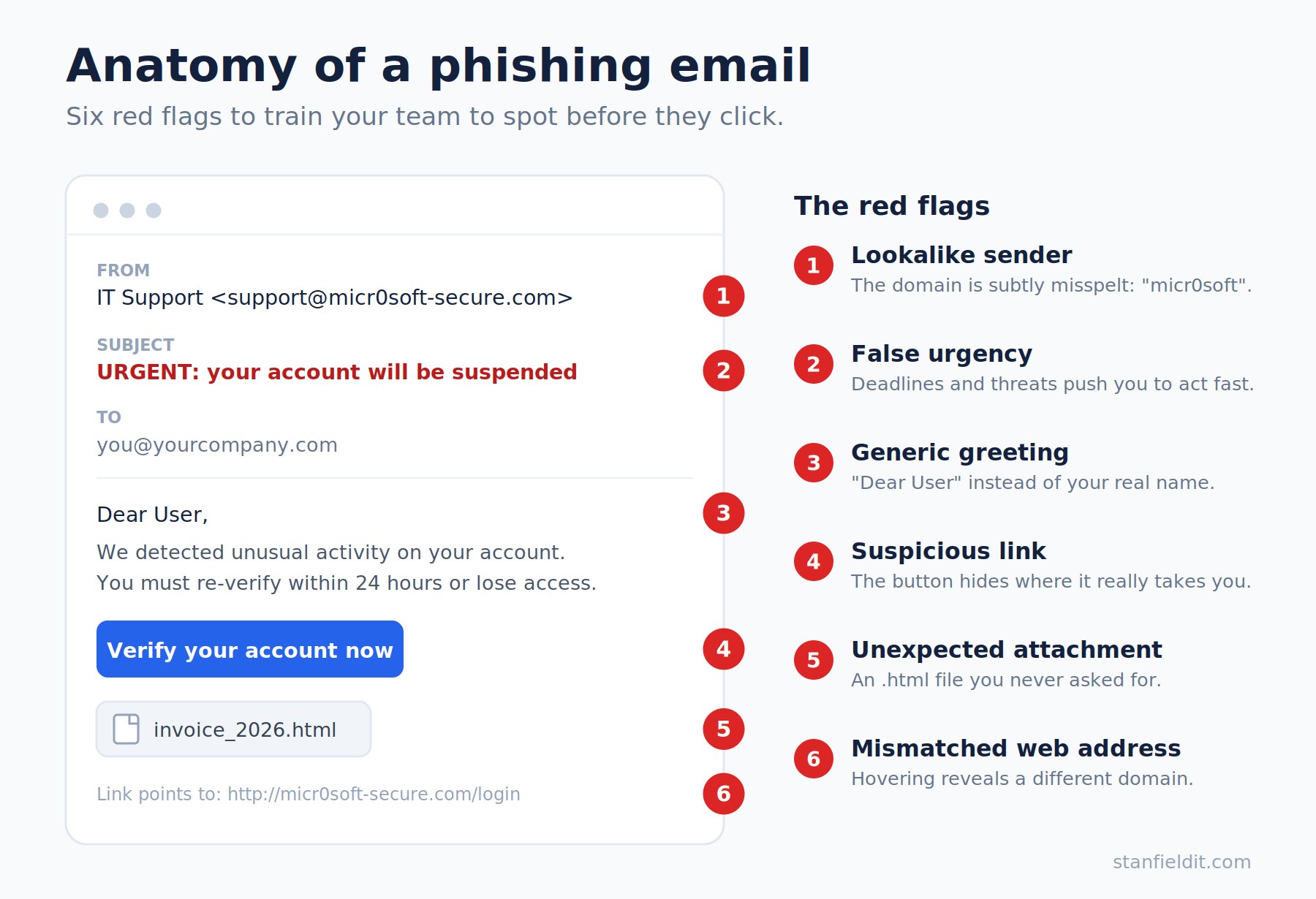
Because attackers have eliminated many of the old giveaways, spotting phishing today is about recognising the pattern of a scam rather than hunting for typos. Encourage your team to pause whenever a message does any of the following:
- Asks you to log in, “verify” your account, or approve an MFA prompt you weren’t expecting
- Pressures you to act urgently or to keep the request confidential
- Requests a payment, a change to bank details, or gift cards
- Comes from an address that’s almost, but not quite, right (check the actual sender, not just the display name)
- Contains an unexpected attachment, link or QR code
Two pieces of older advice now need updating. Don’t rely on the padlock or “https” in a web address as proof a site is safe, because most phishing sites use it too. And don’t trust a message simply because the writing is polished, since AI handles that for the attacker. The single most reliable defence is straightforward: if a request involves money, credentials or sensitive data, verify it through a separate, trusted channel before acting, for example by phoning the person on a known number rather than replying to the message.
How to prevent phishing attacks in your business
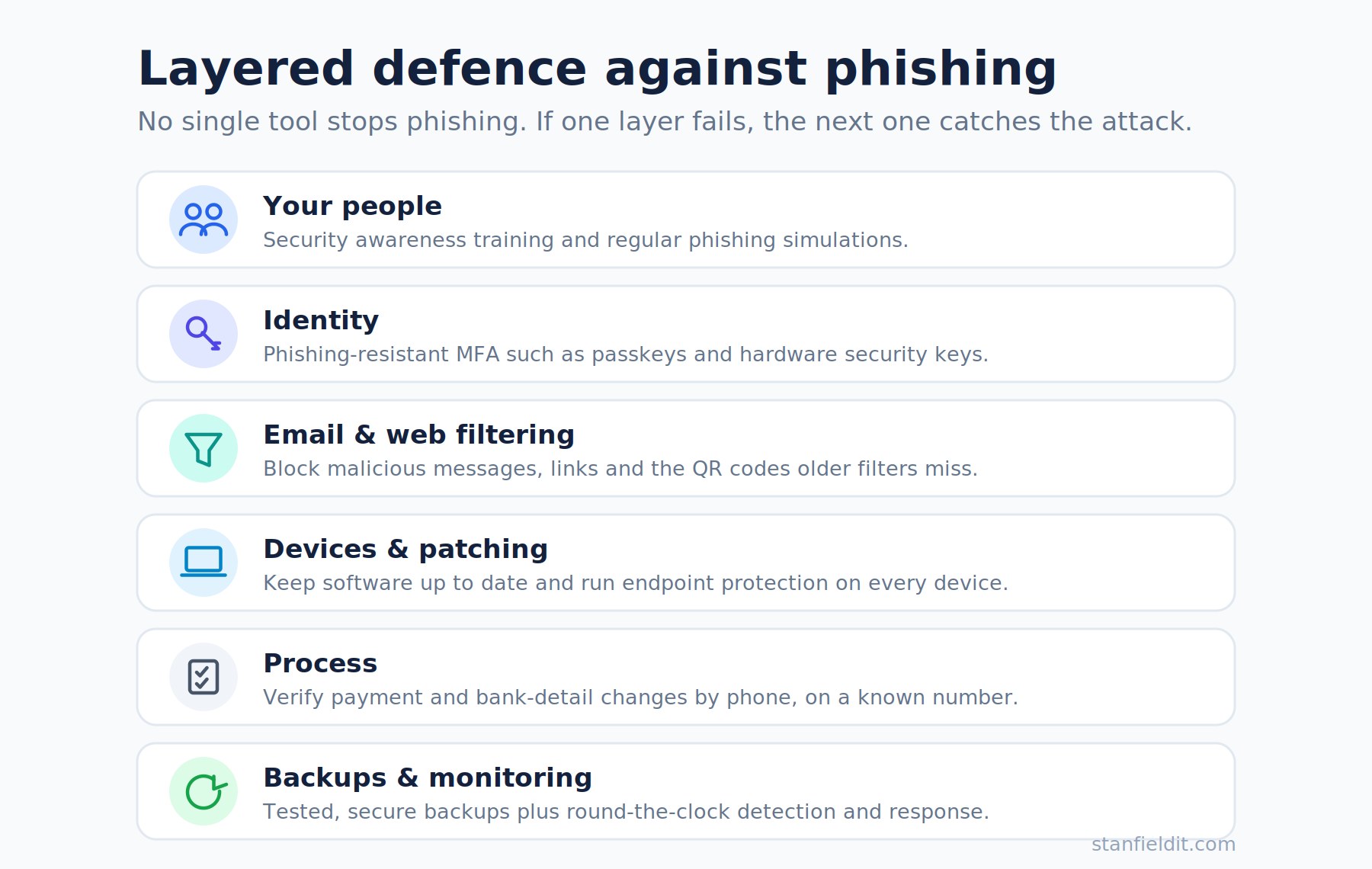
There is no single product that stops phishing. The businesses that handle it best use layers, so that if one control fails, another catches the attack. Here is what that looks like in practice.
Train your people, and keep training them. Your team is your most important line of defence. Regular, practical security awareness training helps staff recognise current tactics, and simulated phishing exercises let them practise safely. Just as importantly, build a no-blame culture so people report a mistake quickly, because attackers often act within seconds of a click.
Upgrade your multi-factor authentication. MFA is still essential, but the type matters. Because attackers can now intercept SMS codes and app prompts, consider moving to phishing-resistant methods such as passkeys or hardware security keys (FIDO2). Microsoft reports these block more than 99% of identity-based attacks, because they verify the real website and can’t be relayed to a fake one.
Strengthen email and web filtering. Modern email security can detect and quarantine suspicious messages, scan attachments and check links, including the QR codes older filters miss. Properly configured email authentication (SPF, DKIM and DMARC) also makes it harder for attackers to spoof your domain.
Keep everything patched and monitored. Outdated software, unpatched devices and exposed network equipment give attackers an easy way in once they have a foothold. Regular updates, endpoint protection and round-the-clock monitoring help you spot and shut down suspicious activity early.
Put verification processes in writing. Many BEC losses are prevented by one simple rule: any change to payment or bank details must be confirmed by a phone call to a known contact. Limit who can authorise payments, apply “least privilege” so staff only have the access they need, and document the steps to follow when something looks off.
Back up your data and have a plan. Tested, secure backups mean that even if an attack succeeds, you can recover. Aligning your controls with the Australian Government’s Essential Eight gives you a practical, well-recognised baseline to work towards.
Pulling all of this together can feel overwhelming, especially without an in-house security team. This is where a managed IT services provider with security expertise can help, putting the right protections in place, training your staff and monitoring your systems so phishing has far fewer ways to succeed.
What to do if you think you’ve been phished
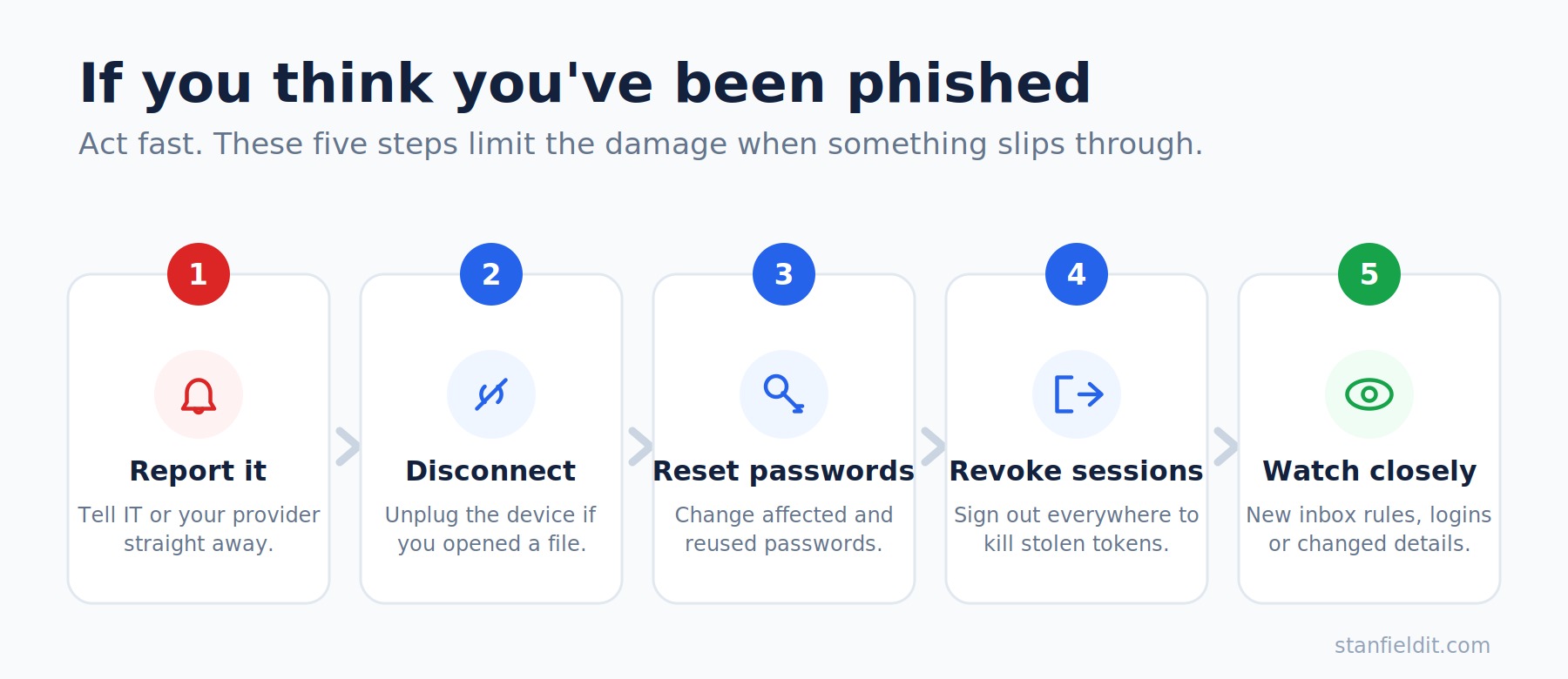
Even with strong defences, mistakes happen, and how quickly you respond makes all the difference. If you suspect you’ve clicked a malicious link, entered details on a fake page or approved a suspicious prompt, act straight away:
- Stop and report it to your IT team or provider immediately, rather than waiting to see what happens.
- Disconnect the device from the network if you’ve downloaded an attachment.
- Change the password for any affected account, and any other account that shares that password.
- Ask IT to revoke active sessions and sign you out everywhere, which helps shut down session-token theft.
- Watch for unusual activity, as new inbox rules, unexpected logins or changed bank details are common signs of compromise.
If personal or customer information may have been exposed, you may also have reporting obligations under the Notifiable Data Breaches scheme. A clear, written incident response plan, and a provider you can call quickly, turns a stressful scramble into a manageable process.
Common mistakes businesses make
A few recurring habits leave businesses exposed. The most common is assuming “we’re too small to be a target”, which is exactly the mindset attackers count on. Others include treating awareness training as a one-off rather than an ongoing program, relying on email filters alone, sticking with SMS-based MFA, and having no verification step for payment changes. Perhaps the most damaging is a blame culture, because if staff are afraid to admit a slip, they delay reporting, and that delay is what turns a near-miss into a full breach.
Building a phishing-resistant business
Phishing attacks aren’t going away. If anything, AI has made them faster, cheaper and more convincing to produce, but they remain highly preventable. The businesses that stay safe treat security as layers rather than a single tool: well-trained people, modern identity protection, strong email and device security, and clear processes for verifying requests and responding to incidents.
Most importantly, prevention is proactive. Waiting until after an attack is far more costly and disruptive than putting sensible protections in place now.
If your business wants help reducing the risk of phishing attacks, through staff training, stronger security controls and proactive monitoring, the team at Stanfield IT can help. As an experienced Australian provider of cyber security solutions and IT support, we work with small and medium businesses to keep their people, data and systems protected. Get in touch for a chat about where your business stands today.