


For most Australian businesses, technology now sits at the centre of everything, from invoicing and payroll to customer records and day-to-day communication. That reliance is exactly why cyber criminals find small and medium businesses so appealing. They assume you are busy, under-resourced, and unlikely to have every base covered.
The good news is that strong protection rarely comes down to one expensive piece of software. It comes from getting the fundamentals right and reviewing them regularly. That is precisely what a cyber security audit checklist is designed to help you do. It gives you a clear, practical way to look at your current defences, spot the gaps, and decide what to fix first.
This guide walks through 22 strategies that genuinely move the needle. We have written it for business owners, office managers, and operations teams rather than IT specialists, so you do not need a technical background to follow along or act on it.
Why every business needs a cyber security audit checklist
It is easy to assume that cyber attacks only happen to big corporations or government departments. In reality, smaller organisations are targeted constantly, often because they make softer targets. A single successful attack can mean locked files, stolen customer data, weeks of disruption, and a serious dent in the trust you have spent years building.
A cyber security audit checklist matters because it turns a vague worry into a concrete plan. Instead of lying awake wondering whether you are protected, you can work through a structured list, see exactly where you stand, and take action on the things that carry the most risk. It replaces guesswork with clarity.
It also helps you avoid the trap of spending money in the wrong places. Plenty of businesses invest in flashy tools while leaving basic gaps wide open, such as staff sharing passwords or backups that have quietly stopped running. A methodical review makes sure your effort and budget go where they will do the most good.
Think of this checklist as a health check for your business technology. You would not skip a regular check-up for something that keeps your business running. Your security deserves the same attention.
How a cyber security audit actually works
Before diving into the strategies, it helps to understand what a proper audit looks like. It is not a single scan or a box-ticking exercise you do once and forget. The most effective approach follows a simple cycle that you repeat over time as your business and the threats around it change.
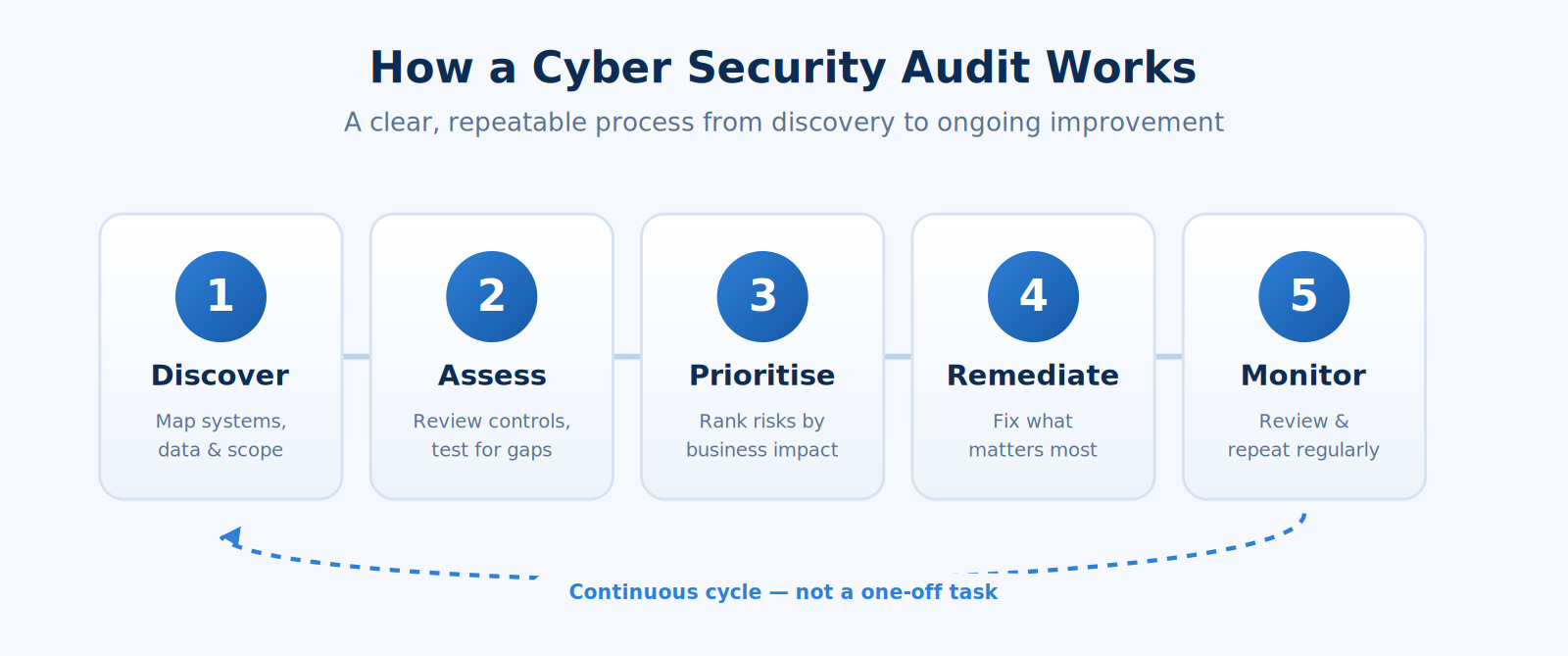
You start by understanding what you actually have, including the systems, data, and people that keep your business running. From there you assess your current controls, prioritise the risks that matter most, fix them in a sensible order, and keep monitoring so new gaps do not creep back in. With that picture in mind, the strategies below become much easier to apply.
Strengthen access, identity and passwords
A huge proportion of breaches trace back to a stolen or weak password. Tightening up who can access what, and how, is one of the highest-value areas in any review.
1. Turn on multi-factor authentication everywhere. Multi-factor authentication (MFA) asks for a second proof of identity, such as a code on a phone, on top of a password. It is one of the single most effective protections available and stops the majority of account takeovers, even when a password has been leaked. Our identity and access management work almost always starts here.
2. Enforce strong, unique passwords. Encourage long passphrases rather than short, complex strings that nobody can remember. Just as importantly, make sure the same password is never reused across multiple systems.
3. Use a password manager. A reputable password manager generates and stores strong credentials so your team does not resort to sticky notes or shared spreadsheets. It removes the temptation to reuse passwords entirely.
4. Apply least-privilege access. People should only have access to the systems and data they genuinely need for their role. The fewer doors each account can open, the less damage a single compromised login can cause.
5. Review accounts regularly. Old accounts from former staff or contractors are a common blind spot. Make removing access part of your offboarding process, and review who has access to what every few months.
Protect your devices, networks and systems
Every laptop, phone, server, and router is a potential way in. Keeping them current and properly configured closes off a large number of opportunities for attackers.
6. Keep everything updated and patched. Software updates frequently fix security holes that criminals actively exploit. Applying patches promptly, across operating systems and applications, is one of the most reliable defences you have.
7. Install reputable endpoint protection. Modern security software does far more than scan for viruses. It watches for suspicious behaviour and can stop threats before they spread across your devices.
8. Configure firewalls correctly. A firewall controls what traffic is allowed in and out of your network. Make sure it is properly set up rather than left on default settings, and that remote access is locked down. Our network services team handles exactly this kind of hardening.
9. Secure your Wi-Fi. Use strong encryption, change default router credentials, and set up a separate guest network so visitors never touch the systems your business depends on.
10. Encrypt sensitive data. Encryption scrambles information so it is useless to anyone without the key. Enabling it on laptops and mobile devices means a lost or stolen device does not become a data breach.
Layer your defences with a complete cyber security audit checklist
No single control protects everything. The strongest businesses stack multiple layers so that if one fails, others are still standing. Security professionals call this defence in depth, and it sits at the heart of any thorough cyber security audit checklist.
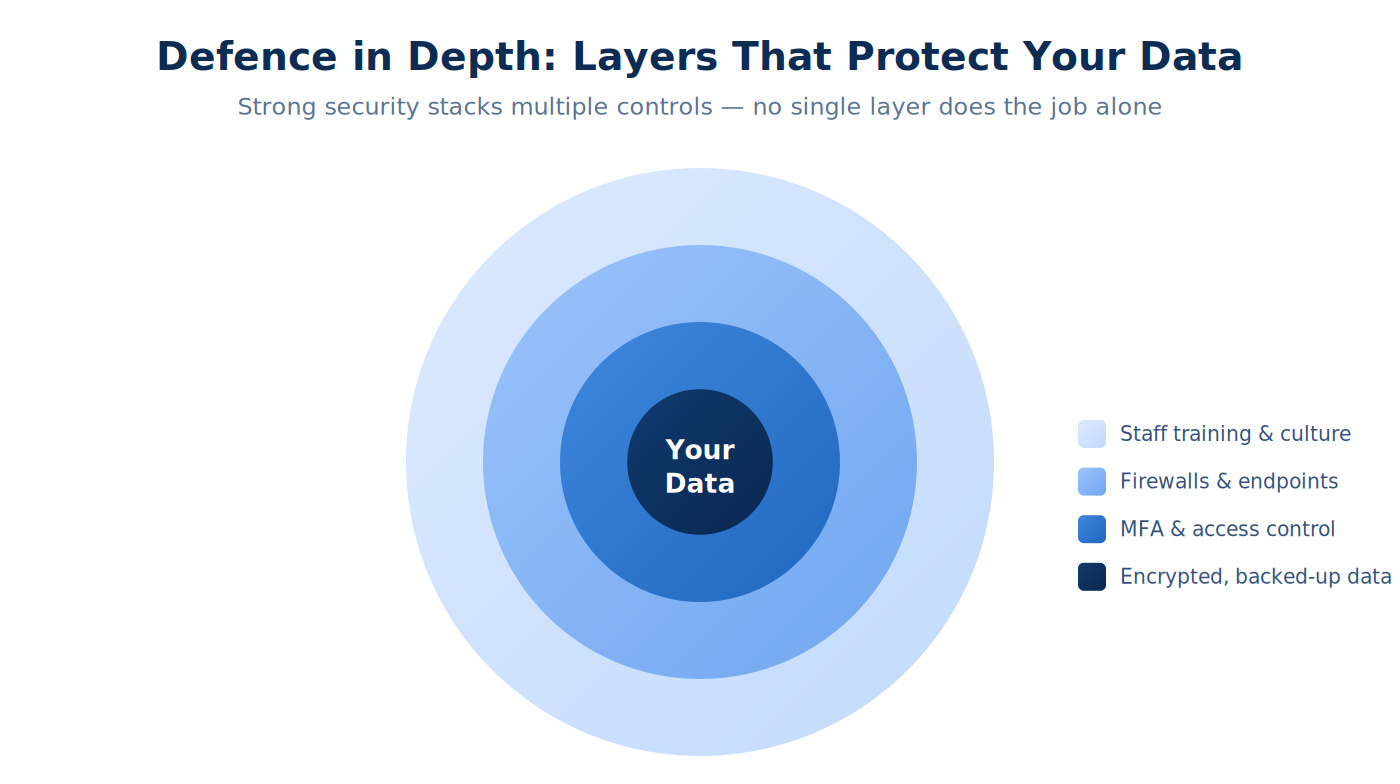
11. Segment your network. Splitting your network into zones means an attacker who breaks into one area cannot roam freely across everything. It is a simple idea that dramatically limits the blast radius of an incident.
12. Control the use of removable media. USB drives and external disks can carry malware straight past your other defences. Set clear rules about what can be plugged in, and where.
13. Secure your cloud platforms. Tools such as Microsoft 365 are powerful, but their default settings are not always the most secure. Reviewing sharing permissions, admin roles, and security policies is essential. Stanfield IT can help through our Microsoft 365 support and migration services.
Back up your data and plan for the worst
Even with excellent defences, you have to assume something could still go wrong one day. Reliable backups and a recovery plan are what stand between a bad day and a business-ending event, particularly when ransomware is involved.
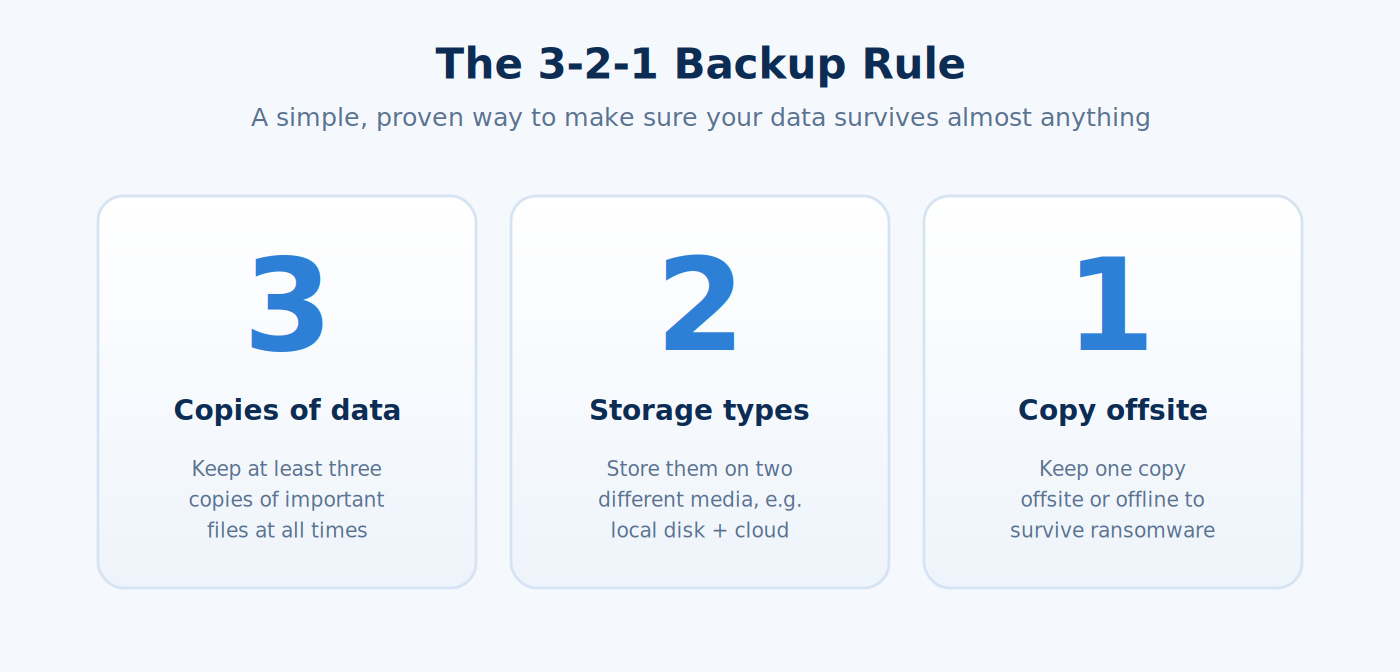
14. Follow the 3-2-1 backup rule. Keep at least three copies of your data, on two different types of storage, with one copy held offsite or offline. This layered approach means a single failure, theft, or ransomware attack cannot wipe out everything at once.
15. Test your backups regularly. A backup you have never restored is only a hope, not a plan. Schedule regular test restores so you know your data will actually come back when it counts.
16. Write a clear incident response plan. When something goes wrong, panic is your enemy. A simple plan that sets out who does what, who to call, and how to communicate will save precious time and limit the damage.
17. Have a business continuity plan. Beyond the technical recovery, think about how you will keep serving customers during an outage. Our backup and disaster recovery services are built around keeping your business moving when the unexpected happens.
Train your people to spot threats
Your team is both your greatest strength and, if left unprepared, your biggest vulnerability. The overwhelming majority of attacks begin by tricking a person rather than defeating a machine, so awareness is genuinely a frontline defence.
18. Run regular security awareness training. One-off training does not stick. Short, regular sessions keep good habits front of mind and help staff recognise the latest tricks, from fake invoices to convincing impersonation emails.
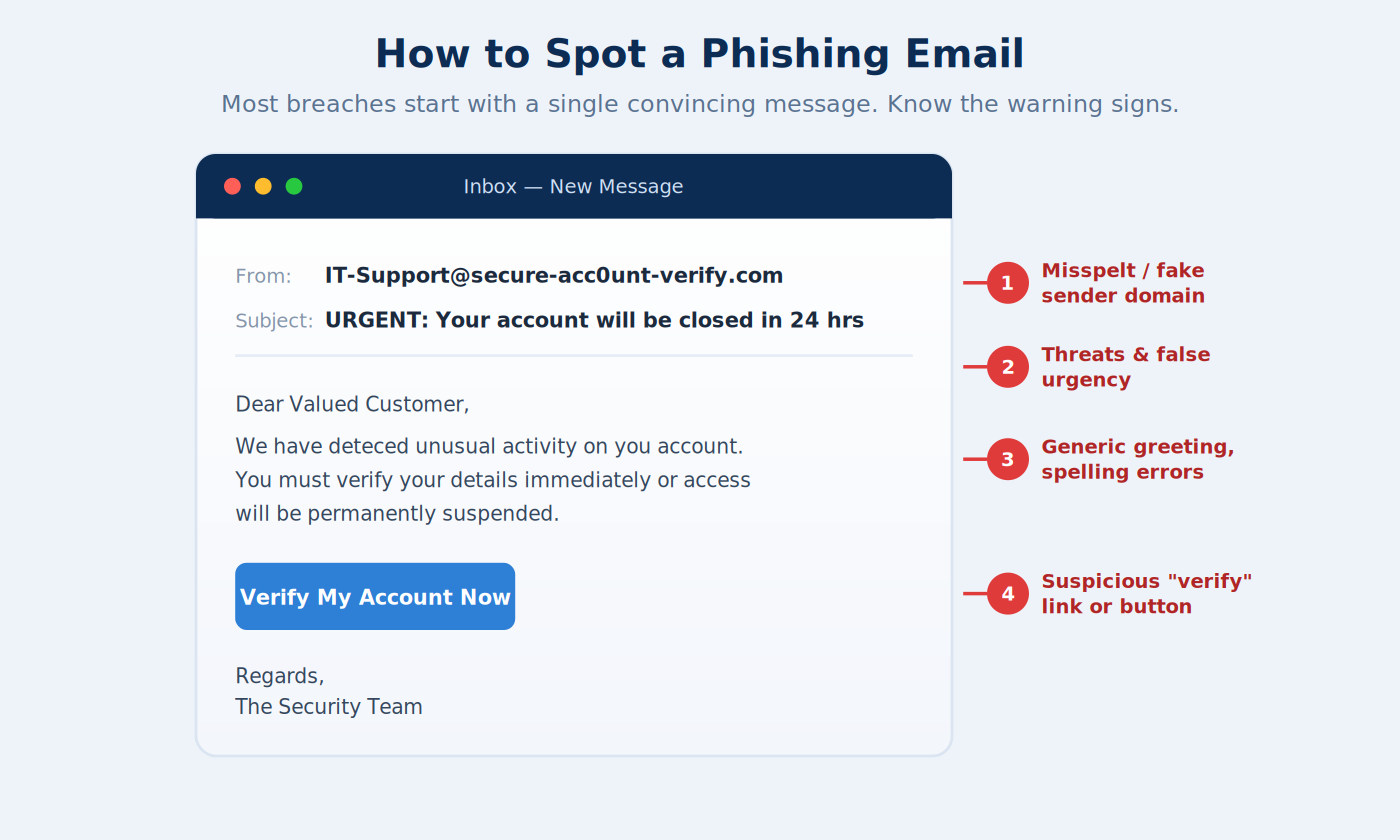
19. Teach staff to recognise phishing. Most people can learn to spot the tell-tale signs of a scam email: an odd sender address, unexpected urgency, spelling mistakes, and links that do not look right. Encourage a simple culture of pausing and checking before clicking.
20. Make it safe to report mistakes. If someone clicks a bad link, you want to hear about it within minutes, not days. A no-blame approach means problems get flagged early, when they are far easier to contain.
Put policies and ongoing reviews in place
Technology and training work best when they sit on a foundation of clear, simple rules and regular check-ins. This final group keeps everything joined up over time.
21. Document clear security policies. Write down the essentials in plain language, covering acceptable use, passwords, device handling, and what to do in an incident. Policies only help when people can actually understand and follow them.
22. Schedule regular security reviews. Threats evolve, and so does your business. Revisiting this cyber security audit checklist at least once a year, and after any major change, keeps your protection current rather than letting it quietly drift out of date.
Common mistakes businesses make
Working through a checklist is only half the battle. It also helps to know the traps that catch even well-meaning teams, so you can sidestep them from the start.
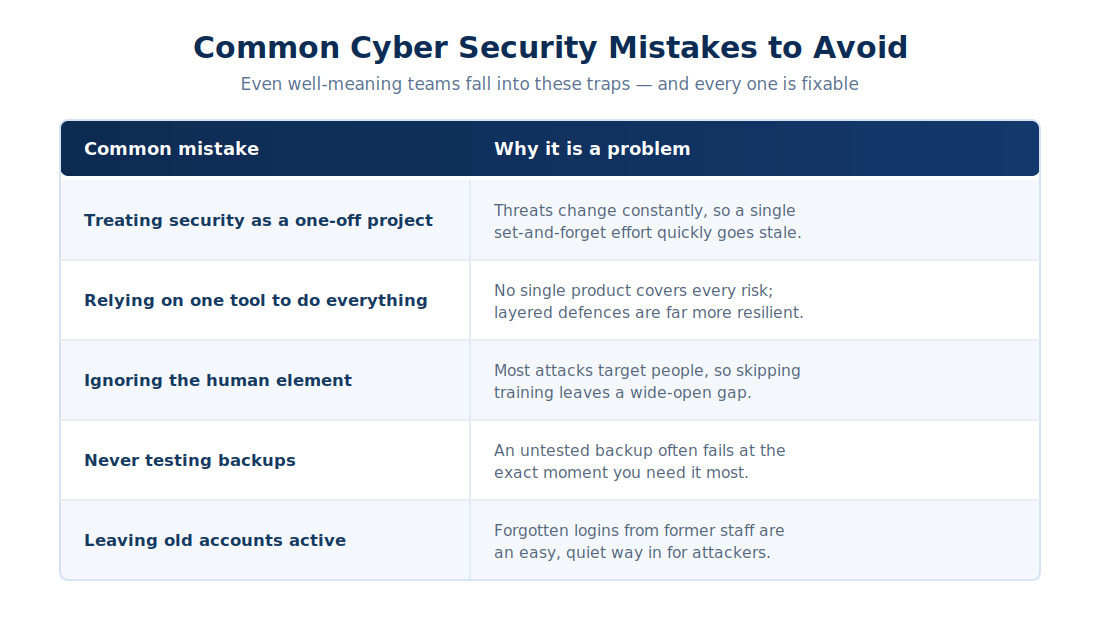
If any of these feel familiar, you are in good company. They are extremely common, and every one of them is fixable with a bit of structure and the right support.
Turning your checklist into real protection
A cyber security audit checklist is a powerful starting point, but its real value comes from acting on what it reveals. The businesses that stay safe are not necessarily the ones with the biggest budgets. They are the ones that treat security as an ongoing habit, get the fundamentals right, and review them consistently.
Start with the highest-impact items, such as multi-factor authentication, reliable backups, prompt updates, and staff awareness. From there, work steadily through the rest at a pace that suits your business. Proactive, well-planned IT management is always cheaper and less stressful than dealing with the fallout of an avoidable breach.
If working through all of this feels daunting, you do not have to do it alone. A trusted local partner can run the audit with you, explain the findings in plain English, and help you put practical protections in place without overwhelming your team.
Ready to strengthen your defences?
If your business wants reliable IT support and proactive, security-focused technology solutions, Stanfield IT can help. Our Australian-based team can walk through your environment with you and build a clear, practical plan to reduce your risk.