

Last updated: June 2026
AI is no longer something only large enterprises need to think about. Staff are using tools such as ChatGPT, Microsoft Copilot, Gemini, Claude, meeting assistants and AI features already built into everyday business software. Used well, these tools can improve productivity and customer service. Used poorly, they can expose sensitive data, create inaccurate work, weaken security and leave leaders unsure who is accountable.
That is why every growing business should have a clear, practical AI policy for your company. The aim is not to block innovation. The aim is to give your team safe guardrails so they know which tools are approved, what information can be used, when human review is required and how AI fits into your wider cyber security and governance approach.
This guide explains how to create an AI policy that is easy for staff to understand, realistic for managers to enforce and strong enough to support safer AI adoption. It is written for Australian small and medium businesses that want to use AI confidently without creating unnecessary data, privacy or operational risk.
Why an AI policy for your company matters now
Many businesses already have AI use happening quietly in the background. A staff member may be using a public chatbot to draft emails. A manager may be testing a meeting transcription tool. A department may be trialling a workflow app with AI features. This is often well-intentioned, but without a policy it becomes difficult to know what data is being shared, whether outputs are being checked, and whether tools have suitable security and privacy settings.
The Office of the Australian Information Commissioner has made it clear that privacy obligations apply when AI involves personal information, and that organisations should complete due diligence before adopting commercially available AI products. The Australian Signals Directorate’s Australian Cyber Security Centre also provides guidance on using AI systems securely. These are practical reminders that AI adoption is not just a productivity project. It is also a governance, data and security project.
A good policy helps leaders answer simple but important questions: which AI tools are approved, what information must never be entered, who can approve higher-risk use, how outputs should be reviewed, and what happens if something goes wrong. Without those answers, staff are left to make their own decisions, often without enough context.
Start by mapping how AI is already being used
Before writing rules, understand what is already happening. Start with a short discovery process across leadership, operations, finance, sales, HR, marketing, administration and IT. Ask which tools people use, what they use them for, what data they enter, whether outputs are checked and whether any AI features are already enabled inside existing systems.
This discovery should include obvious tools such as ChatGPT and Copilot, but also less visible AI features inside CRMs, help desk systems, accounting platforms, browsers, design tools and meeting apps. AI is increasingly embedded into everyday software, so a policy that only names one or two chatbots will quickly become outdated.
The output should be a simple AI use register. Record the tool, owner, purpose, data used, vendor, risk level and whether the use is approved, under review or not allowed. This register becomes the foundation for your AI policy for your company, because the policy is based on real business activity rather than guesses.
Define approved tools, restricted tools and safe use cases
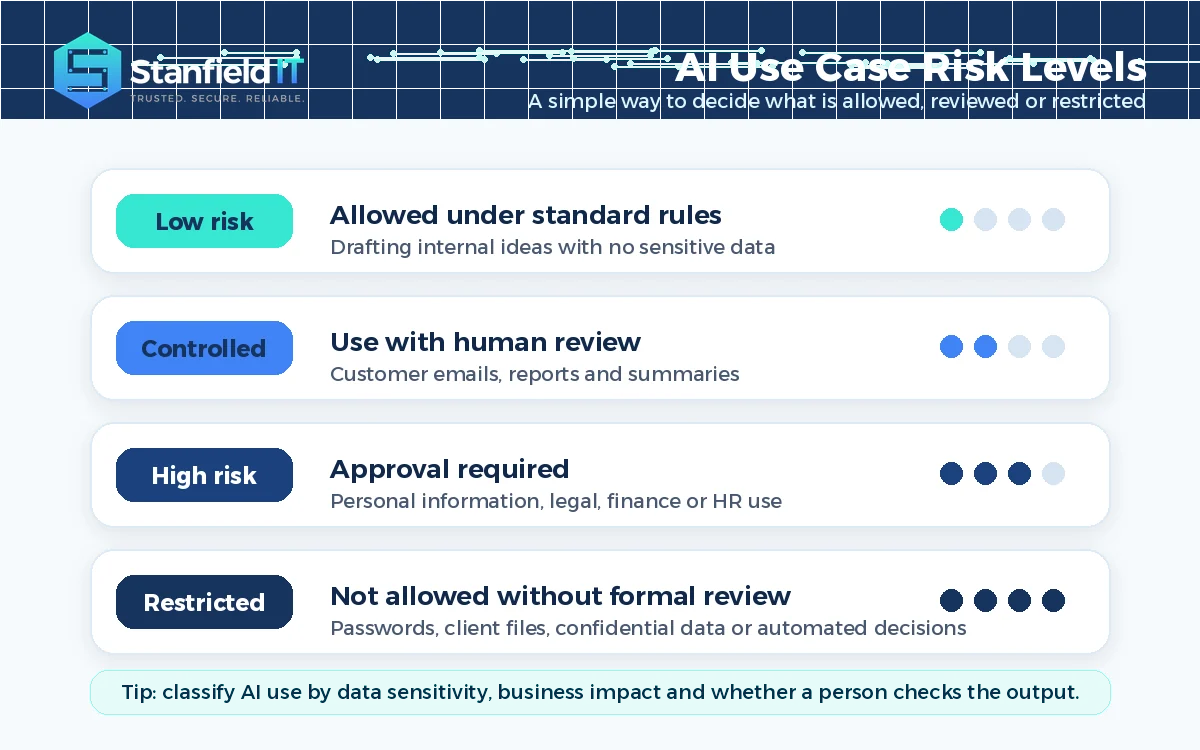
Staff should not have to guess whether a tool is acceptable. Your policy should clearly separate approved tools, tools under review and tools that are not allowed for business use. It should also explain what tasks are acceptable, what needs manager approval and what is prohibited.
For example, a low-risk use might be drafting a first version of an internal announcement using no sensitive data. A controlled use might be preparing a customer email that must be reviewed by a person before it is sent. A high-risk use might involve personal information, financial analysis, legal content, HR decisions or customer-impacting recommendations. Restricted uses should include entering passwords, API keys, confidential client files, commercially sensitive documents or personal information into public tools without approval and proper safeguards.
| Policy area | What to define |
| Approved tools | Which AI platforms staff may use and under what conditions. |
| Data rules | What information can be entered, anonymised or never used. |
| Human review | When AI output must be checked before use or publication. |
| Approval pathway | Who can approve new tools, vendors and higher-risk use cases. |
| Record keeping | What decisions, prompts, outputs or risk reviews must be recorded. |
The most effective policies use plain language. Instead of saying “users must comply with all applicable AI governance requirements”, say “do not enter customer, staff, financial, legal, security or confidential business information into an AI tool unless the tool has been approved for that data and the use case has been reviewed”. Simple rules are easier to follow and easier to train.
Build security into your AI policy for your company
An AI policy should not sit separately from cyber security. AI tools often connect to identity systems, cloud storage, email, documents and customer data. If permissions are messy, files are overshared or multi-factor authentication is weak, AI can amplify those existing problems.
This is especially important for organisations using Microsoft 365, SharePoint, Teams, OneDrive and Copilot. AI search and productivity tools can surface information that users technically have access to, even if the business did not intend that information to be broadly visible. Before rolling out AI across the business, review access permissions, sharing settings, sensitivity labels, data loss prevention controls, conditional access, endpoint protection and audit logging.
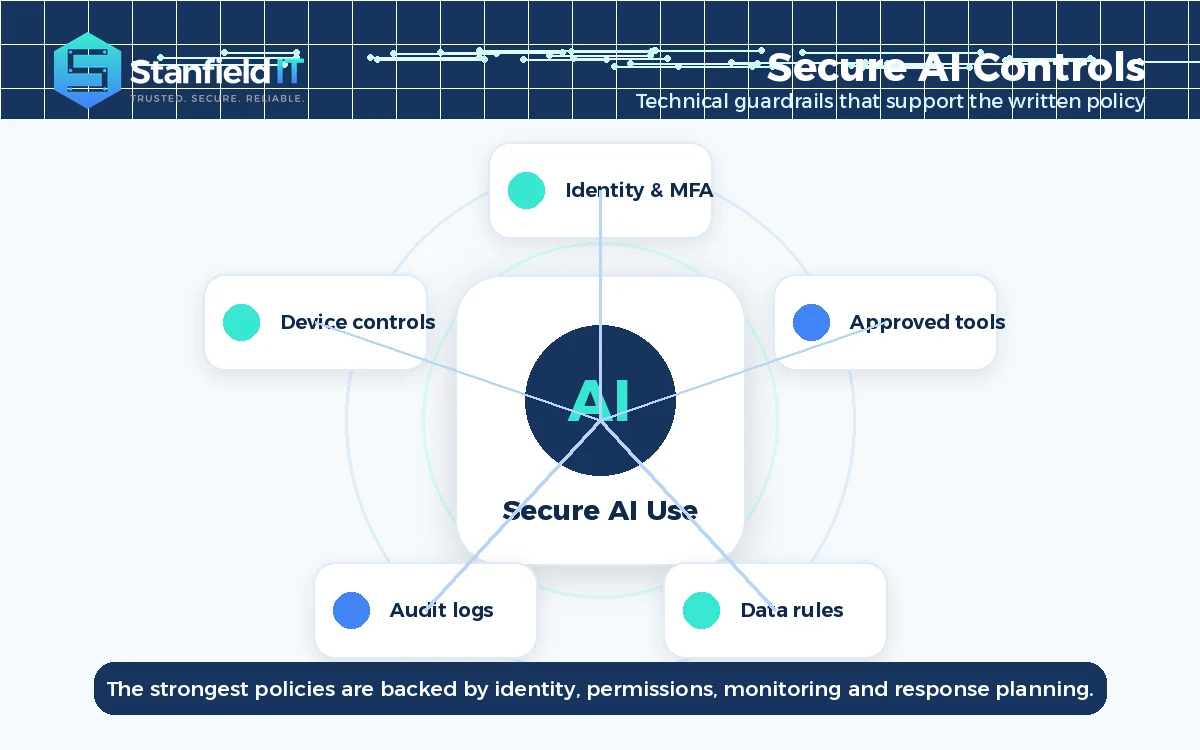
Your policy should work together with technical controls. That may include multi-factor authentication, role-based access, approved browser controls, device management, email security, backup and recovery processes, data classification, monitoring and incident response. If you need a clearer view of your current control gaps, a Cyber Security Risk Assessment can help prioritise what to fix before AI adoption scales.

Set clear ownership and approval pathways
AI governance fails when everyone assumes someone else is responsible. Your policy should name who owns AI governance, who reviews new tools, who approves exceptions, who manages technical controls and who investigates incidents. In a smaller business, this may be a business owner, operations manager and IT partner. In a larger organisation, it may involve IT, cyber security, privacy, legal, HR and department leaders.
A simple approval pathway helps staff move quickly without creating uncontrolled risk. Low-risk uses can follow standard rules. Higher-risk uses should require review before the tool is adopted or the workflow goes live. Anything involving personal information, confidential client material, employment decisions, financial advice, regulated services, public claims or automated customer-impacting decisions should receive closer assessment.
International frameworks such as the NIST AI Risk Management Framework use the functions govern, map, measure and manage to help organisations think about AI risk over time. Australian Government guidance also encourages fit-for-purpose risk management, monitoring and human control where needed. For most SMBs, the takeaway is straightforward: assign ownership, document decisions, review risks regularly and do not let AI operate without human accountability.
Train staff so the policy is actually used
A policy document is only useful if people understand it. Training should explain what AI can help with, what to avoid, how to protect information and how to check outputs. Staff need examples that match their roles, not a long manual that never gets opened again.
Good training might show an admin team how to summarise non-sensitive meeting notes safely, a sales team how to draft proposals without exposing customer information, and a finance team where AI use should be limited or reviewed. It should also teach staff that AI outputs can be inaccurate, biased, outdated or incomplete. Human review is not a formality; it is a key control.
Keep training practical and repeat it as tools change. Short refreshers, manager briefings, onboarding notes and quick-reference guides often work better than one-off presentations. If staff know the approved tools and the rules are easy to follow, they are less likely to rely on unapproved “shadow AI” tools.
Common mistakes to avoid when creating an AI policy
The first mistake is banning all AI without offering a safe alternative. This may look simple, but it often pushes staff towards personal accounts, private devices or unapproved tools. A better approach is to provide approved options with clear limits.
The second mistake is copying a generic template and assuming the job is done. A template can be a useful starting point, but every business has different systems, data, customers, risks and compliance drivers. Your policy should reflect how your team actually works.
The third mistake is ignoring the underlying IT environment. If Microsoft 365 permissions, shared folders, device security and access controls are not well managed, your AI policy will be weaker than it looks on paper. For businesses planning Copilot or deeper Microsoft 365 AI adoption, it is worth reviewing your environment first. Stanfield IT can support this through Microsoft 365 Support & Migration and broader security improvement work.
The fourth mistake is treating the policy as a one-time task. AI tools, vendor terms, regulations, staff behaviour and business use cases will keep changing. Your policy should have an owner, a review cycle and a simple process for raising new AI requests.
A simple AI policy framework you can adapt
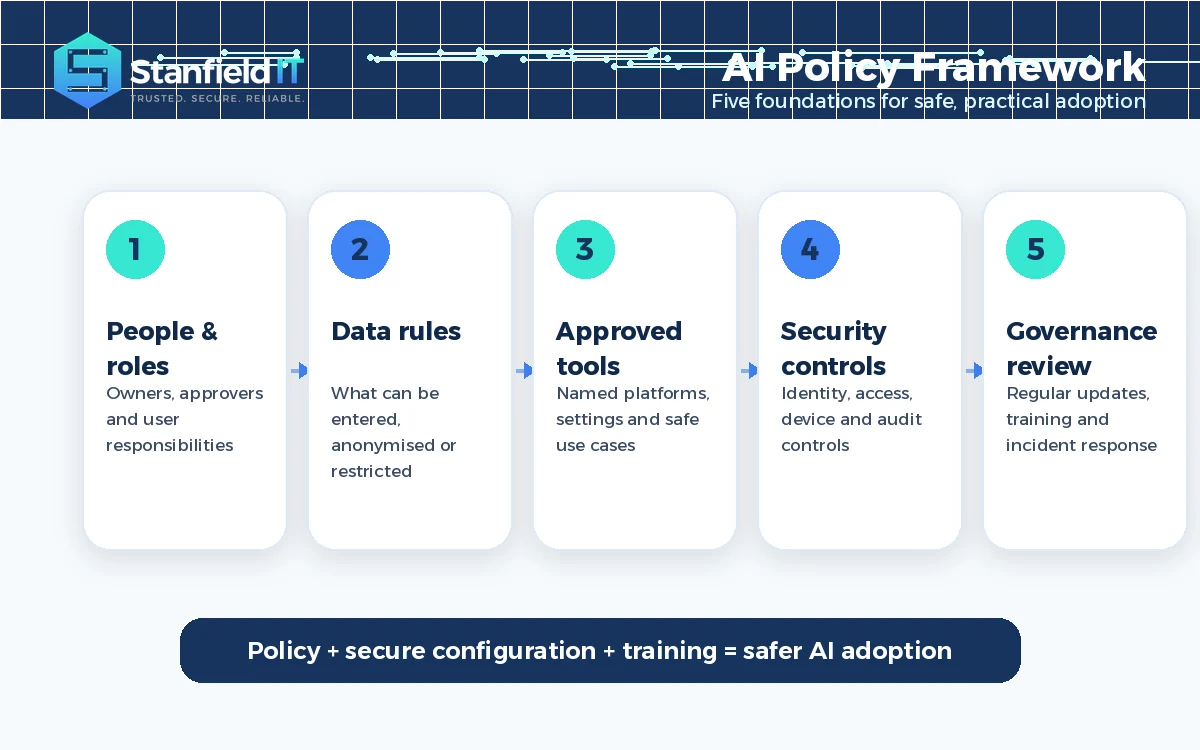
A practical AI policy for your company should cover the following areas:
- Purpose and scope: why the policy exists and who it applies to.
- Approved tools: the AI tools staff may use for work.
- Acceptable uses: low-risk tasks that are allowed under standard rules.
- Restricted uses: activities that require approval or are not allowed.
- Data handling: rules for personal, confidential, financial, legal and client information.
- Human review: when outputs must be checked before they are used.
- Security controls: identity, access, device, data and logging requirements.
- Vendor review: how new AI products are assessed before use.
- Incident reporting: what staff should do if information is exposed or an output causes concern.
- Training and review: how staff are trained and how often the policy is updated.
You can also include sample staff wording. For example:
Employees may use approved AI tools to support productivity, research, drafting and internal analysis where the use does not expose confidential, personal, security-sensitive or regulated information. AI-generated outputs must be reviewed by a person before being relied upon, shared externally or used to make decisions that affect customers, staff, suppliers or the business.
This wording should be customised for your business and reviewed with the right legal, privacy, HR or compliance advisers where required. Staff should finish reading it knowing what they can do, what they cannot do and where to ask for help.
How Stanfield IT helps businesses adopt AI safely
Creating an AI policy for your company is a strong first step, but the best results come when policy, security controls, user training and business goals work together. Stanfield IT helps Australian businesses understand current AI use, reduce shadow AI risk, prepare Microsoft 365 environments, define practical acceptable-use rules and build a secure roadmap for adoption.
Our AI Governance & Secure Adoption service is designed for businesses that want the productivity benefits of AI without guessing about data exposure, staff behaviour, tool settings or approval pathways. We focus on practical outcomes: approved tools, safe use cases, clear policies, secure Microsoft 365 controls, role-based training and ongoing review.
If your team is already experimenting with AI, now is the right time to put structure around it. With the right policy and controls, AI becomes easier to use, safer to manage and more valuable to the business.
Frequently asked questions
Do small businesses need an AI policy?
Yes. Small businesses often adopt AI quickly because staff want faster ways to write, summarise, analyse and automate work. A policy helps them do this safely without exposing customer data, confidential information or business systems.
What should an AI policy include?
It should include approved tools, acceptable uses, restricted uses, data handling rules, human review requirements, ownership, approval pathways, vendor checks, security controls, incident reporting, staff training and review timing.
Can employees use ChatGPT at work?
They can if the business has approved the tool, defined safe use cases and set clear data rules. Public AI tools should not receive confidential, personal, security-sensitive or client information unless the business has reviewed and approved that use.
Who should own the AI policy?
Ownership should sit with a business leader who can make decisions, supported by IT, cyber security, operations, HR, legal or compliance input as needed. Smaller businesses may use an external IT partner to help manage the process.
How often should an AI policy be reviewed?
Review it at least every six to twelve months, and sooner if the business adopts a major new AI tool, changes systems, handles new data types, enters a regulated market or experiences a data or security incident.
Does an AI policy replace cyber security controls?
No. A policy explains what people should do, but technical controls help enforce safer behaviour. AI governance should be supported by identity controls, MFA, data classification, device security, access management, monitoring and incident response.