


Privileged access management (PAM) is the security discipline that controls, monitors and audits elevated access so only authorised actors can perform sensitive tasks on critical systems. If you are an IT security professional or decision-maker in an Australian organisation, three actions matter most right now: discover every privileged account in your environment, restrict access to the minimum required for each role, and monitor every privileged session in real time. Frameworks including the ASD Essential Eight, APRA’s prudential standards and NIST SP 800-53 all treat privileged account controls as non-negotiable. The clearest starting point is a discovery scan, either run internally or through a managed security provider.
- Discover: Run an automated scan to identify every privileged account, service account and shared credential across on-premises, cloud and hybrid environments.
- Restrict: Apply least privilege access so each account holds only the permissions needed for its defined purpose, and remove standing privileges where possible.
- Monitor: Record and alert on every privileged session, integrating logs with your SIEM for forensic readiness and compliance reporting.
PAM secures privileged identities that can change system settings or access sensitive data, and is increasingly required for cyber insurance eligibility and regulatory compliance in Australia.
Table of Contents
- What privileged access management covers and how it fits your security architecture
- Why PAM matters: the real risks of compromised privileged accounts
- How PAM actually works: core components and the privileged session lifecycle
- What types of privileged accounts do you need to find and protect?
- How to implement PAM: a phased roadmap for Australian organisations
- Which deployment model fits your organisation?
- Compliance and regulatory considerations for Australian organisations
- How Stanfield IT implements PAM for Australian SMEs
- Key takeaways
- The part most PAM projects get wrong
- Stanfield IT’s PAM services: what to expect from a first engagement
- Useful sources and further reading
What privileged access management covers and how it fits your security architecture
PAM, identity and access management (IAM) and privileged identity management (PIM) are related but distinct. IAM governs all user identities and their access to resources, covering password management, single sign-on and user lifecycle. PAM is a subset of IAM focused specifically on elevated accounts — those with the ability to change system configurations, access sensitive data stores or administer infrastructure. PIM, as implemented in platforms such as Microsoft Entra, operates at the role level and provides time-bound, approval-based activation of privileged roles. PAM works at the task and session level, controlling and recording what a privileged user actually does once activated.
In practice, PAM sits between your identity provider and your critical assets. A user authenticates through the identity provider, requests elevated access through the PAM broker, receives a time-limited credential or session, and every action is recorded. That session data feeds your SIEM and SOC alerting stack, giving analysts the context they need to detect anomalies quickly.
“Securing privileged access should be the organisation’s top security priority because attackers who compromise privileged accounts can rapidly control business-critical assets. Success criteria include creating isolated privileged sessions and reducing mean time to remediate (MTTR) privileged incidents toward near zero.”
— Microsoft Learn, Securing privileged access overview
PAM also integrates with endpoint detection and response (EDR) tools and network segmentation controls. Privileged assets should carry the highest-priority alerting tags in your SOC. Integrating PAM into Zero Trust means treating every privileged access request as untrusted by default, validating explicitly, and assuming breach at all times.
Why PAM matters: the real risks of compromised privileged accounts
Privileged accounts are the primary target in most serious breaches. When an attacker gains control of a domain administrator or cloud service account, the consequences move fast: lateral movement across the network, ransomware deployment at scale, exfiltration of sensitive data and, in supply-chain attacks, compromise of downstream clients and partners.
The business impact for Australian organisations extends well beyond the immediate incident:
- Data loss and regulatory exposure: A breach involving personal or health information triggers notification obligations under the Privacy Act’s Notifiable Data Breaches scheme, with potential fines and reputational damage.
- Service downtime: Ransomware deployed via a compromised privileged account can take critical systems offline for days or weeks.
- Regulatory sanctions: APRA-regulated entities face supervisory action if privileged access controls are found to be inadequate following an incident.
- Cyber insurance impact: Insurers increasingly require evidence of PAM controls before issuing or renewing policies. A claim arising from a breach where PAM was absent may face reduced or denied coverage.
- Credential theft: Attackers use phishing, password spraying and credential-dumping tools to harvest privileged credentials, then move laterally to escalate access.
- Supply-chain compromise: Vendor and contractor accounts with standing privileged access are a common entry point, particularly where third-party access is not monitored or time-limited.
Pro Tip: Prioritise accounts with the broadest reach or the most trusted relationships first. Domain administrators, cloud service accounts and vendor accounts that span multiple systems create the highest blast radius if compromised. Start your risk reduction there.
How PAM actually works: core components and the privileged session lifecycle
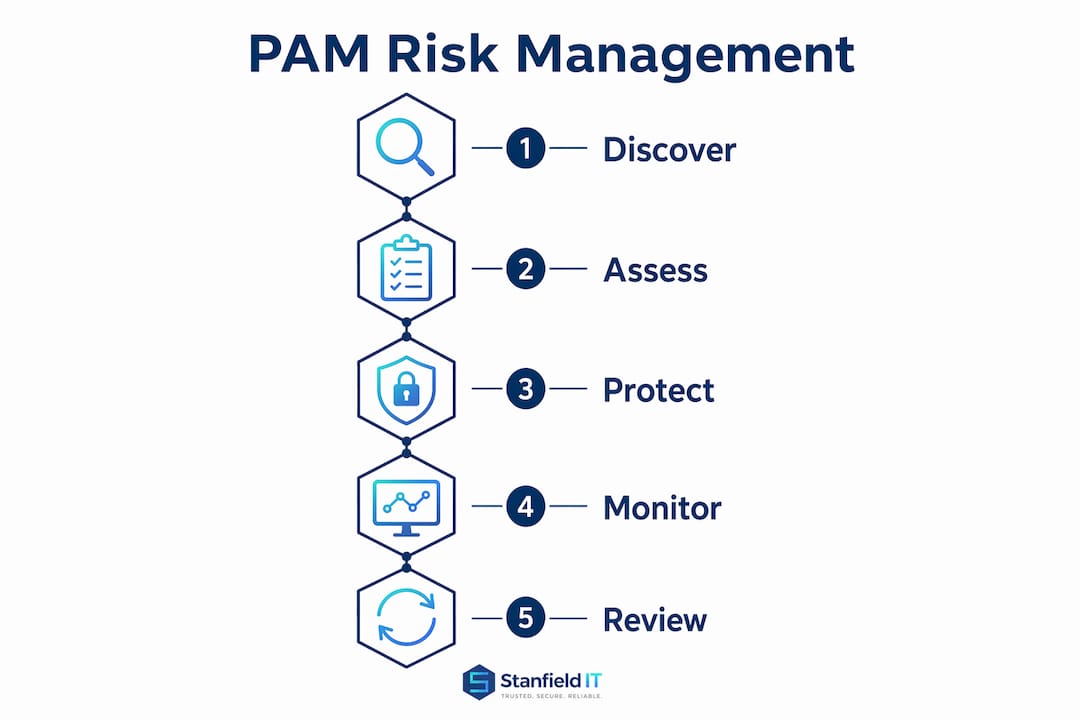
A privileged session in a well-configured PAM environment follows a clear sequence. The user requests access through the PAM portal, specifying the target system and the task. An approval workflow, automated or human-reviewed, validates the request against policy. If approved, the PAM broker issues a time-limited credential or opens an isolated session. The user completes the task, the session is recorded in full, and the credential is automatically rotated or discarded.
The components that make this work:
- Credential vault: Stores and manages privileged passwords, SSH keys and certificates. Credentials are checked out for a session and rotated automatically on return.
- Broker and intermediary: Acts as a gateway between the user and the target system, so the user never sees the actual credential.
- Session manager and recorder: Captures keystrokes, commands and screen activity for every privileged session, creating a forensic record.
- Discovery engine: Continuously scans the environment for new or unmanaged privileged accounts, service accounts and shared credentials.
- Approval and workflow engine: Enforces the request-and-approve process, with escalation paths and time-bound access windows.
- Analytics and UEBA: Detects anomalous behaviour in privileged sessions, such as unusual access times, bulk data access or commands outside normal patterns.
Session recording and automated discovery are the two capabilities most directly linked to forensic readiness and detection of rogue accounts. Ephemeral credentials, issued for a single session and discarded, reduce the window of exposure dramatically compared to long-lived shared passwords.
Pro Tip: Minimise standing credentials wherever possible. Zero Standing Privileges (ZSP), where elevated access exists only for the duration of an approved request, is the target state. Even partial progress toward ZSP reduces your attack surface significantly.

MFA must be enforced for all administrator access. Ephemeral single-factor credentials are not a substitute for phishing-resistant MFA in routine admin workflows.
What types of privileged accounts do you need to find and protect?
Discovery is only useful if you know what you are looking for. These are the account types that create the highest risk and require specific handling:
- Domain and forest administrators: The highest-privilege accounts in an Active Directory environment. Vault credentials, restrict membership, use dedicated privileged access workstations (PAWs) and log every session.
- Local administrator accounts: Often shared across endpoints with identical passwords. Rotate credentials individually using a local admin password solution and remove from standard user machines.
- Service and application accounts: Frequently over-privileged and rarely reviewed. Assign minimum required permissions, vault credentials and set expiry dates. Prefer managed service accounts or group managed service accounts (gMSAs) where the platform supports them.
- Database accounts: DBA and application-level database credentials often have broad read/write access. Vault and rotate, and monitor for bulk data queries.
- Cloud service accounts and service principals: IAM roles, service principals and workload identities in AWS, Azure and Google Cloud. Apply least privilege access at the resource level, use workload identity federation where possible, and avoid long-lived static keys.
- Emergency (break-glass) accounts: Necessary for disaster recovery but must be tightly controlled. Store credentials in a sealed vault, require dual authorisation to access, and trigger an immediate alert on any use.
- Vendor and contractor accounts: Third-party privileged access is one of the most common breach vectors. Time-limit all vendor sessions, require MFA, record every session and revoke access immediately on contract completion.
- Privileged bots and automation accounts: RPA bots and automation scripts often run with elevated credentials. Treat these as privileged accounts, vault their credentials and apply the same monitoring as human accounts.
For application and workload identities, securing enterprise app credentials requires the same discipline as human privileged accounts. Non-human identities are frequently overlooked and represent a growing share of privileged access risk.
How to implement PAM: a phased roadmap for Australian organisations

A PAM programme does not need to be delivered all at once. A phased approach lets you demonstrate value early, manage change carefully and build toward a mature capability.
Phase 1: Prepare (weeks 1–4)
- Define your PAM policy: what constitutes a privileged account, who can hold one, and what the approval process looks like.
- Identify stakeholders: IT, security, compliance, HR and executive sponsors all need to be involved from the start.
- Establish separation of duties: the person who requests privileged access must not be the same person who approves it. Technical controls must enforce this to prevent toxic combinations that enable fraud or error.
- Document your current privileged account inventory as a baseline.
Phase 2: Discover and inventory (weeks 3–8)
- Run automated discovery across Active Directory, cloud tenancies, endpoints and application layers.
- Classify accounts by type, privilege level and business criticality.
- Identify orphaned, shared and unmanaged accounts for immediate remediation.
- Build your privileged account register with accountable owners, defined purposes and review dates.
Phase 3: Proof of concept and pilot (months 2–3)
- Select a limited scope: one business unit or one system tier.
- Deploy the credential vault and broker for the pilot scope.
- Test the request-and-approve workflow with real users and gather feedback.
- Validate session recording and SIEM integration before scaling.
Phase 4: Implement vaulting and JIT access (months 3–6)
- Onboard all high-priority accounts to the vault.
- Configure just-in-time (JIT) access workflows, replacing standing credentials with time-bound approvals.
- Implement automated credential rotation for service and application accounts.
- Deploy privileged access workstations for tier-zero administration.
Phase 5: Integrate session monitoring and SIEM (months 4–7)
- Connect session recordings to your SIEM for alerting and log retention.
- Configure alert rules for anomalous privileged behaviour.
- Establish log retention periods that meet your compliance obligations (see Section 8).
Phase 6: Train and roll out (months 5–9)
- Train all privileged users on the new workflows, the rationale for controls and how to raise issues.
- Communicate policy changes to vendors and contractors.
- Roll out to remaining scope in controlled waves.
Phase 7: Continuous review (ongoing)
- Conduct quarterly access reviews of all privileged accounts.
- Review and tune alert rules based on SOC feedback.
- Track KPIs: discovery coverage, sessions recorded, ephemeral credentials issued, mean time to remediate privileged incidents.
Cost factors to consider: Licensing for PAM tooling, implementation and integration services, ongoing managed service or in-house OPEX, and the cost of privileged access workstations. For most Australian SMEs, a managed service model reduces upfront CapEx and provides access to expertise that would be expensive to hire internally.
Pro Tip: Treat PAM as a governance change, not just a technology deployment. Without executive sponsorship, clear entitlement policies and a defined review cadence, even the best tooling will produce privilege creep within 12 months.
Which deployment model fits your organisation?
| Deployment model | Pros | Cons | Best suited for |
|---|---|---|---|
| On-premises | Full data sovereignty; integrates with legacy systems; no external dependency | Higher CapEx; requires internal expertise to operate and maintain | Regulated entities with strict data residency requirements or complex legacy estates |
| Cloud/SaaS | Faster deployment; lower upfront cost; vendor-managed updates and availability | Data leaves your perimeter; latency for on-prem targets; dependency on vendor uptime | Cloud-first organisations with modern identity stacks and limited on-prem infrastructure |
| Hybrid | Balances sovereignty and agility; can vault on-prem and cloud credentials centrally | More complex to architect and integrate; requires careful session routing design | Most Australian mid-market organisations with mixed on-prem and cloud environments |
Decision criteria: If your organisation is subject to APRA prudential standards or handles sensitive health data under the Privacy Act, data residency and audit log sovereignty are primary concerns. Legacy systems that cannot integrate with modern identity providers may require an on-premises or hybrid broker. For organisations already running Microsoft 365 and Azure, Microsoft Entra Privileged Identity Management provides a natural starting point that integrates with existing tenancy controls.
Session isolation architecture matters regardless of deployment model. Privileged sessions should be isolated to clean devices and accounts, reducing the risk that a compromised standard-user environment contaminates an administrative session.
Compliance and regulatory considerations for Australian organisations
PAM controls map directly to several Australian regulatory and framework requirements. Understanding these mappings helps compliance teams build a business case and demonstrate control effectiveness to auditors and regulators.
- ASD Essential Eight: Restrict administrative privileges (Maturity Level 1–3) requires organisations to limit admin accounts to those who need them, use separate accounts for administrative tasks, and log privileged access. PAM tooling operationalises all three requirements and provides the audit evidence to demonstrate compliance.
- APRA CPS 234: Requires APRA-regulated entities to maintain information security capabilities commensurate with the size and extent of threats. Privileged account controls, session monitoring and vendor access management are directly relevant to CPS 234 obligations.
- Privacy Act and Notifiable Data Breaches: A breach involving personal information accessed through a compromised privileged account triggers mandatory notification. PAM session recording provides the forensic evidence needed to scope and report a breach accurately.
- Log retention: Australian regulatory guidance generally expects security logs to be retained for a minimum of 12 months, with longer periods for regulated industries. Configure your PAM and SIEM to meet this requirement from day one.
- Vendor and third-party access: Generic or shared privileged accounts must have an accountable owner, a defined purpose and an expiry date. This applies equally to vendor accounts. Quarterly access reviews and SIEM integration for log retention and alerting are recommended practice.
- Cyber insurance: Insurers underwriting Australian organisations increasingly ask for evidence of PAM controls as a condition of coverage. A documented PAM programme with session recording and MFA enforcement strengthens your position at renewal and in the event of a claim.
How Stanfield IT implements PAM for Australian SMEs
Stanfield IT’s approach to PAM for Australian small and medium businesses follows a structured engagement model designed to deliver measurable outcomes without requiring an internal security team to manage the programme end-to-end.
What a typical Stanfield IT PAM engagement covers:
- Discovery and inventory: Automated scanning of Active Directory, Microsoft 365, Azure and on-premises systems to identify all privileged accounts, service accounts and shared credentials.
- Policy design: Drafting a privileged access policy aligned to ASD Essential Eight and the organisation’s risk profile, including account classification, approval workflows and review cadence.
- Pilot configuration: Deploying and testing the credential vault, JIT access workflows and session recording in a controlled scope before full rollout.
- Managed vaulting: Ongoing management of the credential vault, including automated rotation, account onboarding and orphaned account remediation.
- Session monitoring and alerting: Integration with your SIEM or Stanfield IT’s managed SOC for real-time alerting on anomalous privileged behaviour.
- Reporting and handover: Monthly reporting on privileged access activity, coverage metrics and outstanding remediation items, with clear handover documentation for internal teams.
Typical outcomes for SME clients include achieving full privileged account discovery early in the engagement, operationalizing JIT access workflows within a few months, and extending session recording coverage to all tier-zero accounts over the medium term.
Pro Tip: Ask your managed provider for a privileged account register at the end of the discovery phase. If they cannot produce one, the discovery was incomplete. The register is the foundation for every subsequent control.
For organisations considering a managed IT services model for PAM, co-managed arrangements let your internal team retain oversight while Stanfield IT handles day-to-day operations and monitoring.
Key takeaways
Privileged access management requires discovery, least-privilege enforcement and continuous session monitoring to reduce the risk of compromised accounts causing serious harm to your organisation.
| Point | Details |
|---|---|
| Discover before you protect | Run automated discovery across all environments before deploying any controls; unknown accounts cannot be managed. |
| Zero Standing Privileges is the target | Replace standing credentials with JIT, time-bound access to reduce your attack surface at every tier. |
| Compliance alignment is built in | PAM controls directly satisfy ASD Essential Eight, APRA CPS 234 and Privacy Act obligations for Australian organisations. |
| Governance drives outcomes | Policy, separation of duties and quarterly access reviews matter as much as the tooling; without them, privilege creep is inevitable. |
| Stanfield IT delivers managed PAM | Stanfield IT provides end-to-end PAM for Australian SMEs, from discovery and policy design through to managed vaulting and SOC-integrated session monitoring. |
The part most PAM projects get wrong
PAM implementations that focus purely on deploying a credential vault and calling it done tend to fail quietly. The vault fills up with accounts, rotation runs on schedule, and everyone assumes the programme is working. Then a quarterly access review reveals that 40 per cent of vaulted accounts have no documented owner, half the service accounts still hold permissions three times broader than their function requires, and no one has reviewed the vendor account list since the initial onboarding.
The technical tool is not the programme. Without clear entitlement policies and a review cadence, privilege creep resumes within months of go-live. The accounts multiply, the exceptions accumulate, and the vault becomes a well-organised version of the problem it was meant to solve.
The other failure mode is tiering. Lower-tier accounts must be technically blocked from resetting or modifying higher-tier credentials. When this is enforced only by policy rather than by technical controls, a compromised tier-two account can escalate to tier-zero in minutes. The separation has to be enforced at the system level, not just documented in a policy that nobody checks.
What actually works is treating PAM as an IT governance programme with a technical component, not the other way around. Executive sponsorship, a named account owner for every privileged identity, and a non-negotiable quarterly review cadence are the controls that make the tooling effective. The organisations that get this right are the ones that still have a clean privileged account register two years after go-live.
Stanfield IT’s PAM services: what to expect from a first engagement
Protecting your organisation’s most sensitive access points does not require building an internal PAM team from scratch.

Stanfield IT delivers managed PAM for Australian SMEs as a structured, outcome-focused service. A first engagement begins with a scoped discovery, producing a full privileged account register and a gap analysis against ASD Essential Eight and your organisation’s risk profile. From there, Stanfield IT designs a pilot configuration, provides a cost estimate for full rollout, and can operate the programme as a managed service so your team retains visibility without carrying the operational burden.
Services include managed security and PAM deployment, IT governance and policy design, incident response, and compliance support for APRA-regulated and Privacy Act-obligated organisations. Typical pilot engagements run four to eight weeks, with full rollout timelines of three to nine months depending on environment complexity.
To start a conversation about your privileged access posture, visit Stanfield IT’s IT services page and request an initial assessment.
Privileged access management is one part of a complete security program. Explore our Cyber Security Services covering identity, cloud protection, monitoring, testing and response.
Useful sources and further reading
The sources below provide authoritative technical and policy detail for organisations building or reviewing a PAM programme.
| Source | Organisation | Where it helps |
|---|---|---|
| Securing privileged access overview | Microsoft Learn | Architecture, Zero Trust integration, MTTR guidance and session isolation |
| Privileged access management in Microsoft Purview | Microsoft Learn | JIT access workflows and task-level PAM for Microsoft 365 environments |
| Developing a privileged access strategy | Microsoft Learn | Holistic strategy, Zero Trust principles and governance approach |
| Privileged Identity Playbook | IDManagement.gov | Implementation phases, ZSP, MFA requirements and discovery guidance |
| — | NCSC-style guidance | Separation of duties, toxic combinations, account registers and audit controls |
| PAM glossary and definition | BeyondTrust | Concise PAM definition, insurance and compliance context |
| ASD Essential Eight | Australian Signals Directorate | Australian framework requirements for restricting administrative privileges |
| Managed IT security services guide | Stanfield IT | Managed security service models and how a provider structures security operations |
