


Your team no longer works from one office on company-owned desktops. Laptops, phones and tablets now connect from homes, cafés and client sites, and they often mix personal and work life on the same device. That flexibility is great for productivity, but it leaves a lot of business owners asking a fair question: how do we keep every device secure and up to date without burying our IT team in manual work?
Microsoft Intune is built for exactly that challenge. In this guide we walk through the best Microsoft Intune features in plain English, with the focus firmly on what each one does for your business — stronger security, less downtime, and a lighter load on whoever looks after your technology.
What is Microsoft Intune?
Microsoft Intune is a cloud-based service for managing and securing the devices and apps your business runs on. It brings together mobile device management (controlling the whole device) and mobile application management (protecting just the work data inside apps) in a single platform. If you have used Microsoft 365, Intune sits right alongside the tools your team already relies on — and our Microsoft 365 support and migration services often go hand in hand with setting it up.
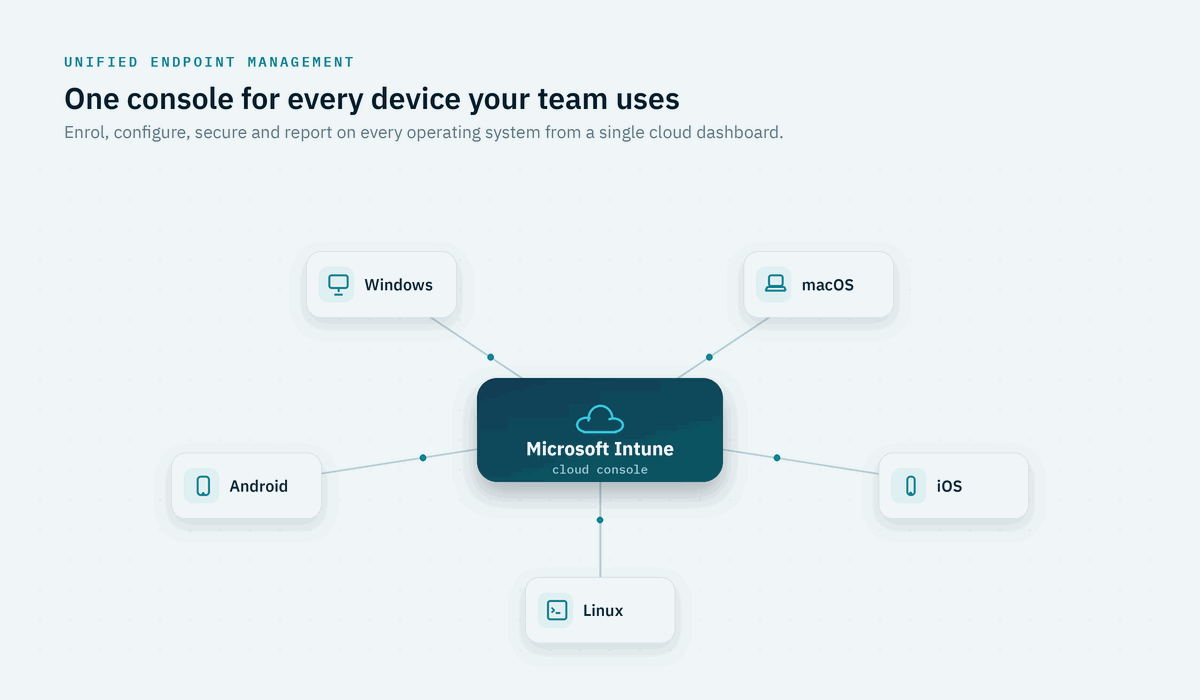
You might have known Intune under the older “Microsoft Endpoint Manager” name. Microsoft has since brought everything under the Intune brand, and the platform now manages Windows, macOS, iOS, Android and even Linux devices from one place. Because it runs in the cloud, you can manage that whole fleet from anywhere, with no servers to maintain on site.
Why Microsoft Intune features matter for growing businesses
As a business grows, devices multiply — and so does the risk. A lost phone, an unpatched laptop or a personal device with no security controls can quietly become the weak point an attacker walks through. At the same time, your IT team can’t realistically configure every machine by hand or chase staff for updates one by one.
This is why the Microsoft Intune features below are worth understanding. They let you apply the same sensible rules to every device automatically, support a remote or hybrid team without losing control, and meet the security expectations of clients, insurers and frameworks such as the Australian Signals Directorate’s Essential Eight. In short, they help you scale safely.
1. Unified device management across every platform
Intune gives you one dashboard to manage every device your team uses, whether it’s company-owned or a personal phone enrolled under a bring-your-own-device (BYOD) arrangement. From that single console you can see what’s connected, push settings and apply security rules consistently. Because Intune isn’t Windows-only, a mixed fleet of PCs, Macs and mobiles no longer means juggling several tools. For a growing business that’s a genuine time-saver — when someone joins, leaves or swaps devices, you make the change once and it flows out automatically.
2. App protection and mobile application management
Sometimes you don’t need to control the whole device — just the work data on it. That’s where app protection policies come in. Intune can secure company information inside apps like Outlook, Teams and OneDrive without taking over an employee’s personal phone. You can stop work files being copied into personal apps, require a PIN to open them, or wipe only the work data if someone leaves the business. This “manage the app, not the device” approach is ideal for BYOD: staff keep their privacy, and your data stays contained.
3. Compliance policies and Conditional Access
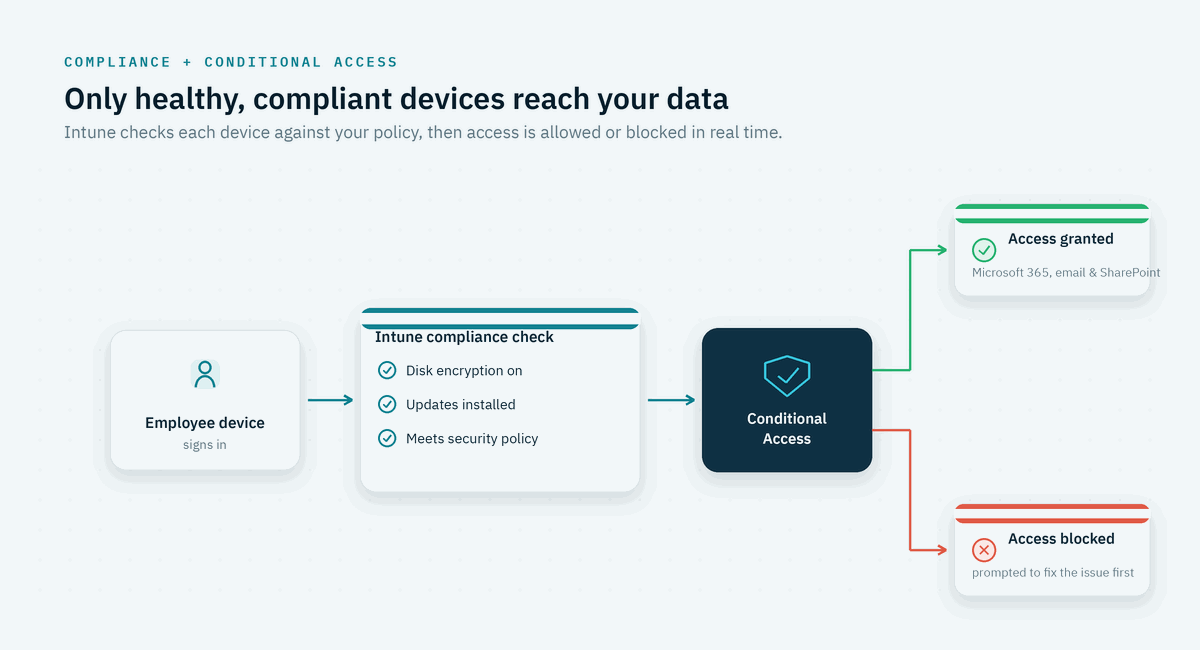
This is where Intune becomes a real security control rather than just a management tool. You define what a healthy device looks like — encrypted, up to date and screen-locked — and Intune continuously checks each one against that standard. Paired with Conditional Access, any device that doesn’t measure up can be blocked from reaching email, SharePoint or other Microsoft 365 data until it’s fixed. It’s the practical, everyday face of a Zero Trust approach, and it lines up neatly with the security frameworks many Australian businesses are working towards.
4. Windows Autopilot for zero-touch setup
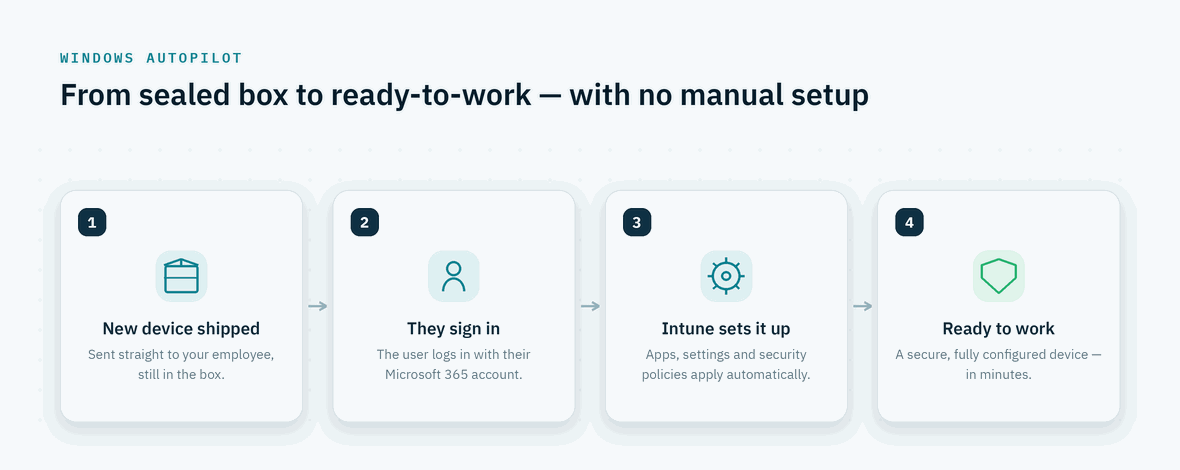
Setting up a new laptop the old way meant IT unboxing it, wiping it, installing software and handing it over — hours of work per device. Windows Autopilot turns that on its head. A new device can be shipped straight to your employee, and when they sign in with their Microsoft 365 account, Intune automatically applies your apps, settings and security policies. The staff member is productive in minutes, your IT team barely lifts a finger, and every device is configured to the same secure standard. For distributed teams and fast onboarding, it’s one of the most valuable features of Microsoft Intune.
5. Security baselines and device hardening
Knowing exactly how to configure a device securely takes real expertise. Intune ships with security baselines — pre-built, recommended settings developed by Microsoft’s security team — so you can apply a strong configuration across your fleet in a few clicks instead of researching dozens of individual settings. Microsoft keeps these baselines updated as threats change, which means your devices stay aligned with current best practice without constant manual tuning. For businesses without a large in-house security team, it’s a fast, reliable way to lift your overall security posture.
6. Automated update management
Out-of-date software is one of the most common ways attackers get in, yet chasing updates across a busy team is thankless work. Intune lets you manage Windows updates centrally using update rings: you decide which devices update first, set deadlines and roll changes out in a controlled way. The result is fewer unpatched machines, fewer surprise reboots during important work, and a clear record of what’s current. It quietly closes a major security gap while taking a recurring headache off your team’s plate.
7. Remote actions and Remote Help
Because Intune is cloud-based, your IT support isn’t tied to the office — which matters most when something goes wrong. From the admin console, your team can take action on a device from anywhere:
-
- Remotely lock or wipe a lost or stolen device to protect your data
-
- Reset a forgotten password without an office visit
-
- Restart a device or push a policy fix to resolve an issue
-
- Use Remote Help — a secure screen-sharing tool with identity checks and full session logging — to guide a staff member through a problem
For remote and hybrid teams, this keeps people moving and avoids the downtime of waiting for someone to be physically on site.
8. Endpoint Privilege Management
Letting everyone run as a local administrator is convenient, but it’s one of the easiest ways for malware to take hold. Endpoint Privilege Management, part of the Intune Suite, removes that trade-off. Staff run as standard users day to day, but when they genuinely need elevated rights to install approved software, Intune can grant just that action, just for that moment. You shrink your attack surface dramatically while keeping people productive. With Microsoft reporting that the large majority of recent ransomware attacks reached organisations through endpoints, tightening admin rights is one of the highest-value security moves a business can make.
9. Self-service through the Company Portal
Not every IT task needs a support ticket. The Intune Company Portal gives staff a self-service hub where they can install pre-approved apps, enrol a new device or find help — all without waiting on IT. You stay in control of what’s available and to whom, while routine requests effectively resolve themselves. For the business, that means less time lost to small interruptions and an IT team free to focus on work that actually moves things forward.
10. Reporting, analytics and AI-assisted insights
You can’t improve what you can’t see. Intune provides detailed reporting across devices, apps, compliance and configuration, so you always know what’s connected and where the risks sit. The Intune Suite’s Advanced Analytics goes a step further, using AI to flag device-health issues and friction before they cause downtime. Microsoft has also introduced Copilot and Security Copilot agents in Intune, letting admins ask questions in plain language and receive guided recommendations — a clear sign of where endpoint management is heading. For decision-makers, it turns a sea of devices into clear, useful information.
Which Microsoft Intune features come with your plan?
A question we hear often is whether Intune has to be bought separately. For most businesses the answer is no — the core Microsoft Intune features are already included in plans you may well own, such as Microsoft 365 Business Premium, E3 and E5. More advanced capabilities are grouped into the Intune Suite add-on and Intune Plan 2.
| Plan | What it typically includes |
|---|---|
| Intune Plan 1 (in Microsoft 365 Business Premium, E3, E5) | Device and app management, compliance and Conditional Access, Windows Autopilot, security baselines, update management and reporting |
| Intune Suite (add-on) | Remote Help, Endpoint Privilege Management, Advanced Analytics, Enterprise App Management and Microsoft Cloud PKI |
| Intune Plan 2 (add-on) | Microsoft Tunnel for app-level VPN access and management of specialty devices |
There’s also good news on the horizon. From July 2026, Microsoft is including several Intune Suite capabilities in Microsoft 365 E3 and E5 at no extra cost — Remote Help and Advanced Analytics for E3 customers, plus Endpoint Privilege Management, Microsoft Cloud PKI and Enterprise App Management for E5. The practical takeaway for business owners is simple: many of these features are already paid for, and more are on the way. The real value lies in setting them up properly.
Common mistakes businesses make with Intune
Intune is powerful, but a rushed rollout can create friction with staff and gaps in your security. The pitfalls we see most often include:
-
- Pushing strict policies to everyone at once instead of piloting with a small group first
-
- Treating Intune as Windows-only and leaving Macs and mobile devices unmanaged
-
- Setting it up once and never revisiting policies as the business changes
-
- Skipping the link between compliance, Conditional Access and multi-factor authentication, so the policies don’t actually enforce anything
Avoiding these comes down to planning, testing and ongoing review — which is exactly where many businesses choose to bring in a partner.
Turning Microsoft Intune features into business results
On their own, the Microsoft Intune features above are just capabilities. The value comes from configuring them around how your business actually works — the right policies, sensible defaults and a rollout your team barely notices. Done well, Intune means secure devices, smooth onboarding, fewer disruptions and a noticeably lighter load on your IT team.

If your business is moving to Microsoft 365, strengthening its cyber security, or simply wants to get more from the Intune features you already pay for, Stanfield IT can help you plan and roll it out the right way. Give our team a call on 1300 910 333 to talk through your environment and the most practical next steps.