


If your organisation runs Microsoft 365 E5 on a Windows-centric estate, enable Microsoft Defender for Endpoint. It requires no additional cost for eligible customers and performs strongly in independent evaluations. If you operate a heterogeneous fleet, run macOS or Linux at scale, or need 24/7 managed threat hunting without building a SOC, CrowdStrike Falcon is the stronger fit.
The single most important decision driver is your existing Microsoft licensing. Defender for Endpoint Plan 2 is bundled in Microsoft 365 E5, so choosing CrowdStrike requires justification based on the additional per-device cost. Both platforms rank at the top of MITRE ATT&CK and AV-Comparatives enterprise evaluations, so detection quality alone rarely settles the argument. The decision is architectural. Stanfieldit works with Australian professional services and healthcare organisations on exactly this choice, and the answer almost always comes down to licensing economics and OS mix before any feature comparison.
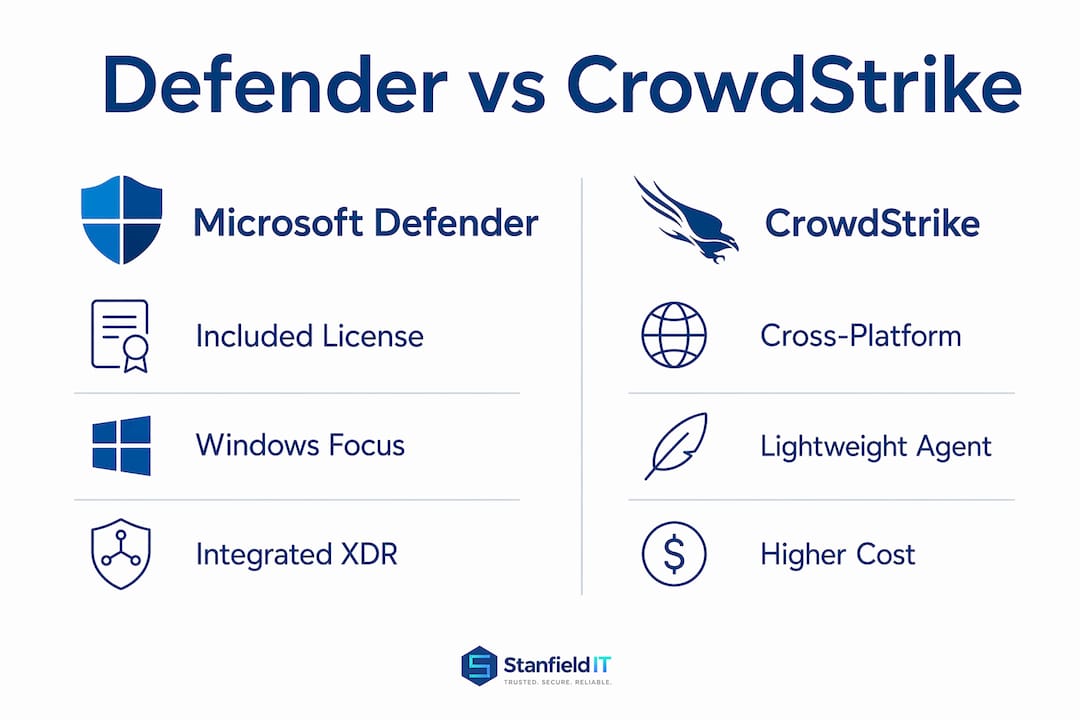
Table of Contents
- How do Microsoft Defender and CrowdStrike compare at a glance?
- How do detection, response, and integrations actually differ?
- Which platform handles mixed OS and cloud workloads better?
- What does each platform actually cost?
- How much operational effort does each platform demand?
- Which platform fits your Australian organisation?
- How do you run a selection process that actually settles the choice?
- Implementation paths and Stanfieldit’s managed service option
- Key takeaways
- The choice most organisations get wrong
- Useful sources and further reading
How do Microsoft Defender and CrowdStrike compare at a glance?
| Dimension | Microsoft Defender for Endpoint | CrowdStrike Falcon |
|---|---|---|
| Best for | Windows/M365 E5 estates | Heterogeneous fleets, managed hunting |
| Detection & response | Cloud ML + Microsoft tenant signals | Cloud ML + threat graph + OverWatch MDR |
| OS support | Windows, macOS, Linux, Android, iOS | Windows, macOS, Linux, containers, cloud |
| Microsoft ecosystem | Native (Intune, Entra ID, Sentinel) | Third-party connectors required |
| Management overhead | High: multiple consoles, deep tuning | Lower initial tuning, single console |
| MDR availability | Via third-party or co-managed MSP | Falcon OverWatch (built-in, quoted) |
| Pricing model | Per-user; Plan 2 included in M365 E5 | Per-device tiers: Go, Pro, Enterprise |
| Deployment complexity | Built-in on Windows; agents for others | Single lightweight cross-platform agent |
Standout by platform:
- Defender: The value play for E5 customers. Zero incremental licensing cost and native integration across the Microsoft stack.
- CrowdStrike: Best-of-breed for mixed environments. Lower tuning overhead, a purpose-built threat graph, and Falcon OverWatch for teams that cannot staff a 24/7 SOC.
How do detection, response, and integrations actually differ?
Defender for Endpoint uses cloud-based machine learning fed by Microsoft’s global telemetry and your tenant’s own signals. That tight integration with Microsoft 365 means email, identity, and endpoint data correlate natively inside Microsoft Sentinel or the Defender XDR portal. For a Windows-centric organisation already ingesting logs into Sentinel, that correlation happens without additional connectors or data-movement costs.

CrowdStrike’s threat graph processes endpoint telemetry at scale across its customer base, giving analysts richer attribution context and faster timeline reconstruction during an incident. Its analytic detections tend to carry more threat-actor context out of the box, which reduces the analyst work needed to triage an alert.
Both platforms perform at the top of MITRE ATT&CK enterprise evaluations, so neither has a clear detection supremacy. What differs is the context attached to detections and how quickly a lean team can act on them.
Statistic callout: Independent MITRE ATT&CK and AV-Comparatives enterprise tests consistently place both Defender for Endpoint and CrowdStrike Falcon among the top-performing EDR platforms. Treat these results as parity signals, not a tiebreaker.
Pro Tip: When running a proof-of-concept, weight benchmark results by your own alert triage time, not vendor-quoted detection rates. Run the same simulated attack scenario against both platforms and measure how long it takes your analyst to reach a confident verdict.
For XDR, Defender’s native stacking of email (Defender for Office 365), identity (Entra ID Protection), and cloud apps gives Microsoft-heavy teams a single correlated incident view. CrowdStrike integrates with third-party SIEMs and SOAR tools well, but those connections require configuration and ongoing maintenance.
Which platform handles mixed OS and cloud workloads better?
CrowdStrike deploys a single lightweight agent across Windows, macOS, Linux, and container workloads. That consistency matters operationally: one agent policy, one console, one update cadence regardless of OS. For organisations running developer Linux workstations, AWS EC2 instances, or macOS fleets alongside Windows, that uniformity reduces deployment complexity significantly.

Defender for Endpoint uses a built-in sensor on Windows (no agent install required) and separate agents for macOS and Linux. The Windows experience is genuinely frictionless. Non-Windows coverage is functional but requires additional configuration effort, and server licensing carries separate SKU considerations that can catch buyers off guard.
Key compatibility notes:
- Coexistence: When CrowdStrike is the active EDR, Defender can run in passive mode to continue telemetry collection for Defender XDR visibility. This is a common dual-vendor arrangement.
- Containers and cloud workloads: CrowdStrike’s Falcon Cloud Security covers runtime protection for containers and cloud-native workloads more comprehensively at this stage.
- Legacy systems: Defender’s built-in Windows sensor covers older Windows versions without a separate agent, which is useful for organisations with legacy infrastructure they cannot retire.
- Resource usage: Defender’s minimal background footprint on Windows is a genuine operational advantage, particularly in resource-constrained environments.
What does each platform actually cost?
The economics hinge on your Microsoft licensing tier. Defender for Endpoint Plan 2 is included in Microsoft 365 E5, making it effectively free to enable for E5 customers. Standalone, Plan 1 and Plan 2 have published per-user per month list prices.
CrowdStrike’s per-device tiers (Falcon Go, Falcon Pro, Falcon Enterprise) carry a significantly higher per-unit list price than Defender Plan 2 standalone. Falcon Complete, the fully managed tier, is quoted separately.
| Tier | Pricing model | Notes |
|---|---|---|
| Defender Plan 1 | USD $3/user/month (standalone) | Basic EPP; limited EDR |
| Defender Plan 2 | USD $5.20/user/month (standalone) | Full EDR; included in M365 E5 |
| CrowdStrike Falcon Go | Per-device, list price not published | Entry-level; limited threat hunting |
| CrowdStrike Falcon Pro | Per-device, list price not published | Core EDR + threat intelligence |
| CrowdStrike Falcon Enterprise | Per-device, list price not published | Full platform; OverWatch add-on |
| CrowdStrike Falcon Complete | Quoted (fully managed) | MDR included; premium pricing |
TCO checklist before you commit:
- Count devices per user. Per-device billing grows quickly for users with laptops, desktops, and servers.
- Confirm your Microsoft 365 licence tier. E5 customers should exhaust Defender’s capabilities before budgeting for CrowdStrike.
- Factor analyst time. Tuning Defender to a low false-positive state across multiple consoles carries a hidden labour cost that rarely appears in licence comparisons.
- Account for module sprawl. CrowdStrike’s modular pricing means cloud workload protection, identity protection, and threat intelligence each add to the base cost.
How much operational effort does each platform demand?
Achieving a near set-and-forget experience with Defender requires coordination across the Defender Portal, Intune, Entra ID, and Group Policy. Organisations consistently underestimate the administrative effort and entitlement mapping involved. A lean IT team without a dedicated security analyst will feel that overhead quickly.
CrowdStrike’s cloud-native design and integrated threat intelligence mean lower initial tuning requirements. Falcon OverWatch, its managed threat hunting service, extends coverage to teams that cannot staff 24/7 detection. For Australian SMBs and mid-market organisations without a full SOC, that operational model is a practical advantage.
Pro Tip: During your pilot, log analyst time per alert from first notification to closed verdict. That single metric reveals the true operational cost of each platform more clearly than any vendor benchmark.
Staffing models to consider:
- In-house SOC: Suits enterprises with dedicated security analysts. Defender’s Microsoft integration adds value here.
- Co-managed: Your team handles policy and escalations; an MSP handles monitoring and initial triage. Works with both platforms.
- Fully managed MDR: Outsource detection, hunting, and response entirely. CrowdStrike Falcon Complete or a managed security service from a provider like Stanfieldit covers this model.
Which platform fits your Australian organisation?
The correct choice is architectural and operational, not purely a product decision. Here is how common Australian profiles map to each platform:
- SMB / professional services (under 100 seats, M365 Business Premium or E3): Start with Defender. Upgrade to E5 or add Plan 2 standalone. Pair with a co-managed MSP for monitoring. For small business cyber security, the licence economics strongly favour Defender.
- Mid-market (100–500 seats, mixed OS, growing cloud footprint): Pilot Defender first if on E5. If macOS or Linux coverage gaps appear, evaluate CrowdStrike Falcon Pro. Consider Stanfieldit’s co-managed model to bridge the SOC gap.
- Enterprise (500+ seats, dedicated security team): Both platforms are viable. The decision turns on OS mix, SIEM investment, and whether Falcon OverWatch’s managed hunting justifies the incremental cost over Defender XDR.
- Healthcare and regulated industries: Essential Eight alignment and APRA CPS 234 evidence requirements are real procurement drivers. Both platforms generate audit-ready telemetry, but Defender’s native Microsoft 365 integration simplifies evidence collection for organisations already using Microsoft Purview Compliance.
When concentration risk is a concern, running Defender in passive mode alongside CrowdStrike as the active EDR is a proven dual-vendor arrangement that preserves Microsoft XDR visibility without full redundancy cost.
How do you run a selection process that actually settles the choice?
Selection checklist (priority order):
- Confirm Microsoft 365 licence tier and whether Defender Plan 2 is already included.
- Map your OS mix: percentage of Windows, macOS, Linux, and cloud workloads.
- Assess SOC maturity: do you have analysts available for 24/7 triage?
- Identify integration requirements: SIEM, SOAR, identity, email.
- Determine managed hunting need: can your team detect lateral movement without human hunters?
- Document compliance evidence requirements: Essential Eight maturity level, APRA, Privacy Act obligations.
Pilot design:
- Deploy on a representative sample: Windows desktops, macOS laptops, at least one Linux server, and one cloud workload.
- Run for a minimum of 30 days to capture realistic alert volume.
- Simulate three analyst scenarios: phishing payload execution, lateral movement, and credential dumping.
- Measure: false positive rate, mean time to triage, alert actionable rate, and dwell time reduction.
Vendor questions for your RFP:
- What is the coexistence behaviour when running alongside the other platform?
- What is the telemetry retention period and forensic export format?
- Is local Australian support available, and what are the SLA response times?
- How does your platform map to Essential Eight Maturity Level 2 and 3 controls?
When evaluating cybersecurity analyst skill requirements for each platform, factor in the different tooling expertise each demands from your security team.
Implementation paths and Stanfieldit’s managed service option

Three practical deployment routes exist, each with different complexity and resource requirements.
| Engagement model | Who manages it | Typical timeline | Best for |
|---|---|---|---|
| Enablement only | Internal IT team | 4 weeks | Mature in-house SOC |
| Co-managed monitoring | Internal IT + MSP | 2–4 weeks | Growing teams, partial SOC |
| Fully managed MDR | MSP/MSSP | 1–3 weeks | Lean teams, no SOC |
Deployment notes:
- DIY rollouts suit organisations with dedicated security staff and clear policy ownership. Expect 6–12 weeks for a full Defender deployment across a complex estate.
- Co-managed arrangements split policy management (internal) from monitoring and triage (MSP). This is the most common model Stanfieldit sees among Australian mid-market clients.
- Fully managed MDR removes the internal burden entirely. CrowdStrike Falcon Complete and Stanfieldit’s managed security services both cover this model.
Stanfieldit bundles platform enablement with Essential Eight evidence collection, incident response, and ongoing tuning for Australian organisations. Whether you are enabling Defender for Endpoint on an existing E5 licence or deploying CrowdStrike across a mixed fleet, the engagement starts with a scoped assessment to confirm the right fit before any tooling decision is locked in. Contact Stanfieldit at stanfieldit.com to discuss your organisation’s requirements.
Pro Tip: Do not lock in a platform before completing a scoped assessment of your licence entitlements. Many Australian organisations are paying for Defender Plan 2 through their E5 subscription without having enabled it.
Key takeaways
For most Australian organisations, the Microsoft Defender vs CrowdStrike decision resolves to a licensing and OS-mix question before any feature comparison is needed.
| Point | Details |
|---|---|
| Licence first | Defender Plan 2 is included in M365 E5; exhaust that entitlement before budgeting for CrowdStrike. |
| OS mix decides the rest | CrowdStrike’s single cross-platform agent suits heterogeneous fleets; Defender’s built-in sensor wins on Windows-only estates. |
| Hidden tuning cost | Defender’s multi-console management carries a real analyst time cost that per-licence comparisons rarely capture. |
| Pilot before committing | A 30-day pilot measuring false positive rate and triage time is more reliable than any vendor benchmark. |
| Managed options exist | Stanfieldit offers co-managed and fully managed MDR for Australian organisations that cannot staff a 24/7 SOC. |
The choice most organisations get wrong
Most Australian IT leaders approach this as a product comparison. They read the feature matrix, note that both platforms score well in MITRE evaluations, and then pick based on brand familiarity or a vendor demo. That is the wrong frame.
The real question is whether your team has the operational capacity to extract value from whichever platform you choose. Defender for Endpoint is genuinely capable, but a near-automated deployment requires careful coordination across Defender Portal, Intune, Entra ID, and Group Policy. Organisations that skip that configuration work end up with a noisy, under-tuned deployment that erodes analyst confidence over time.
CrowdStrike’s lower initial tuning overhead is a real advantage for lean teams, but it does not eliminate the need for skilled analysts. Falcon OverWatch provides managed hunting, not managed response. Your team still needs to act on what OverWatch surfaces.
The organisations that get this right treat the tool choice as secondary to the operating model. Confirm your licence position, map your OS mix, and be honest about your SOC maturity before you open a vendor conversation. If you are not sure where to start, Stanfieldit’s cyber security services include a scoped assessment that works through exactly these questions with you.
Useful sources and further reading
- MITRE ATT&CK Evaluations: The primary independent benchmark for EDR detection coverage. Review the enterprise round results for both platforms before finalising your POC success criteria.
- AV-Comparatives Enterprise Reports: Complementary to MITRE; tests real-world protection rates and false positive rates in enterprise environments.
- Microsoft Defender for Endpoint licensing documentation: Confirms which capabilities are included in each Microsoft 365 plan. Essential reading before any licence negotiation.
- Gartner Peer Insights: CrowdStrike Falcon vs Microsoft Defender for Endpoint: Verified practitioner reviews from real deployments. CrowdStrike Falcon holds a 4.7-star rating from 2,529 reviews; Defender for Endpoint holds 4.5 stars from 1,863 reviews as of the latest published data.
- Stanfieldit managed security services guide: Covers co-managed and fully managed MDR engagement models relevant to Australian buyers evaluating operational fit alongside platform selection.
- Australian Signals Directorate Essential Eight: The ASD’s maturity model is the baseline compliance framework for most Australian organisations. Confirm how your chosen platform maps to Maturity Level 2 and 3 controls before procurement.
