


Last updated: June 2026
Avoiding cyber security mistakes is no longer just an IT concern. For most Australian businesses, technology now supports almost every part of the operation: email, payments, customer records, file sharing, phones, cloud apps, remote work, and the systems people use to serve clients every day.
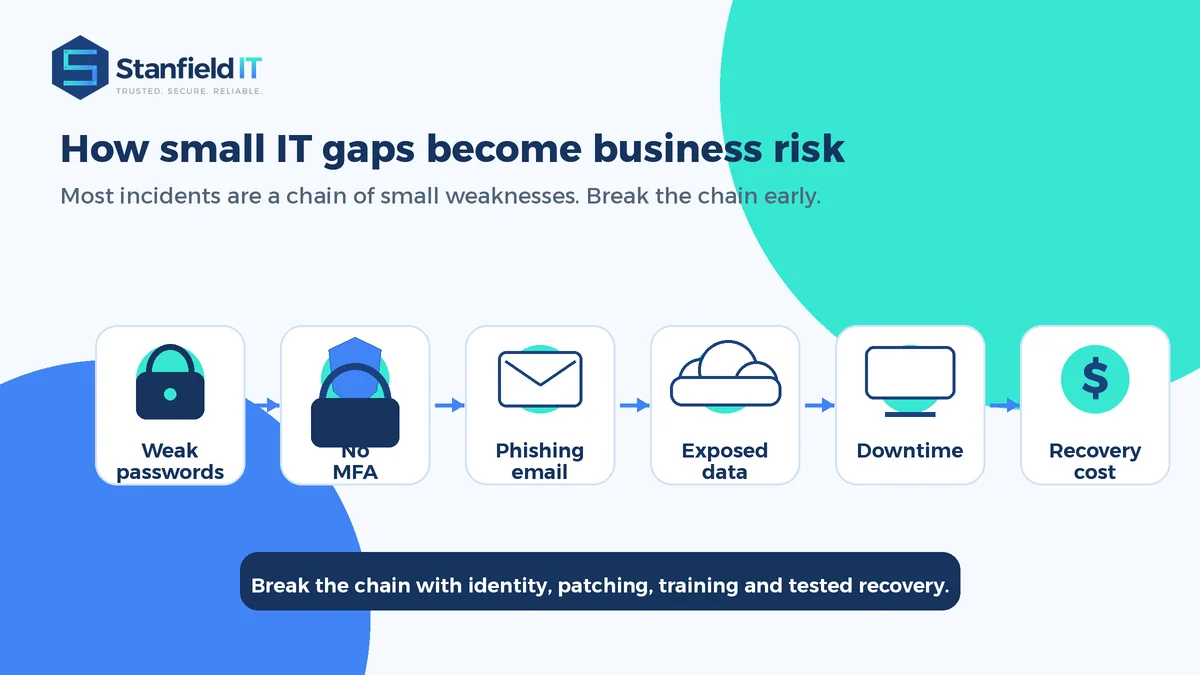
That means a small weakness can quickly become a business problem. A reused password can expose a mailbox. A missed software update can leave a known vulnerability open. A backup that has never been tested can turn a recoverable incident into days of disruption.
The risk is real. According to the ASD Annual Cyber Threat Report 2024–25, ReportCyber received more than 84,700 cybercrime reports, which is about one report every six minutes. The same report noted that the average self-reported cost per business cybercrime report rose to $80,850.
This guide explains 13 practical IT and cyber security risks to stop now. It is written for business owners, office managers, operations teams, and growing organisations that want stronger security without making technology harder to use.
Why cyber security mistakes are usually business mistakes
Many incidents do not begin with an advanced technical attack. They begin with everyday gaps: a staff member clicks a convincing email, an old laptop misses updates, a supplier account still has access, or an administrator account is shared because it seems convenient.
The impact is rarely limited to IT. A cyber incident can interrupt billing, stop staff from accessing files, delay customer service, trigger privacy obligations, damage trust, and absorb management time. The OAIC’s January to June 2025 data breach statistics found malicious or criminal attacks remained the largest source of data breach notifications, with cyber security incidents continuing to be the predominant source of breaches of this kind.
The good news is that many common weaknesses are fixable. The best approach is not panic or tool overload. It is a steady program of clear priorities, good governance, secure defaults, staff awareness, and regular review.
The cyber security mistakes that create the biggest risk
These 13 issues are common because they are easy to overlook during busy periods. They are also the areas where practical improvement can make a meaningful difference.
1. Using weak or reused passwords
Weak passwords remain one of the easiest ways for attackers to access business systems. The risk increases when people reuse the same password across work and personal accounts, share credentials internally, or store passwords in spreadsheets and browser notes.
Move your team to a reputable password manager, require unique passwords for every account, and remove shared logins wherever possible. For sensitive systems, strong passwords should be paired with multi-factor authentication so a stolen password alone is not enough to get in.
2. Not enforcing multi-factor authentication
Multi-factor authentication, or MFA, adds a second proof of identity when someone signs in. It is especially important for email, Microsoft 365 or Google Workspace, remote access, finance systems, cloud platforms, and administrator accounts.
Where possible, use phishing-resistant methods such as passkeys, security keys, or app-based authentication rather than relying only on SMS codes. The ASD Essential Eight places clear emphasis on MFA, restricting administrator privileges, patching, and backups because these controls reduce common attack paths.
3. Ignoring software updates and patches
Software updates can feel inconvenient, but they often fix known security flaws. Delaying updates across laptops, servers, browsers, phones, firewalls, and business applications gives attackers more time to exploit weaknesses that may already be public.
Create a patching process with ownership, reporting, and maintenance windows. Critical security updates should be prioritised, and older devices or unsupported software should be replaced before they become a permanent risk.
4. Treating email security as an afterthought
Email is still one of the most common ways attackers reach a business. Phishing, invoice redirection, malicious attachments, fake login pages, and impersonation emails are designed to look normal enough that busy people act quickly.
Strong email protection should include spam and phishing filtering, secure email authentication settings such as SPF, DKIM and DMARC, clear reporting processes, and staff guidance on how to verify unusual payment or data requests. Email security is not just a filter; it is a combination of technology and habits.
5. Having backups but not testing recovery
Backups are only valuable if they can be restored when needed. Many businesses discover too late that backups are incomplete, too slow to recover, not protected from ransomware, or missing key systems.
A strong backup strategy should cover critical files, cloud data, business applications, servers, and devices where necessary. It should include clear recovery targets and regular restore testing. Stanfield IT’s Backup & Disaster Recovery support helps businesses plan for recovery before an outage or cyber incident creates pressure.
6. Overlooking endpoint and mobile device security
Every laptop, desktop, phone, and tablet connected to business systems is an endpoint. If those devices are unmanaged, unencrypted, or missing protection, they can become a doorway into email, files, and cloud applications.
Use device management to enforce screen locks, encryption, security updates, endpoint protection, and remote wipe for lost devices. For bring-your-own-device environments, make the rules clear so personal devices do not quietly become unmanaged business infrastructure.
7. Giving people more access than they need
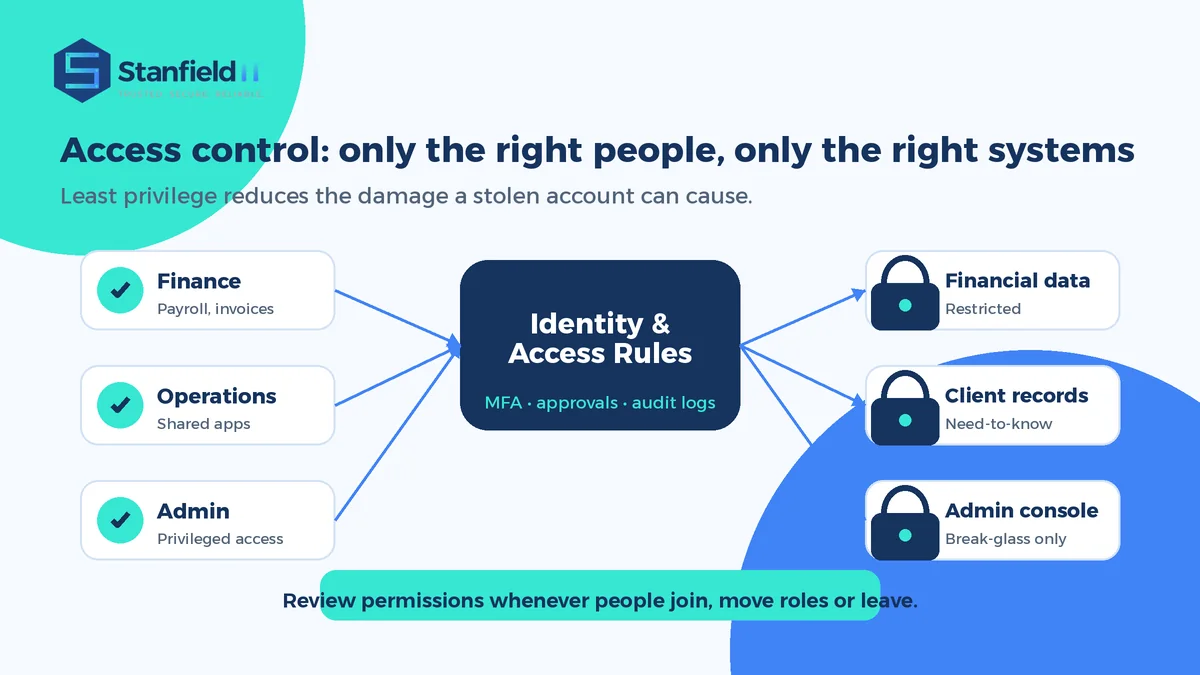
Access often expands over time. A staff member moves roles, joins a new project, or receives temporary access that is never removed. Over months or years, this can create a wide attack surface where one compromised account exposes far more than it should.
Apply least privilege: each person should have the access they need to do their work, and no more. Administrator privileges should be limited, monitored, and reviewed regularly. Joiner, mover, and leaver processes are essential so access changes when people start, change roles, or leave.
8. Making cyber security training too rare or too technical
People are a critical part of security, but training often fails because it is too infrequent, too generic, or too technical. A once-a-year presentation is unlikely to change daily behaviour when phishing emails, fake invoices, and suspicious links arrive throughout the year.
Training should be practical, short, and relevant to the roles people actually perform. Teach staff how to recognise phishing, report suspicious messages, verify payment changes, protect passwords, handle sensitive data, and ask for help without fear of blame.
9. Not having a cyber incident response plan
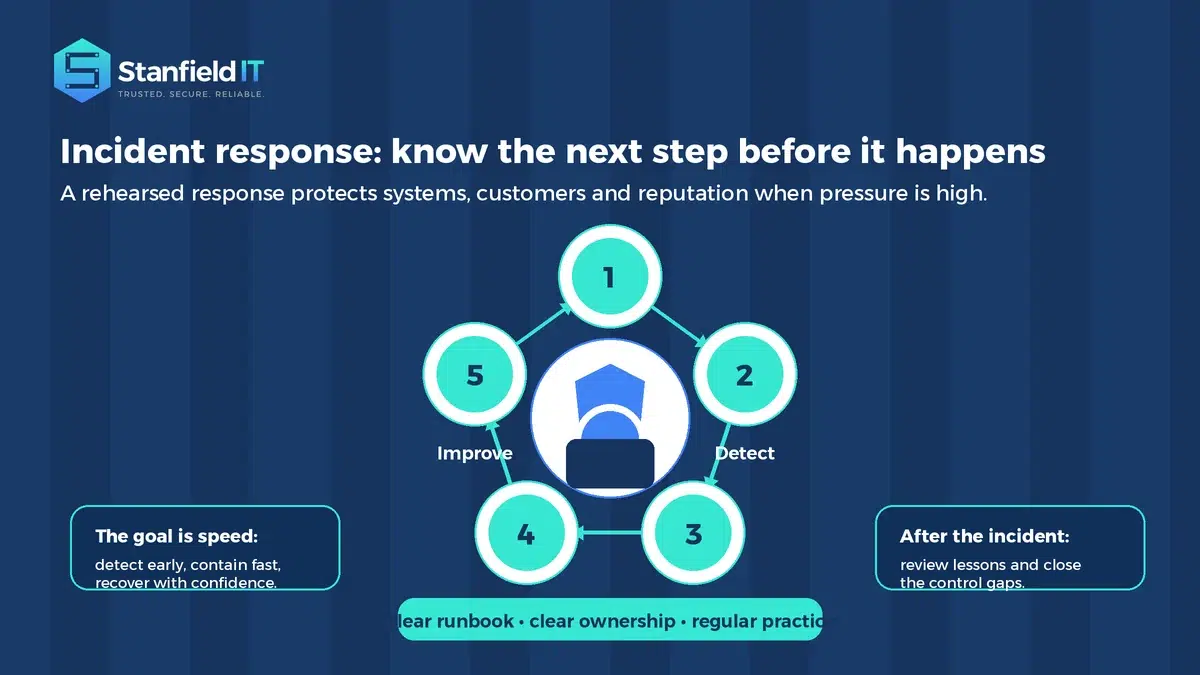
When something goes wrong, confusion costs time. Without an incident response plan, teams may not know who to contact, which systems to isolate, whether to reset passwords, how to preserve evidence, or when to notify customers, insurers, regulators, or legal advisers.
Your plan does not need to be complicated, but it does need to be clear. Define roles, escalation steps, communication rules, supplier contacts, recovery priorities, and decision points. Then test it with simple tabletop exercises so the first practice run is not during a real incident.
10. Ignoring physical security
Cyber security is not only digital. Unlocked server rooms, unattended devices, visible passwords, unsecured network equipment, and poor visitor control can all create unnecessary risk.
Secure network hardware, restrict access to sensitive areas, require screen locking, dispose of old devices safely, and maintain asset records. Physical security works best when it is simple enough for staff to follow consistently.
11. Skipping regular security audits
If no one is checking your controls, it is difficult to know whether they are working. Security settings drift, new systems are added, staff permissions change, and suppliers introduce new risks. What was secure last year may not be secure today.
Schedule regular assessments that review identity, devices, cloud configuration, backups, patching, email security, network exposure, and policies. The output should be practical: what is working, what is risky, what should be fixed first, and who owns the next step.
12. Letting third-party access and shadow IT grow unchecked
Suppliers, contractors, software platforms, and unofficial apps can all hold business data or connect to company systems. If they are not reviewed, they can create blind spots that internal policies do not cover.
Keep a register of key suppliers, SaaS applications, administrator access, integrations, and data locations. Review supplier access when contracts change, remove old accounts quickly, and create a process for approving new tools before staff start using them with business information.
13. Entering sensitive business data into public AI tools
AI tools can improve productivity, but they can also create privacy, confidentiality, and compliance risks if staff paste sensitive information into tools that have not been approved for business use.
Set clear rules for AI use. Define what data can and cannot be entered, which tools are approved, how outputs should be checked, and who is responsible for governance. AI should help your team work smarter without weakening the security and privacy standards your customers expect.
How to avoid cyber security mistakes with proactive IT management
The strongest businesses treat security as an ongoing operating rhythm, not a once-off project. That means assigning ownership, reviewing risks regularly, making improvements in priority order, and keeping security aligned with how the business actually works.
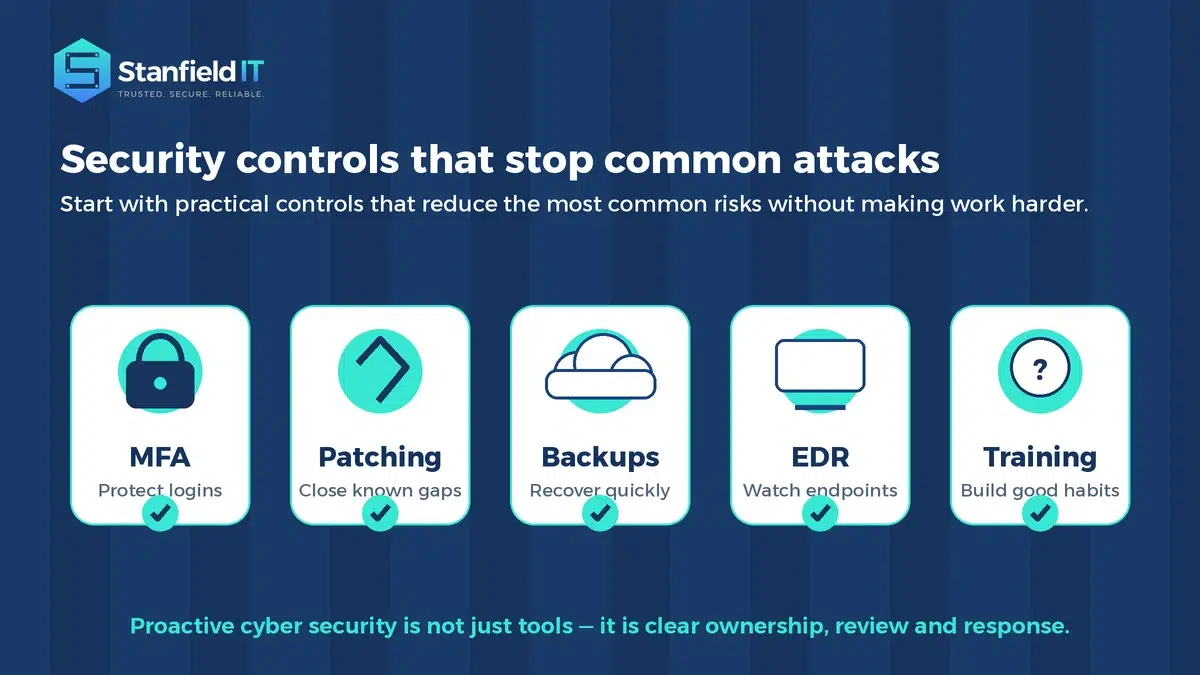
A practical starting point is to focus on the controls that reduce the most common risks: MFA, patching, backups, endpoint protection, email security, least privilege, staff awareness, and incident response. These are not just technical tasks. They are business resilience measures.
For many small to medium businesses, the challenge is not knowing that these controls matter. It is finding the time, expertise, and accountability to implement them properly. That is where working with an experienced IT partner can make the difference between a list of good intentions and a managed program that actually improves security.
Stanfield IT provides practical Cyber Security Services for Australian organisations that want clearer visibility, stronger controls, and support that fits the way their team works.
A simple priority order for reducing risk
If your business is unsure where to start, avoid trying to fix everything at once. Begin with the foundations that lower risk quickly and create momentum.
- Secure identity first: MFA, strong passwords, conditional access, and administrator controls.
- Close known technical gaps: patch systems, remove unsupported software, and harden devices.
- Protect recovery: make sure backups are complete, protected, and tested.
- Reduce human risk: improve phishing awareness, payment verification, and reporting habits.
- Review and improve: run regular audits, update documentation, and track progress.
This order helps you move from reactive security to a more controlled, measurable, and proactive approach.
Frequently asked questions about cyber security mistakes
What are the most common cyber security mistakes?
The most common issues include weak passwords, missing MFA, delayed updates, poor email security, untested backups, excessive user access, unmanaged devices, and no incident response plan.
How often should a business review cyber security?
At minimum, review key controls quarterly and after major changes such as new systems, staff changes, office moves, supplier changes, or security incidents. High-risk environments may need more frequent review.
Is MFA enough to protect a business?
MFA is essential, but it is not enough on its own. It should be supported by patching, endpoint protection, email security, access reviews, backups, monitoring, and staff awareness.
What should we do first if our security feels messy?
Start with an assessment. A good review will identify the highest-risk gaps, prioritise the most valuable fixes, and give leadership a clear roadmap instead of a long technical wish list.
Final thoughts
Cyber security does not need to be overwhelming, but it does need to be intentional. The businesses that improve fastest are usually the ones that stop treating security as a collection of separate tools and start treating it as part of everyday operations.
By addressing these cyber security mistakes, your organisation can reduce avoidable risk, improve reliability, protect customer trust, and give your team more confidence in the systems they depend on.
If your business wants practical guidance, clearer priorities, and reliable support, contact Stanfield IT. We can help you assess where things stand today and build a realistic plan to strengthen your IT and cyber security foundations.
