


Co-managed IT is a structured partnership where your internal team keeps operational ownership while an external provider fills capacity or specialist gaps. If you have at least one capable but overstretched IT person on staff, co-managed services are almost always a better fit than fully managed outsourced services.
Here is when co-management is the right call:
- Your internal IT person or team is stretched across helpdesk, projects, and security simultaneously.
- You have specific skill gaps, such as security monitoring, cloud migrations, or compliance work, that are hard to hire for permanently.
- After-hours ticket volume is growing and you cannot justify a second full-time hire to cover it.
- You need enterprise-grade tooling (RMM, SIEM, PSA) without the full cost of licensing and managing it yourself.
- You want to retain institutional knowledge and vendor relationships in-house while buying specialist capacity around them.
Stanfield IT works with Australian professional services and healthcare organisations in exactly this model, providing co-managed IT solutions that slot into your existing team rather than replacing it.
Table of Contents
- How co-managed IT actually works
- What services does an MSP typically cover in this model?
- Who owns what? A practical responsibilities grid
- How does co-managed IT compare with fully managed and in-house?
- Advantages and risks of a co-managed arrangement
- When should you consider co-managed IT?
- Onboarding a co-managed MSP: checklist and timeline
- How MSPs price co-managed services in Australia
- Tooling, access controls, and Australian compliance
- How to choose a co-managed MSP: what to look for
- How Stanfield IT runs co-managed engagements
- Key takeaways
- A candid view on what actually makes co-managed IT succeed
- Stanfield IT co-managed IT services
- Useful sources and further reading
How co-managed IT actually works
Co-managed IT is a shared-responsibility arrangement where an MSP works alongside your internal IT staff. The word “co-manage” means exactly what it says: joint management, with each party owning defined slices of the function. This is distinct from fully managed services, where the MSP owns everything, and from break-fix, where a vendor only appears when something breaks.
In practice, the split looks like this:
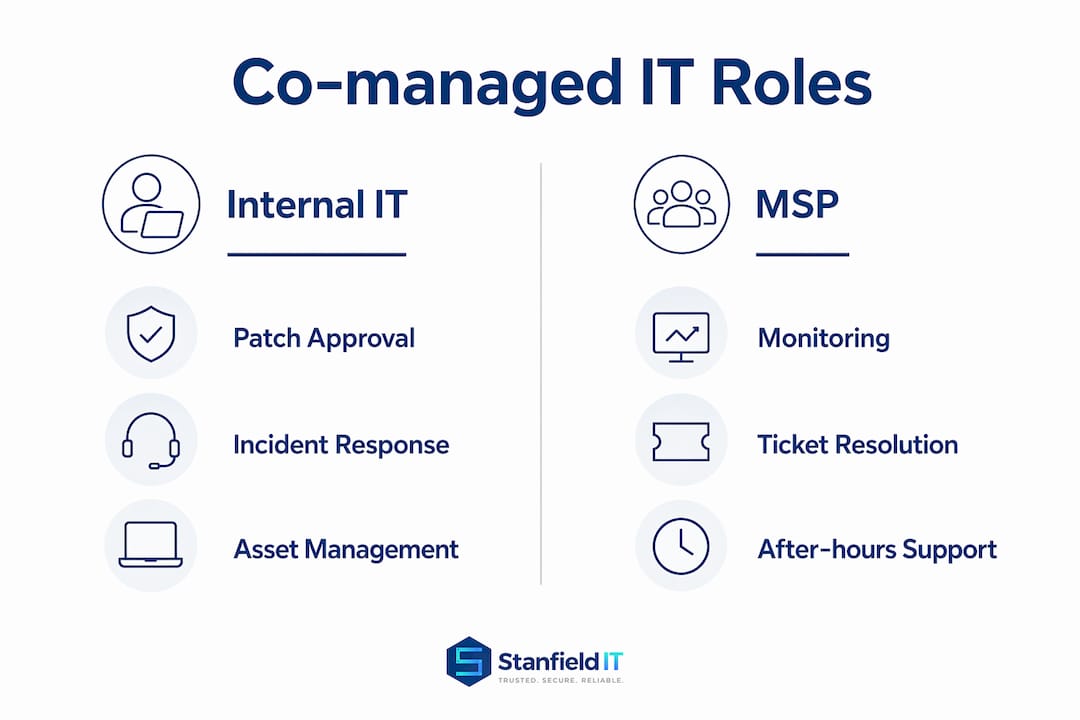
- Internal team: owns business context, vendor relationships, privileged access decisions, and day-to-day user relationships.
- MSP: supplies tooling, after-hours capacity, specialist skills, and escalation depth.
Operationally, the two teams share a single ticketing system (PSA), a monitoring platform (RMM), and a knowledge base. Tickets are routed by tier or category: your team handles Tier 1 and business-context issues; the MSP handles Tier 2/3 escalations, after-hours alerts, and specialist tasks. Change coordination happens through agreed change windows, and both teams contribute to a shared runbook.
Pro Tip: Before onboarding begins, insist on a written responsibility matrix in RACI format. Without it, alerts get duplicated, tasks get dropped, and both teams assume the other is handling something critical.

What services does an MSP typically cover in this model?
The services an MSP delivers inside a co-managed agreement depend on your gaps, but the most common packages include:
- 24/7 monitoring and alerting: The MSP’s RMM platform watches endpoints, servers, and network devices around the clock. Your team reviews alerts during business hours; the MSP handles out-of-hours response.
- Managed patching: The MSP schedules, tests, and deploys patches to endpoints and servers. Your team approves change windows and handles exceptions for business-critical systems.
- Security monitoring: A SIEM or managed detection and response (MDR) service ingests logs and raises alerts. The MSP triages; your team confirms business context before escalation. Stanfield IT’s managed IT security services cover this layer directly.
- Backup and disaster recovery: The MSP manages backup jobs, monitors replication, and runs test restores. Your team owns the recovery plan and business continuity decisions.
- Escalation helpdesk: After-hours or overflow tickets route to the MSP. Your team handles Tier 1 during business hours.
- Project support: Cloud migrations, Microsoft 365 deployments, and infrastructure refreshes are delivered by MSP engineers under your team’s direction.
- Identity and access management: The MSP manages provisioning workflows and MFA enforcement; your team approves access requests and owns the identity governance policy.
Co-managed arrangements typically include access to the MSP’s monitoring dashboards and ticketing portals, so your team has visibility without needing to run the tooling itself.
Who owns what? A practical responsibilities grid
Ambiguity is the primary failure mode of co-managed IT. When ownership is unclear, alerts get ignored, patches get skipped, and incidents escalate further than they should. A written RACI table, agreed before day one, prevents this.
| Function | Internal IT | MSP | Shared |
|---|---|---|---|
| Patch scheduling and approval | Approves windows | Executes and reports | Change review |
| Backup monitoring and test restores | Owns recovery plan | Monitors jobs, runs tests | DR plan review |
| Identity provisioning | Approves requests | Executes provisioning | Access policy |
| Helpdesk Tier 1 | Responsible | Overflow/after-hours | Escalation path |
| Helpdesk Tier 2/3 | Consulted | Responsible | Incident bridge |
| Incident response | Business context owner | Technical lead | Post-incident review |
| Cloud and infrastructure projects | Sponsor and approver | Delivery | Architecture sign-off |
| Security monitoring (SIEM/MDR) | Business context | Responsible | Alert triage |
SLA clauses worth locking in: a defined response time by ticket priority (e.g. P1 within 15 minutes, P2 within 2 hours), a monthly reporting cadence, and a named escalation contact on both sides. Without a named escalation path, a P1 incident at 2 AM becomes a guessing game.
How does co-managed IT compare with fully managed and in-house?
The right model depends on your headcount, capability, and how much operational control you want to retain. Model selection comes down to whether you want a single accountable provider or in-house ownership with external depth.
- Co-managed IT: You retain ownership and institutional knowledge. The MSP fills gaps. Best when you have at least one capable internal IT person and want to keep control of vendor relationships and business-critical decisions.
- Fully managed services: The MSP owns the entire function. Best when you have no internal IT staff or want a single accountable provider with no internal overhead.
- Pure in-house: Full control, full cost. Best when your team has the headcount, skills, and budget to cover all functions without burnout.
Co-managed is the wrong shape in two clear situations: when you have no internal IT staff at all (fully managed delivers better outcomes), and when your internal team is already complete with no skill gaps or capacity pressure. Paying for co-managed services on top of a fully staffed team creates tooling duplication and split accountability without a corresponding benefit.
Advantages and risks of a co-managed arrangement
| Factor | Advantage | Risk | Mitigation |
|---|---|---|---|
| Capacity | After-hours and overflow covered without a new hire | MSP may not understand business context | Shared runbook and weekly sync |
| Specialist skills | Access to security, cloud, and compliance expertise | Skills may not be consistently available | Name dedicated engineers in the contract |
| Tooling | Enterprise RMM, PSA, SIEM without full licensing cost | Tooling duplication if both teams run separate stacks | Agree on a single tooling stack before onboarding |
| Cost | Lower than a fully staffed team for the same coverage | Scope creep can push total cost above budget | Fixed scope with a clear change-request process |
| Accountability | Clear SLAs for MSP-owned functions | Split accountability can obscure who owns an incident | RACI reviewed monthly in governance meetings |
| Cultural fit | MSP engineers become familiar with your environment | Team friction if communication norms differ | Shared Slack/Teams channel and named contacts |
The cost risk is real. A co-managed arrangement scoped too loosely can end up costing more than a fully managed service once you add internal salaries, MSP fees, and tooling. Scope it tightly, review it quarterly, and treat the RACI as a living document.
When should you consider co-managed IT?
Several clear signals point to co-management as the right next step:
- A single IT person is covering helpdesk, patching, security, and projects simultaneously with no capacity for strategic work.
- After-hours ticket volume has increased to the point where your team is being called outside business hours more frequently.
- An upcoming cloud migration, Microsoft 365 deployment, or Essential Eight uplift requires skills your team does not have in-house.
- You have had a staff retention issue and lost institutional knowledge when someone left.
- A compliance requirement (OAIC Notifiable Data Breaches, industry-specific audit) demands security monitoring or documentation your team cannot produce alone.
Three questions to ask right now:
- If your IT person were unavailable for a week, what would break and who would fix it?
- Are there recurring tasks (patching, backup monitoring, after-hours alerts) that consume more than 30% of your team’s time?
- Do you have a documented incident response plan, and has it been tested recently?
If the answer to question 1 is “a lot” and question 3 is “no,” co-managed IT is worth a scoping conversation. For smaller organisations, after-hours and onsite coverage from a regional provider can also supplement a co-managed arrangement where local presence matters.

Onboarding a co-managed MSP: checklist and timeline
A clean onboarding prevents the most common early failures: duplicate alerts, missing credentials, and unclear escalation paths.
Pre-engagement tasks:
- Map all assets (endpoints, servers, network devices, cloud tenants) into a CMDB or documentation workspace. A lightweight tool like Kovira suits small to mid-sized teams that need a pragmatic start without a long deployment.
- Document current processes: patching cadence, backup schedules, helpdesk tiers, and change windows.
- Assign RACI owners for every function in scope before the MSP touches anything.
- Prepare an access and credential plan: which accounts the MSP needs, at what privilege level, and how credentials will be vaulted.
30/60/90-day timeline:
| Phase | Deliverables |
|---|---|
| Days 1–30 | RMM agent rollout, PSA integration, alert baseline, RACI signed off, credential vaulting complete |
| — | Alert tuning, runbook first draft, patching schedule agreed, first monthly report delivered |
| — | Runbook handover, backup test completed, SLA review, governance cadence established |
Pro Tip: Run a simulated incident drill in week 3. Pick a realistic scenario (ransomware alert, server outage) and walk through the escalation path end to end. It will surface gaps in the RACI and knowledge base before a real incident does.
Centralising runbooks and SOPs in a shared knowledge platform accessible to both teams, with controlled access, prevents duplicated effort and speeds up handover during incidents.
How MSPs price co-managed services in Australia
Pricing varies by scope, but the common structures are:
- Per user per month: A flat fee per user in scope. Predictable, scales with headcount. Works well when the MSP covers helpdesk and monitoring across all users.
- Per device per month: Priced by endpoint or server count. Better when your user base is stable but device count varies.
- Per service bundle: A base fee for a defined set of services (monitoring, patching, backup) with project work billed separately at a day rate.
- Hybrid: A base monthly fee covering core services, with after-hours or specialist work billed at an agreed rate above the base.
Cost drivers to understand before you sign: scope of responsibilities (more functions = higher base), after-hours coverage windows, tooling access fees (some MSPs charge for portal access), compliance requirements (Essential Eight assessments and OAIC-related documentation add cost), and integration complexity with your existing stack.
Questions to ask prospective MSPs: What is included in the base fee and what triggers an out-of-scope charge? Who owns the tooling data if the engagement ends? What is the notice period and transition support obligation? How are SLA breaches reported and remediated?
Tooling, access controls, and Australian compliance
A co-managed engagement requires a clear tooling stack agreed upfront. The core components are:
- RMM platform: Monitors endpoints and servers, deploys patches, and raises alerts. Both teams need read access; the MSP needs write access for remediation.
- PSA/ticketing: Single source of truth for all tickets. Datto Autotask is widely used by Australian MSPs and supports co-managed workflows with shared ticket queues and SLA tracking.
- SIEM or security monitoring: Ingests logs from endpoints, firewalls, and cloud platforms. The MSP triages; your team provides business context.
- Backup and replication dashboard: Both teams should have read access to confirm job status and test results.
- CMDB or documentation workspace: Asset records, runbooks, and SOPs. Tools like Kovira offer a living CMDB approach that suits SME environments better than heavyweight enterprise deployments.
Access controls matter as much as tooling. Apply least-privilege principles: the MSP gets access to what it needs for its defined functions, nothing more. Use just-in-time access for privileged tasks, enforce MFA on all shared accounts, and vault credentials in a PAM tool. Designing the collaboration workspace around zero-trust principles reduces the attack surface for shared tools and makes privilege delegation safer during incidents.
Australian compliance touchpoints:
- Essential Eight: If your organisation is working toward Essential Eight maturity, the co-managed MSP should be able to demonstrate experience with patching cadence, application control, and MFA enforcement across the framework.
- OAIC Notifiable Data Breaches scheme: Any data breach involving personal information must be assessed and, if required, notified to the OAIC. Your co-managed agreement should define who is responsible for breach detection, assessment, and notification, and the MSP’s obligations must be explicit in the contract.
- Audit trails for access, changes, and incidents should be retained and exportable. Auditors will ask for them.
For a deeper look at the security layer, Stanfield IT’s guidance on cyber security services covers the practical controls Australian businesses need.
How to choose a co-managed MSP: what to look for
Evaluation criteria:
- Technical coverage: Does the MSP cover every function in your RACI, or are there gaps you will still need to fill internally?
- Tooling integration: Can the MSP integrate with your existing PSA, RMM, or identity platform, or will they insist on replacing your stack?
- SLA clarity: Are response times defined by priority level, and are penalties or remediation processes specified?
- Escalation model: Is there a named escalation contact, and what is the path from Tier 1 to Tier 3?
- Australian compliance knowledge: Does the MSP understand Essential Eight, the OAIC’s Notifiable Data Breaches scheme, and any industry-specific requirements (e.g. My Health Records Act for healthcare)?
- Local presence: For onsite support or rapid response, does the MSP have engineers in your city or region?
Interview questions to ask:
- Walk me through how you handled a P1 incident for a co-managed client in the last six months.
- How do you handle a situation where your team and the internal team disagree on the right fix?
- Can you show me a sample RACI from a current co-managed engagement?
- What tooling access will we have, and what happens to our data if we end the agreement?
Red flags:
- Vague or verbal RACI with no written documentation.
- Unwillingness to share tooling access or portal visibility with your internal team.
- Opaque pricing with no clear definition of what triggers out-of-scope charges.
- No demonstrable experience with Australian compliance frameworks.
- A contract with no transition or exit support clause.
For context on the Australian MSP market, the top managed IT services providers guide covers local options worth evaluating.
How Stanfield IT runs co-managed engagements
Stanfield IT’s co-managed model follows a structured process built around clear ownership from day one.
Typical engagement flow:
- Discovery: A scoping session maps your current environment, documents the RACI, and identifies tooling gaps. This session produces a written scope of work before any access is granted.
- Access and tooling: RMM agents are deployed, PSA integration is configured, and credentials are vaulted. The MSP’s access is scoped to the agreed functions only.
- Runbook handover: Stanfield IT engineers document processes, escalation paths, and known issues in a shared knowledge base accessible to both teams.
- Ongoing governance: Monthly reporting covers MTTR (mean time to resolve), ticket volume by category, SLA compliance, and patch status. Quarterly reviews assess whether the RACI needs updating.
KPIs Stanfield IT tracks in co-managed arrangements: MTTR by ticket priority, ticket volume reduction over the first 90 days, SLA compliance percentage, patch compliance rate, and backup job success rate.
Stanfield IT’s co-managed approach is built on a simple principle: your team keeps control of what matters to your business, and we fill the gaps with the tools, skills, and coverage you need to operate confidently. The RACI is not a formality — it is the foundation of the whole arrangement.
For more on Stanfield IT’s service breadth and approach, the IT services for Australian businesses page is the right starting point.
Key takeaways
Co-managed IT works when your internal team has the context but lacks the capacity, skills, or tooling to cover every function without burnout or risk.
| Point | Details |
|---|---|
| RACI before anything else | A written responsibility matrix must be agreed before onboarding begins to prevent dropped tasks and split accountability. |
| Tooling must be unified | Agree on a single RMM, PSA, and documentation stack upfront; duplicate tooling creates alert noise and wasted cost. |
| Australian compliance is non-negotiable | Your co-managed agreement must explicitly assign responsibility for Essential Eight alignment and OAIC Notifiable Data Breaches obligations. |
| Scope drives cost | Price co-managed services by defined scope, not vague coverage; review the RACI quarterly to prevent scope creep. |
| Stanfield IT as your partner | Stanfield IT provides co-managed IT for Australian professional services and healthcare organisations, with structured onboarding and monthly governance reporting. |
A candid view on what actually makes co-managed IT succeed
Most articles on co-managed IT focus on the commercial case: cost savings, skill access, enterprise tooling at SME prices. That framing is accurate but incomplete. The arrangements that work well are not primarily a technology decision. They are a cultural one.
The internal IT person who has been running everything solo for three years often has mixed feelings about an MSP arriving with a RACI and a monitoring platform. That is understandable. The risk is that the internal team starts working around the MSP rather than with them, keeping knowledge in their head instead of the shared runbook, or handling incidents without logging them. When that happens, the MSP cannot do its job, and the whole arrangement underperforms.
The fix is not a better contract clause. It is a deliberate investment in the working relationship from the first week. A shared Slack or Teams channel, a named MSP engineer who attends your weekly IT meeting, and a genuine commitment from leadership that the MSP is a partner rather than a threat. The RACI matters, but the relationship is what makes people actually follow it.
The other thing most guides understate is the documentation gap. Most SME IT environments have almost no written runbooks when co-management starts. The 30/60/90 onboarding plan looks clean on paper, but the first 30 days are often consumed by discovery work that was not scoped. Build that buffer into your timeline and your budget. The organisations that get the most from co-managed IT are the ones that treat the documentation sprint as a first-class deliverable, not an afterthought.
Stanfield IT co-managed IT services
Your internal team knows your business. Stanfield IT brings the tools, coverage, and specialist skills to fill the gaps. For Australian professional services and healthcare organisations, that means 24/7 monitoring, managed patching, security monitoring aligned to the Essential Eight, and escalation support that slots into your existing workflows without replacing your team.

The engagement starts with a scoping session: we map your environment, agree the RACI, and define exactly what we own and what you own before a single agent is deployed. No ambiguity, no surprises. Visit Stanfield IT to request a co-managed scoping call and get a written scope of work within five business days.
Useful sources and further reading
- What Is Co-Managed IT? How It Works, Costs, and When to Use It: Clear definition of the shared-responsibility model and practical signals for when co-management fits. Good starting point for building your internal business case.
- How Co-Managed IT Services Augment Your Internal Team: Explains the tooling access and typical services packaged in co-managed arrangements. Useful for mapping your gaps to vendor offerings.
- Managed IT security services: a guide for business leaders: Stanfield IT’s practical guide to the security layer in managed IT, covering controls relevant to Australian businesses.
- IT collaboration tool — secure knowledge sharing | MyGlue: Covers centralised documentation, password management, and SOP sharing for co-managed teams. Relevant for runbook and knowledge base setup.
- Kovira: Living CMDB and ITSM Platform for IT Teams and MSPs: A pragmatic CMDB option for small to mid-sized co-managed environments that need quick-start asset documentation without a heavyweight deployment.
- A zero-trust collaboration workspace for IT management: Describes privileged access controls and incident-centric workspaces relevant to co-managed security arrangements.
- Managed IT services vs in-house IT: which is right for your business?: Practical trade-off analysis for organisations deciding between outsourcing models and in-house teams.
- IT support for small business: what you need to know: Stanfield IT’s guide to outsourced support for smaller organisations, including after-hours coverage and gap-filling strategies.
- HeyTech Hobart — small business IT support: Example of a regional provider offering no-lock-in plans and locally focused support, useful context for organisations in smaller Australian cities.
