


11 Firewall Features Every Business Should Look For
A firewall should be part of a broader cyber security strategy, not the whole strategy on its own. For small and medium businesses, it plays an important role in controlling traffic, protecting users, and reducing the risk of unauthorised access to systems and data.
The challenge is that firewalls have changed a lot. Older devices mainly allowed or blocked traffic based on ports, IP addresses, or basic rules. Modern business networks now include cloud platforms, remote users, Microsoft 365, mobile devices, guest Wi-Fi, branch offices, and third-party applications. A basic firewall can still help, but it may not give your business the visibility, filtering, and response capability needed for today’s risks.
That is why it helps to understand the firewall features that matter most. The right firewall can improve security, reduce downtime, support remote work, and give your IT team clearer information about what is happening across the network.
Why firewall features still matter for business security
Many cyber attacks begin with something simple: a user clicks a malicious link, an exposed service is targeted, a compromised device starts communicating with an unsafe destination, or a remote access account is misused. A firewall helps reduce these risks by acting as a controlled gateway between trusted systems and the wider internet.
A good firewall does more than block obvious threats. It can inspect traffic, apply rules by user or group, prioritise critical applications, support secure remote access, and generate useful logs when something looks unusual. These capabilities are especially important for businesses that do not have a large internal IT or cyber security team.
Firewalls also support practical business outcomes. If your phone system or video meetings keep dropping out, bandwidth control may help. If staff are accidentally reaching unsafe sites, web filtering can reduce exposure. If a suspicious login pattern appears, good logging can help your team investigate quickly. The best capabilities are the ones that improve both security and day-to-day reliability.
For businesses reviewing their wider security posture, firewall management should sit alongside identity protection, endpoint security, backups, patching, and user awareness. Stanfield IT’s Cyber Security Services can help bring those controls together into a practical plan.
What is a firewall?
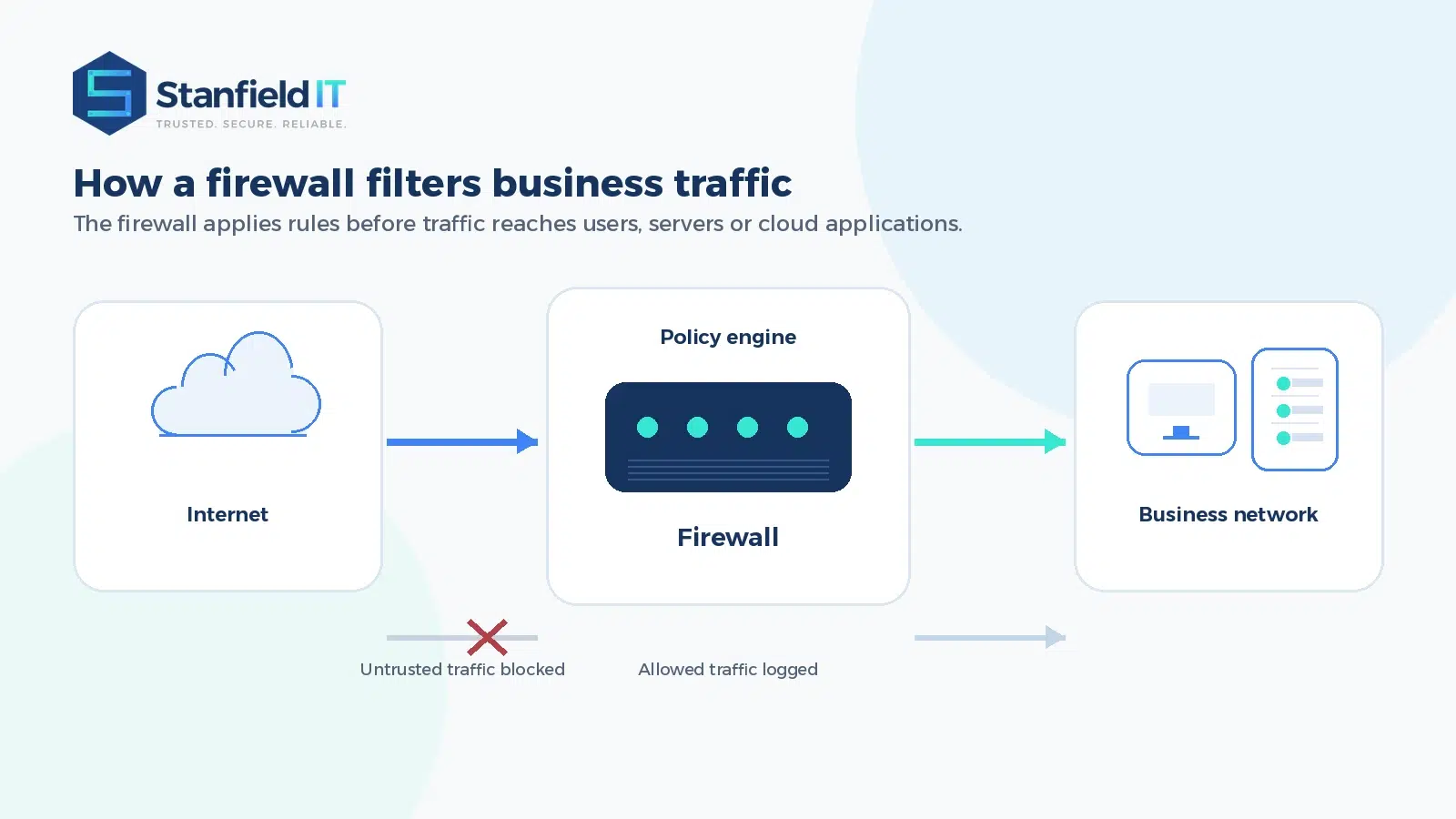
A firewall is a network security system that controls incoming and outgoing traffic based on defined rules. It can be a physical device, a virtual appliance, or a cloud-based security service. In simple terms, it decides which traffic is allowed through, which traffic should be blocked, and which activity should be logged for review.
For an office network, the firewall usually sits between the business network and the internet. For cloud environments, it may sit between applications, users, and hosted systems. For hybrid workplaces, it may also support secure access for remote staff, branch offices, and mobile users.
The important point is that a firewall is not just a “set and forget” device. It needs sensible policies, regular updates, monitoring, and periodic review. A firewall with strong features but poor configuration can still leave gaps. A simpler firewall that is well managed may perform better than an expensive one that has not been maintained.
11 firewall features to look for
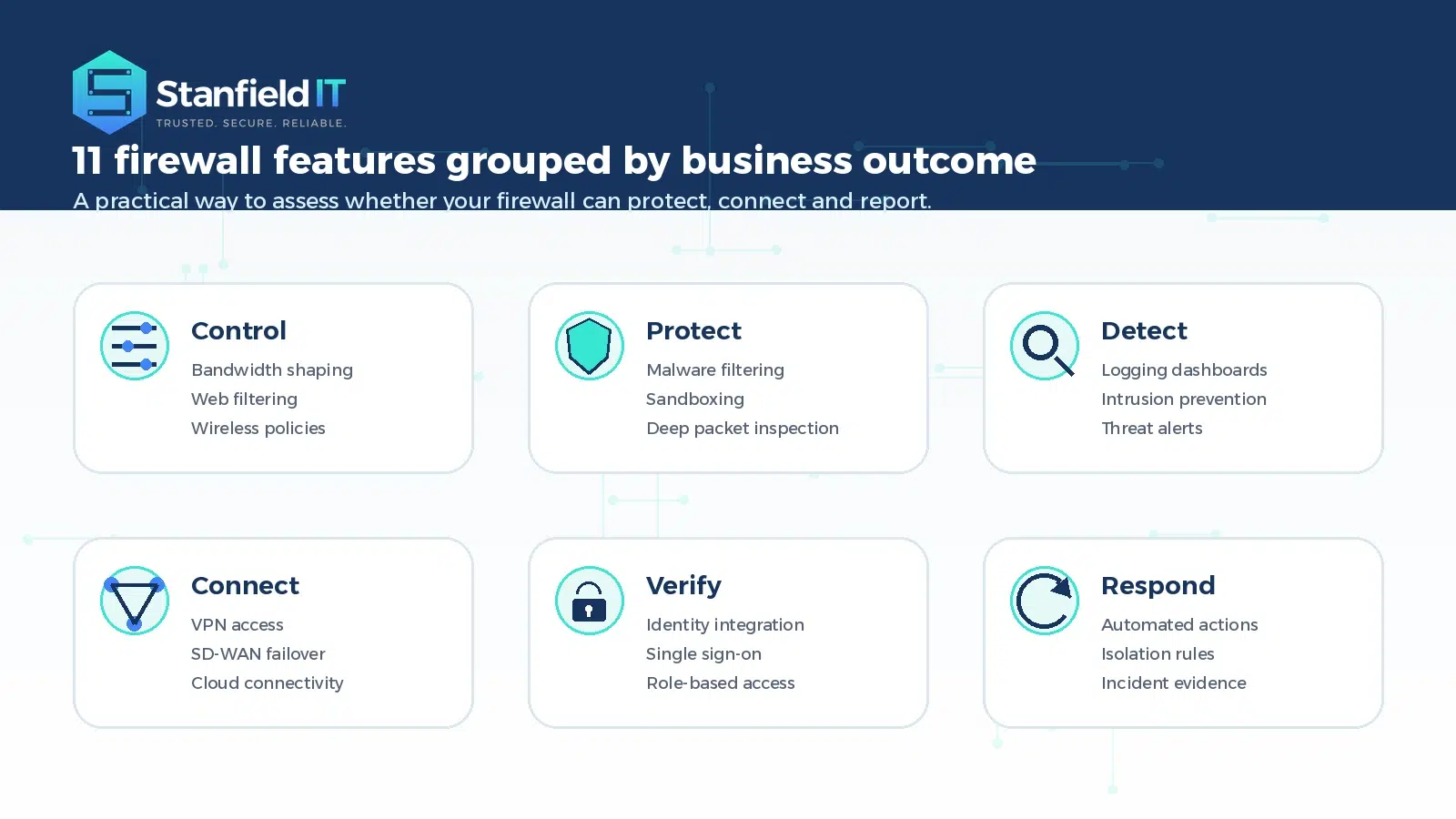
When comparing firewall options, it is easy to focus on hardware size, licence cost, or brand names. Those things matter, but they do not tell the full story. The most useful capabilities are the ones that match your business risks, users, locations, and applications.
1. Bandwidth control and traffic shaping
Bandwidth control helps your business prioritise important traffic. For example, you may want voice calls, video meetings, accounting platforms, or cloud-based line-of-business applications to perform consistently during the workday.
Without traffic shaping, large downloads, file synchronisation, backups, or streaming can consume bandwidth and affect everyone else. A firewall with bandwidth control can set priorities, limit non-essential traffic, and schedule heavy tasks outside business hours. This is especially useful for multi-site businesses, shared office connections, and teams that rely heavily on cloud applications.
2. Web filtering
Web filtering helps control which websites and content categories can be accessed through the business network. It can block known malicious domains, phishing pages, risky downloads, and inappropriate or distracting categories.
This is not about micromanaging staff. It is about reducing avoidable risk. If a user clicks a link in a phishing email, web filtering may stop the page from loading. If malware tries to connect to a known command-and-control domain, filtering can help block that communication. For guest Wi-Fi, it can also help keep your public or visitor network separate and safer.
3. Logging, alerting and reporting
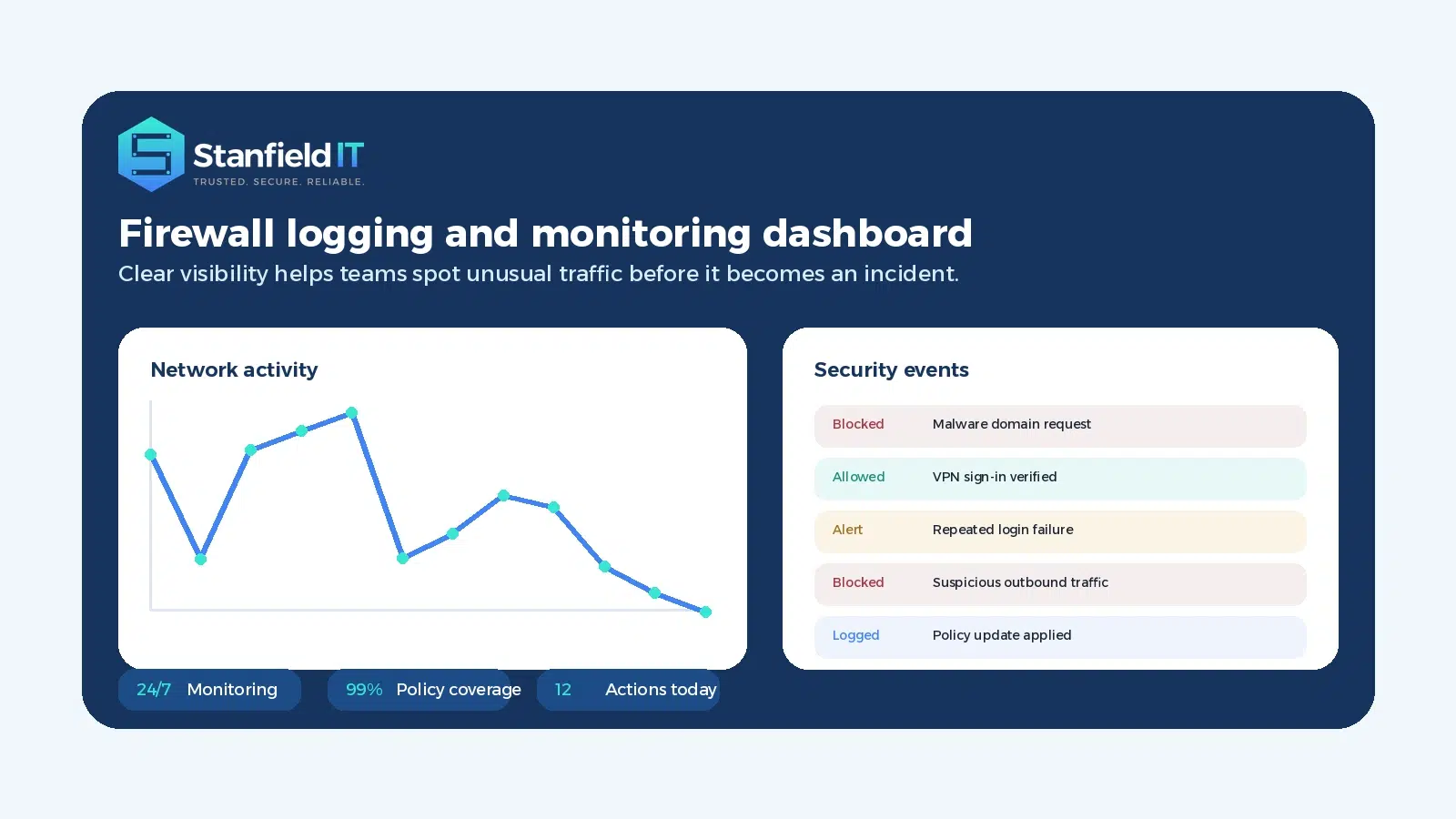
Logging is one of the most valuable firewall capabilities because it helps turn network activity into evidence. Good logs can show blocked traffic, repeated login failures, unusual outbound connections, policy changes, bandwidth usage, and attempted attacks.
For business owners and managers, reporting also creates visibility. Instead of guessing whether the firewall is doing its job, you can see what is being blocked, which applications are using bandwidth, and whether rules need to be adjusted. Logs are also important during incident response because they help identify what happened, when it happened, and which systems may be involved.
4. Internet aggregation and SD-WAN
Many businesses now rely on multiple internet connections. You may have an NBN service, a secondary fibre link, 4G or 5G backup, or connections across several sites. Internet aggregation and SD-WAN features help use these links more intelligently.
For example, critical applications can be sent over the most reliable connection, while lower priority traffic can use a cheaper or secondary link. If one connection fails, traffic can automatically move to another. This improves resilience and can reduce the disruption caused by outages or provider issues.
5. Sandboxing
Sandboxing helps protect users from suspicious files and links by testing them in an isolated environment before they reach the production network. If a file behaves like malware, the firewall can block it before it reaches the user or server.
This is useful because not every threat is already known. Some attacks use new files, unusual payloads, or links that have not yet been classified. Sandboxing provides an extra layer of protection against threats that may slip past more basic scanning.
6. Integrated wireless control
Some firewalls can manage wireless access points and Wi-Fi policies from the same platform. This can simplify administration, especially for businesses with multiple locations or separate staff, guest, and device networks.
Integrated wireless control can help enforce consistent security settings, create separate SSIDs, and apply different rules for different users. For example, staff devices may have access to internal applications, while guest Wi-Fi only allows internet access. This separation reduces risk and makes the network easier to manage.
7. Deep packet inspection
Deep packet inspection allows a firewall to examine the content of traffic, not just the source, destination, or port. This can help identify malware, suspicious patterns, unauthorised applications, and hidden threats inside allowed traffic.
Modern attacks often try to blend in with normal activity. A basic rule may allow web traffic because the destination uses a common port, but deep inspection can look more closely at what is actually being transferred. This gives the firewall a better chance of detecting unsafe content before it reaches the business network.
8. Virtual private networks and secure remote access
A virtual private network, or VPN, creates an encrypted connection between a remote user and the business network. This can be useful for staff who need access to internal systems while working away from the office.
VPNs are still widely used, but they should be configured carefully. Access should be limited to what each user actually needs, protected with multi-factor authentication, and monitored for unusual activity. For some businesses, newer zero trust network access options may be a better fit than traditional VPN access, especially when most systems are cloud-based.
9. Malware and virus filtering
Malware and virus filtering helps scan traffic for known threats before they reach users or systems. This can include malicious files, unsafe websites, botnet traffic, and compromised downloads.
This feature should not replace endpoint protection, but it does add another layer. If your firewall blocks a malicious file at the network edge, your endpoint security has one less threat to handle. Layered protection is important because no single control catches everything.
10. Intrusion prevention
An intrusion prevention system, often called IPS, monitors traffic for known attack patterns and policy violations. When it detects suspicious activity, it can block the traffic, alert the IT team, and record details for investigation.
IPS is particularly helpful for exposed services, branch networks, and environments where the firewall protects critical systems. It can reduce the risk of known exploits being used against vulnerable systems, although it should still be supported by patching, secure configuration, and vulnerability management.
11. Identity management and single sign-on integration
Firewall rules are more useful when they understand users, not just devices or IP addresses. Identity integration allows policies to apply based on a user’s role, department, location, or group membership.
For example, finance staff may need access to finance systems, while warehouse devices may only need access to specific cloud applications. Single sign-on and directory integration can reduce administration and improve accountability. Stanfield IT’s Identity & Access Management services can help businesses strengthen this part of their security foundation.
Modern firewall features for hybrid and cloud work
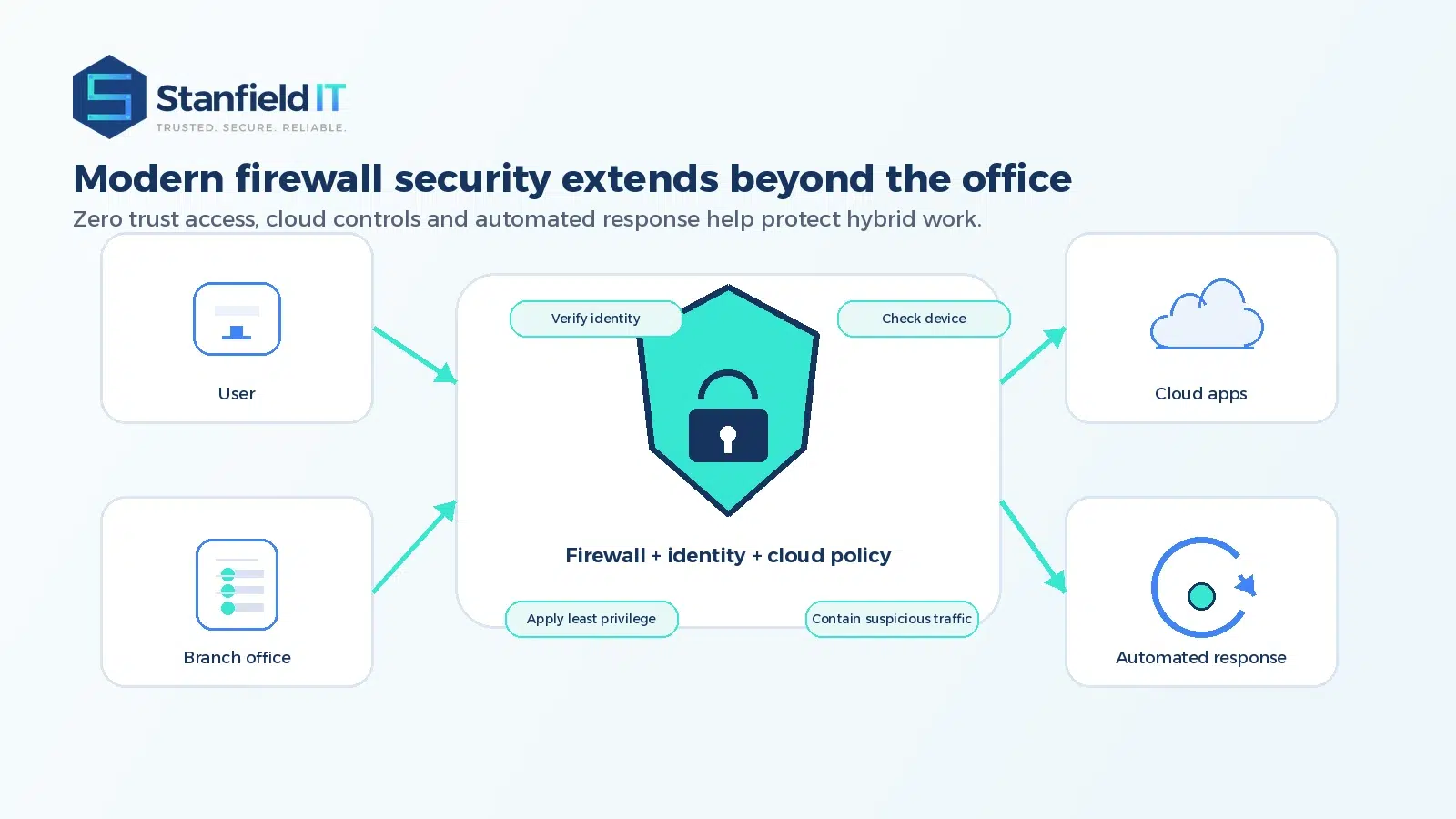
The modern workplace is no longer contained neatly inside one office. Users connect from home, shared workspaces, client sites, airports, and mobile devices. Applications may sit in Microsoft 365, cloud platforms, SaaS tools, or private data centres. This means your security tools need to support a more flexible security model.
Zero trust network access is one example. Instead of trusting a user simply because they are connected to the network, zero trust principles focus on verifying identity, device health, location, and access context. The goal is to give users the access they need and nothing more.
Cloud integration is also becoming more important. Businesses need consistent policies across on-premise systems and cloud environments, not separate rules that drift apart over time. A firewall or security platform that provides clearer cloud visibility can make it easier to manage risk as systems move or scale.
Automation is another practical improvement. If a firewall detects a known threat, it may be able to block traffic, isolate a device, notify the support team, or trigger a response workflow. This can reduce the time between detection and containment, which is critical during a cyber incident.
Common firewall mistakes to avoid
One common mistake is buying a firewall and then leaving it unchanged for years. Business systems, users, threats, and applications all change. Firewall rules should be reviewed regularly so outdated access is removed and new risks are addressed.
Another mistake is allowing too much access “just in case”. Overly broad rules may be convenient at first, but they can create unnecessary exposure. It is better to start with clear access requirements and apply least privilege wherever practical.
Businesses should also avoid relying on the firewall alone. Strong security usually includes multi-factor authentication, endpoint protection, email security, backups, software updates, user training, and incident response planning. Your firewall is an important control, but it works best as part of a layered environment.
Finally, logs need attention. If nobody reviews alerts or reports, important warning signs can be missed. Good firewall management includes monitoring, escalation, and clear ownership.
Choosing the right firewall features for your business
The right firewall depends on your size, industry, risk profile, locations, cloud usage, and internal capability. A small professional services firm may need strong web filtering, VPN or zero trust access, Microsoft 365 protection, and clear reporting. A multi-site operation may need SD-WAN, centralised policy management, and strong network segmentation. A business with compliance obligations may need deeper logging, stronger access controls, and regular reporting.
Start by asking practical questions. Which systems are critical to daily operations? Where do staff work from? What data needs protecting? Which applications must stay online? What would happen if the internet, email, or cloud access stopped for a day?
From there, you can select the controls that support real business needs, rather than paying for capabilities you will never use. Stanfield IT’s Network Services can help assess your current setup, recommend improvements, and manage firewall and network changes with minimal disruption.
Final thoughts
A modern firewall gives your business more than a basic barrier between the office and the internet. It can help control traffic, protect users, support remote work, improve visibility, and respond faster when suspicious activity appears.
The most important firewall features are the ones that reduce real risk while keeping your team productive. With the right configuration, ongoing monitoring, and a broader cyber security strategy, your firewall can become a valuable part of your business resilience.
If your business is reviewing its firewall, network security, or wider cyber security posture, Stanfield IT can help you understand what is working, where the gaps are, and what to improve next.
